Use Extrinsic Functions to Calibrate Data for Standalone Code Generation
R2026bThis example shows how to generate standalone C code from MATLAB® code by calling two functions extrinsically:
A MATLAB function that code generation does not support
A MATLAB function that returns a constant in standalone code generation
The code generator does not generate code for extrinsic functions. See Using Extrinsic Functions.
This example uses a numeric algorithm that applies a gain and offset to sensor data. You generate a MEX function to test different calibration inputs, then generate standalone code that treats the calibration inputs as constants.
Examine MATLAB Functions
Examine the function applyCalibration, which applies the gain and offset returned by user-written function readCalibrationFromFile to an input array. The function uses coder.extrinsic to specify that all calls to readCalibrationFromFile are extrinsic. It uses coder.target to differentiate between code paths depending on the target:
When you execute
applyCalibrationin MATLAB, MATLAB ignores thecoder.extrinsicdirective and callsreadCalibrationFromFileas a normal MATLAB function.When you generate a MEX function, the code generator includes a call to MATLAB in the generated code. At run time, the MEX function executes
readCalibrationFromFilein MATLAB.When you generate standalone code, the function uses
coder.constto constant-fold the extrinsic function. That is, the code generator executesreadCalibrationFromFilein MATLAB during code generation and includes the result of the call in the generated code as a constant.
type applyCalibration.mfunction out = applyCalibration(x) %#codegen
coder.extrinsic("readCalibrationFromFile");
gain = 0;
offset = 0;
if (coder.target("MEX")) || (coder.target("MATLAB"))
[gain,offset] = readCalibrationFromFile;
else
[gain,offset] = coder.const(@readCalibrationFromFile);
end
out = gain.*x+offset;
end
In generated MEX code, the outputs of extrinsic calls are treated as mxArray objects unless the code generator can infer a known type. The generated code supports only a limited number of operations on mxArray objects. To use an mxArray in most code, you must first convert it to a known type by assigning it to a variable with a known type. This function preinitializes gain and offset as doubles to force the code generator to convert these variables from mxArray objects to doubles. To learn more about handling mxArray data, see Working With mxArray Outputs in Generated Code.
Examine the function readCalibrationFromFile. This function calls readtable, which is not supported for code generation. You can call this function in the generated code because applyCalibration treats readCalibrationFromFile as an extrinsic function.
type readCalibrationFromFile.mfunction [gain,offset] = readCalibrationFromFile
T = readtable("calibration.txt");
gain = T.Gain(1);
offset = T.Offset(1);
end
Test the MATLAB function with randomly generated signal data.
rng(0,"twister");
x = 2.0 + 0.05*randn(size(0:0.01:5));
calibrated_ML = applyCalibration(x)
calibrated_ML = 1×501
2.4336 2.5146 2.2588 2.4539 2.4199 2.3183 2.3729 2.4214 2.6236 2.5731 2.3156 2.5897 2.4453 2.3961 2.4447 2.3872 2.3922 2.4931 2.4881 2.4886 2.4420 2.3245 2.4448 2.5019 2.4306 2.4647 2.4454 2.3810 2.4184 2.3508 2.4555 2.3283 2.3332 2.3494 2.2160 2.4899 2.4203 2.3528 2.4856 2.2930 2.3936 2.3849 2.4200 2.4196 2.3459 2.3981 2.3897 2.4392 2.4683 2.4693
Generate and Run MEX Function
Generate a MEX function for the applyCalibration function by using the codegen command. By default, the codegen command generates a MEX function in C in the working folder. Use the -args option with coder.typeof to specify that the input argument to applyCalibration is a variable-length row vector of doubles. Use the -report option to produce a code generation report.
codegen -report applyCalibration -args {coder.typeof(0,[1 inf])}
Code generation successful: View report
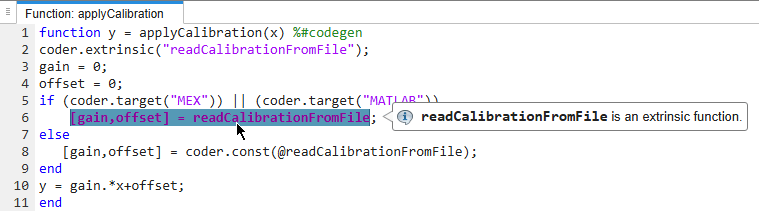
The code generation report identifies readCalibrationFromFile as an extrinsic function.
Run the generated MEX function to check that the generated code produces the same output as the original MATLAB code.
calibrated_MEX = applyCalibration_mex(x)
calibrated_MEX = 1×501

    2.4336    2.5146    2.2588    2.4539    2.4199    2.3183    2.3729    2.4214    2.6236    2.5731    2.3156    2.5897    2.4453    2.3961    2.4447    2.3872    2.3922    2.4931    2.4881    2.4886    2.4420    2.3245    2.4448    2.5019    2.4306    2.4647    2.4454    2.3810    2.4184    2.3508    2.4555    2.3283    2.3332    2.3494    2.2160    2.4899    2.4203    2.3528    2.4856    2.2930    2.3936    2.3849    2.4200    2.4196    2.3459    2.3981    2.3897    2.4392    2.4683    2.4693
isequal(calibrated_ML,calibrated_MEX)
ans = logical
   1
Generate and Inspect C Code
Generate a C static library by using the codegen command with the -config:lib option. Use the same -args syntax that you used to generate the MEX function.
codegen -config:lib -report applyCalibration -args {coder.typeof(0,[1 inf])}
Warning: Code generation is using a coder.EmbeddedCodeConfig object. Because Embedded Coder is not installed, this might cause some Embedded Coder features to fail.

Code generation successful (with warnings): View report
Open the code generation report and inspect the generated C function applyCalibration in the file applyCalibration.c. In the for-loop that calculates the calibrated data, the generated C code uses hard-coded values for gain and offset.
for (i = scalarLB; i < loop_ub; i++) {
    out_data[i] = 1.25 * x_data[i] - 0.1;
  }
See Also
codegen | coder.const | coder.extrinsic | coder.target | coder.typeof

