Arrays of Linear Models
You can specify and manipulate collections of linear models as single entities using LTI
arrays. For example, if you want to vary the Kb and Km
parameters for the DC motor and store the resulting state-space models, use this code.
K = [0.1 0.15 0.2]; % Several values for Km and Kb
A1 = [-R/L -K(1)/L; K(1)/J -Kf/J];
A2 = [-R/L -K(2)/L; K(2)/J -Kf/J];
A3 = [-R/L -K(3)/L; K(3)/J -Kf/J];
sys_lti(:,:,1)= ss(A1,B,C,D);
sys_lti(:,:,2)= ss(A2,B,C,D);
sys_lti(:,:,3)= ss(A3,B,C,D);
The number of inputs and outputs must be the same for all linear models encapsulated by the LTI array, but the model order (number of states) can vary from model to model within a single LTI array.
The LTI array sys_lti contains the state-space models for each value of
K. Type sys_lti to see the contents of the LTI
array.
Model sys_lti(:,:,1,1)
======================

  a =
                        x1           x2
           x1           -4         -0.2
           x2            5          -10
.
.
.
Model sys_lti(:,:,2,1)
======================

  a =
                        x1           x2
           x1           -4         -0.3
           x2          7.5          -10
.
.
.
Model sys_lti(:,:,3,1)
======================

  a =
                        x1           x2
           x1           -4         -0.4
           x2           10          -10
.
.
.
3x1 array of continuous-time state-space models.
You can manipulate the LTI array like any other object. For example,
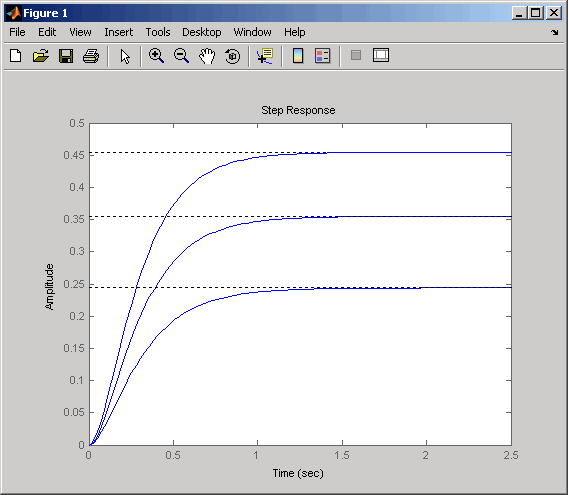
step(sys_lti)
produces a plot containing step responses for all three state-space models.
Step Responses for an LTI Array Containing Three Models
LTI arrays are useful for performing batch analysis on an entire set of models. For more information, see Model Arrays.

