Prune Neural Network with Memory Requirement
R2026bThis example shows how to compress a neural network to a specific size using Taylor pruning.
If you have a memory requirement for your network, for example, because you plan to embed it into a resource-constrained hardware target, then you might need to reduce the size of the network to meet that requirement. This example shows how to prune a neural network to meet a memory requirement while maintaining as much accuracy as possible.
Load Pretrained Network and Data
Load a pretrained network and the data, loss function, and training options that were used to train it. To learn how this network was trained, see Train Sequence Classification Network for Road Damage Detection.
load("RoadDamageAnalysisNetwork.mat")
loadAndPreprocessDataForRoadDamageDetectionExample
Analyze Network for Compression
To determine if the network supports Taylor pruning and if it is possible to compress the network to the required size, open the network in Deep Network Designer.
>> deepNetworkDesigner(netTrained)
To see how much you can compress the network by pruning, projecting, or quantizing it, click Compression Analysis on the toolstrip. A compression analysis report opens.
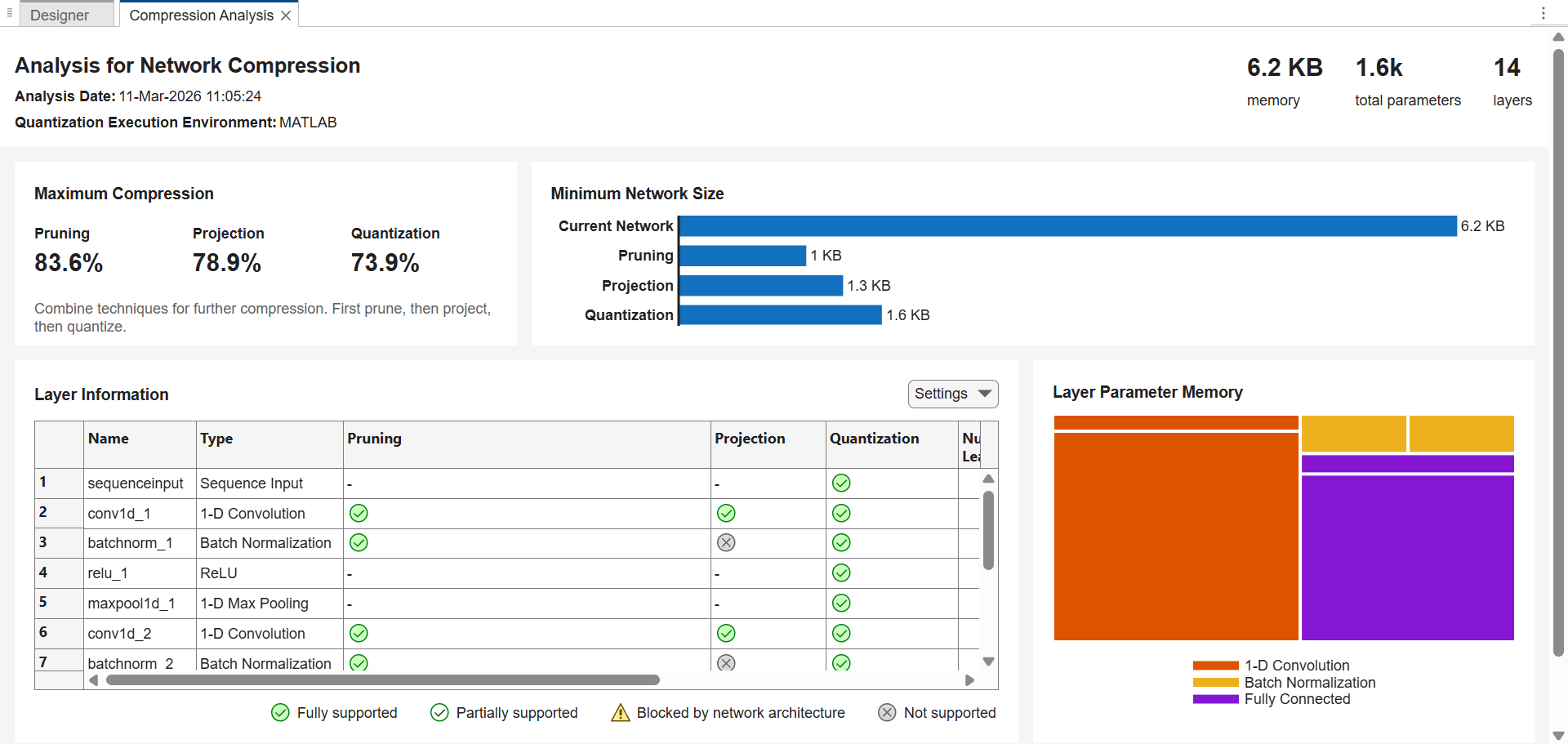
The trained network takes up 6.2 KB of memory. Pruning can reduce the network size by up to 83.6%, that is, to as small as 1 KB.
Set Learnables Reduction Goal
Determine the learnables reduction goal based on your memory requirement. For example, to compress the network to 2 KB of memory, you must reduce the number of learnable parameters by 68%.
currentMemory = 6.2; % KB
targetMemory = 2; % KB
learnablesReductionGoal = 1 - targetMemory/currentMemory
learnablesReductionGoal =
0.6774
Configure Fine-Tuning Options
The compressNetworkUsingTaylorPruning function prunes a network iteratively using these steps:
Compute the importance score of each prunable filter.
Prune the least important filters.
Fine-tune the pruned network.
Specify the training options for the fine-tuning step. Use the same options that were used to train the original network, but use fewer training epochs. The network does not need to be trained from scratch, so you need fewer training epochs to retrain it.
The compressNetworkUsingTaylorPruning function applies the MaxEpochs training option to each fine-tuning period, during each pruning iteration. For example, if you set the LearnablesIncrement option to 0.05, then each pruning iteration removes approximately 5% of the original number of learnable parameters. In this case, pruning can comprise up to 20 pruning iterations, and the total number of training epochs can be as many as 20*MaxEpochs. Choosing the number of fine-tuning epochs is a tradeoff between pruning time and network accuracy.
The network in this example was trained using 200 training epochs.
disp(options)
  TrainingOptionsADAM with properties:

             GradientDecayFactor: 0.9000
                       MaxEpochs: 200
                InitialLearnRate: 0.0100
               LearnRateSchedule: 'piecewise'
             LearnRateDropFactor: 0.5000
             LearnRateDropPeriod: 20
                   MiniBatchSize: 128
                         Shuffle: 'every-epoch'
         CheckpointFrequencyUnit: 'epoch'
        PreprocessingEnvironment: 'serial'
                         Verbose: 0
                VerboseFrequency: 50
                  ValidationData: {[1×32×615 dlarray]  [2×32 dlarray]}
             ValidationFrequency: 10
              ValidationPatience: 20
                         Metrics: 'accuracy'
             ObjectiveMetricName: 'loss'
            ExecutionEnvironment: 'auto'
                           Plots: 'training-progress'
                       OutputFcn: []
                  SequenceLength: 'longest'
            SequencePaddingValue: 0
        SequencePaddingDirection: 'right'
                InputDataFormats: {'TCB'}
               TargetDataFormats: "auto"
         ResetInputNormalization: 1
       ResetInverseNormalization: 1
                NormalizeTargets: 0
    BatchNormalizationStatistics: 'auto'
                   OutputNetwork: 'last-iteration'
                    Acceleration: "auto"
                  CheckpointPath: ''
             CheckpointFrequency: 1
        CategoricalInputEncoding: 'integer'
       CategoricalTargetEncoding: 'auto'
                L2Regularization: 1.0000e-04
         GradientThresholdMethod: 'l2norm'
               GradientThreshold: Inf
      SquaredGradientDecayFactor: 0.9990
                         Epsilon: 1.0000e-08
For fine-tuning, set MaxEpochs to 20 instead.
options.MaxEpochs = 20;
Compress Network
Compress the network using the compressNetworkUsingTaylorPruning function. To match the training configuration, specify the loss function as lossFcn and specify the training options as options. Specify the learnables reduction goal as learnablesReductionGoal.
[netPruned,info] = compressNetworkUsingTaylorPruning(netTrained,XTrain,TTrain,lossFcn,options,LearnablesReductionGoal=learnablesReductionGoal);
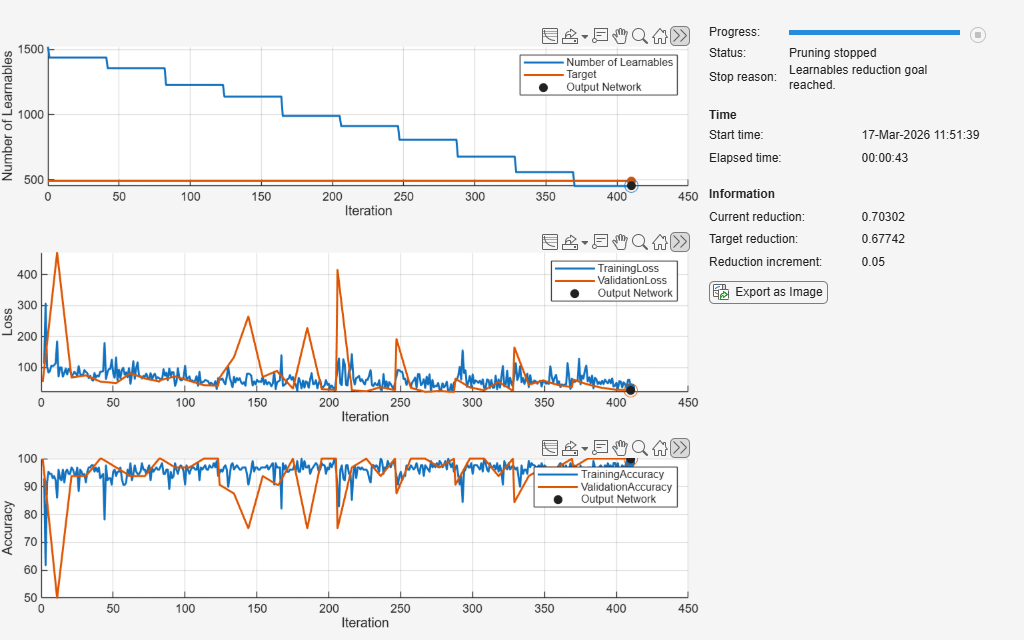
Compressed network has 70.3% fewer learnable parameters.
Pruning compressed 5 layers: "conv1d_1","batchnorm_1","conv1d_2","batchnorm_2","fc_1"
The pruning progress plots shows that in this example, the function performs 10 pruning iterations. During each iteration, the software tries to remove 5% of learnable parameters, until it exceeds the target learnables reduction. At the beginning of each pruning iteration, the loss spikes and the accuracy drops, but both loss and accuracy recover during fine-tuning.
Test Pruned Network
View the pruning history.
info.PruningHistory
ans = 11×3 table
     0    1522         0
     1    1439    0.0545
     2    1356    0.1091
     3    1228    0.1932
     4    1138    0.2523
     5     990    0.3495
     6     912    0.4008
     7     808    0.4691
     8     677    0.5552
     9     558    0.6334
    10     452    0.7030
Test the pretrained network by evaluating its accuracy using the testnet function.
trainedAccuracy = testnet(netTrained,XTest,TTest,"accuracy",InputDataFormats="CTB")
trainedAccuracy =
97.0588
Test the pruned network.
prunedAccuracy = testnet(netPruned,XTest,TTest,"accuracy",InputDataFormats="CTB")
prunedAccuracy =
97.0588
The accuracy of the pruned network is similar or identical to the accuracy of the trained network. The accuracies of the two networks on the test dataset can be identical because the test dataset in this example has only 68 data points.
If your network loses accuracy due to the pruning process, you can retrain the network for several epochs to regain some of the lost accuracy.
See Also
compressNetworkUsingTaylorPruning | trainnet | trainingOptions | testnet

