Tasks
R2026bMap tasks in the Infineon AURIX to interrupt service routines on the hardware board
Since R2022b
Description
Add-On Required: This feature requires the Embedded Coder Support Package for Infineon AURIX TC4x Microcontrollers add-on.
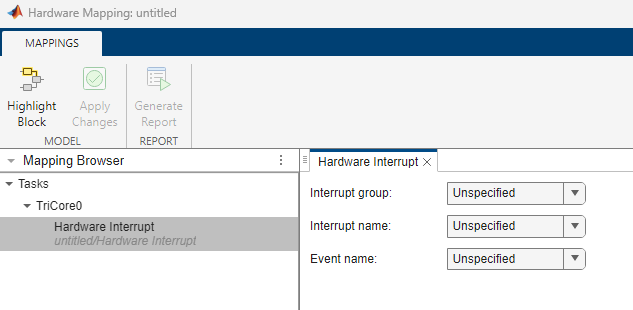
View and edit the map of tasks in the interrupt service routines (ISRs) on the hardware board.
In this tool, you can map the tasks in your software model to the available event sources and interrupts:
Manually select the task in Browser > Tasks >
TriCore#orPPU. Select the desired event or interrupt. source. Click the Apply Changes button in the toolstrip.The sources of events or interrupts depend on the choice of hardware board and peripherals available in the model.
Open the Tasks
In the Hardware tab, click Hardware Mapping.

Examples
- Field-Oriented Control of PMSM with Encoder Using Infineon AURIX Microcontrollers
- Analyze Sensorless Observers for Field-Oriented Control Using Multiple Cores of Infineon AURIX
- Accelerate AI Based Software Development on Infineon AURIX TC4x Microcontroller
- Interrupt-Based CAN Communication Using MCAN Blocks of Infineon AURIX TC4x
Parameters
Version History
Introduced in R2022b

