Generate Row-Major Code for S-Functions
R2026bYou can generate row-major code for models that contain S-functions. By default, the code generator generates column-major code. To learn more about row-major code generation, see Code Generation of Matrices and Arrays.
For an existing model that contains S-functions, when you set the configuration parameter Array layout as Row-major, the configuration parameter External functions compatibility for row-major code generation is enabled and set to error by default. When you try to build the existing model, you get an error because the S-functions are not enabled for row-major code generation by default. You can test the compatibility of your S-function for row-major code generation by using the External functions compatibility for row-major code generation configuration parameter.
This workflow is also applicable to C Caller blocks in a model.
Example
1. Open example model ex_sfcn_rowmajor_unset. The model needs these additional files:
S-function:
ex_sfcn_rowmajor.cTLC:
ex_sfcn_rowmajor.tlc.
Save these files to your local folder.
open_system('ex_sfcn_rowmajor_unset');
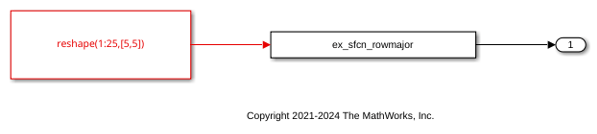
2. The model is configured with Array layout set to Column-major. To enable row-major code generation, set Array layout to Row-major.
3. When you build the model, the code generator terminates the build and you see this error message:

4. To proceed, do one of the following:
If you want to test your existing S-functions with the row-major code for the model, change the setting of the configuration parameter External functions compatibility for row-major code generation to
warningornone. The code generator completes the build without generating row-major code for the S-functions.If you want to update your S-functions so that they are compatible with row-major array layout, use the S-function API to enable the S-function for row-major code generation.
To test your model for S-functions with unspecified array layout, you can also run the Model Advisor checks on the model. Select the Identify TLC S-functions with unset array layout check and click the Run This Check button. If the model includes S-functions with unspecified array layout, you see a warning such as:
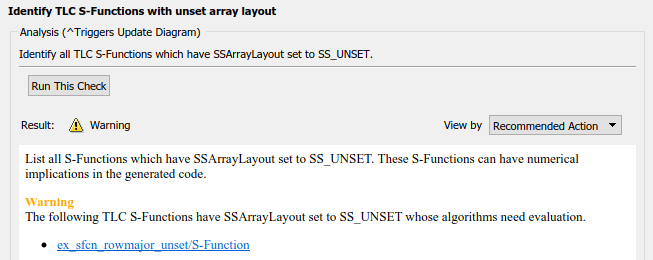
To specify the array layout of the user-defined S-function, use the ssSetArrayLayoutForCodeGen function of the SimStruct API. You can set the enumerated type SSArrayLayout to:
SS_UNSET– This setting is the default setting that disables the block for row-major code generation.SS_COLUMN_MAJOR– Specify the block for column-major code generation only.SS_ROW_MAJOR– Specify the block for row-major code generation only.SS_ALL – Specify the block as allowed for code generation regardless of the array layout.
5. To configure the block for row-major code generation, in ex_sfcn_rowmajor.c, uncomment the ssSetArrayLayoutForCodeGen function in the mdlInitializeSizes method:
static void mdlInitializeSizes(SimStruct *S)
{
    /* Specify array layout of the S-function */
    ssSetArrayLayoutForCodeGen(S, SS_ROW_MAJOR);
    .
    .
    .
}
If your S-function is not affected by an array layout, set SSArrayLayout to SS_ALL.
6. Compile the S-function by using this command in the MATLAB® Command Window:
mex ex_sfcn_rowmajor.c
Building with 'gcc'.
MEX completed successfully.
7. To build the model and generate code, press Ctrl+B.
8. Inspect the generated code.
In ex_sfcn_rowmajor_unset_data.c, the input array appears in row-major order:
const ConstP_ex_sfcn_rowmajor_unset_T ex_sfcn_rowmajor_unset_ConstP = {
    /* Expression: reshape(1:25,[5,5])
    * Referenced by: '<Root>/Constant1'
    */
    { 1.0, 6.0, 11.0, 16.0, 21.0, 2.0, 7.0, 12.0, 17.0, 22.0, 3.0, 8.0, 13.0, 18.0,
    23.0, 4.0, 9.0, 14.0, 19.0, 24.0, 5.0, 10.0, 15.0, 20.0, 25.0 }
};
In ex_sfcn_rowmajor_unset.c, the step function extracts the [5] element of the linearized array:
/* S-Function Block: <Root>/S-Function */
ex_sfcn_rowmajor_unset_Y.Out1 = ex_sfcn_rowmajor_unset_ConstP.Constant1_Value[5];
This operation is equivalent to extracting the [1][0] element of the array in column-major. To extract the same element from the array in row-major order, update the following line in ex_sfcn_rowmajor.tlc to:
%assign u = LibBlockInputSignal(0, "", "", 1)
Then regenerate code.
If you generate S-functions by using S-Function Builder, use the parameter Array layout to specify the majority of the S-function. For more information, see Build S-Functions Automatically Using S-Function Builder. If you use the Legacy Code Tool to integrate C functions, use the convertNDArrayToRowMajor option in legacy_code. The S-Function Builder and Legacy Code Tool apply preceding transposes when the S-function is set to row-major array layout during simulation in normal mode.

