Create Predictive Vector Autoregression Model Using Econometric Modeler
R2026bThis example models the quarterly US GDP growth rate, M1 money supply rate, and the 3-month T-bill rate series by using the Econometric Modeler app. The example shows how to perform the following actions in the app:
Stabilize the raw nonstationary series.
Fit several competing vector autoregression (VAR) models, and choose the one with the best, parsimonious fit.
Diagnose each residual series.
Export the chosen model to the command line to conduct a Granger-Causality test.
Generate MMSE forecasts from the best fitting model using the app.
At the command line, the example conducts Granger-causality tests on the series given the estimated model, and it uses the model to generate forecasts.
The data set, which is stored in Data_USEconModel.mat, contains
the raw, quarterly US GDP, M1 money supply, and 3-month T-bill rate, among other
series, from 1947 through 2009.
Load and Import Data into Econometric Modeler
At the command line, load the Data_USEconModel.mat data
set.
load Data_USEconModelAt the command line, open the Econometric Modeler app.
econometricModeler
Alternatively, open the app from the apps gallery (see Econometric Modeler).
Import DataTimeTable into the app:
On the Modeler tab, in the Import section, click the Import button
 .
.In the Import Data dialog box, select the check box for the
DataTimeTablevariable.Click Import.
GDP, M1SL, and
TB3MS, among other series, appear in the
Time Series pane, and a time series plot containing all
series appears in the figure window.
Create separate time series plots by double-clicking each of
GDP, M1SL, and
TB3MS in the Time Series
pane. Position the Plot(series)
tabs by clicking and dragging each to see all plots simultaneously.
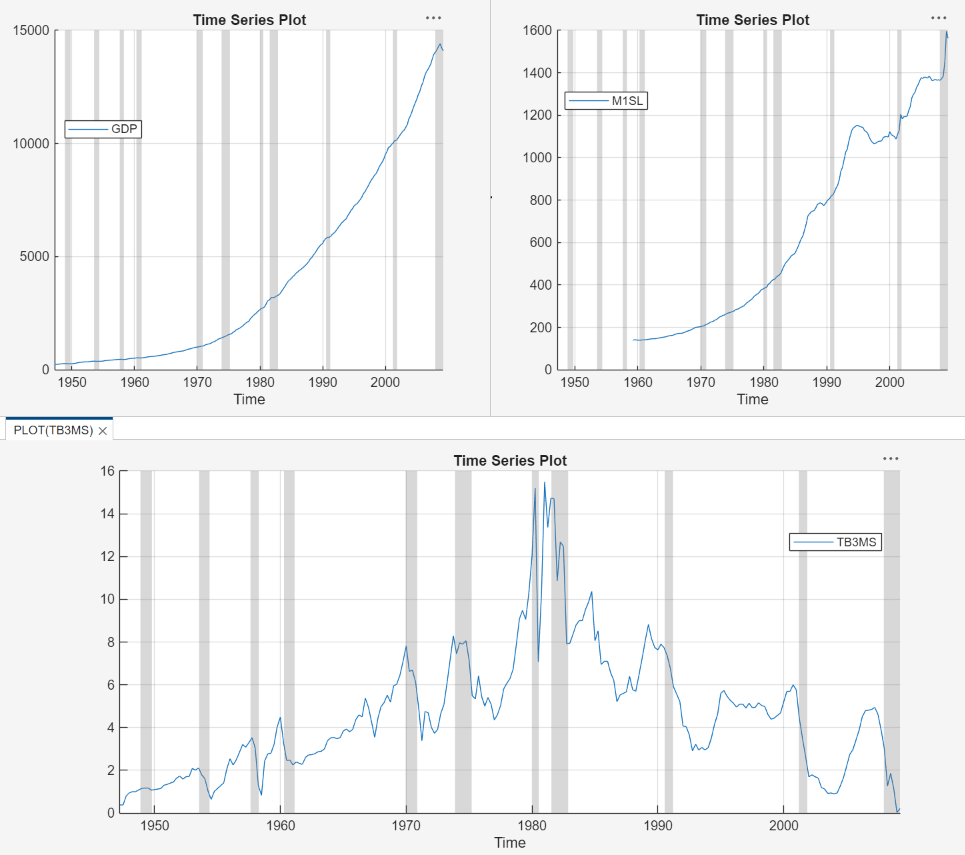
The US GDP and M1 money supply series exhibit exponential growth, and the 3-month T-Bill series appears like a random walk.
Diagnose and Transform Series
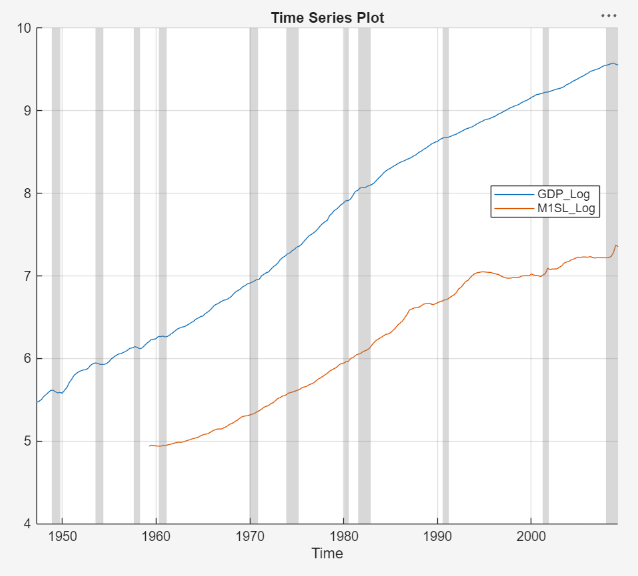
Remove the exponential trend from the GDP and M1 money supply series by
applying the log transform to each series. Close all documents. Click the
Modeler tab, and then, in the Time
Series pane, click GDP and
Ctrl click M1SL. In the
Transforms section, click Log.
The transformed series GDP_Log and
M1SL_Log appear in the Time
Series pane, and their time series plot appears in the
Plot(GDP_Log) figure window.
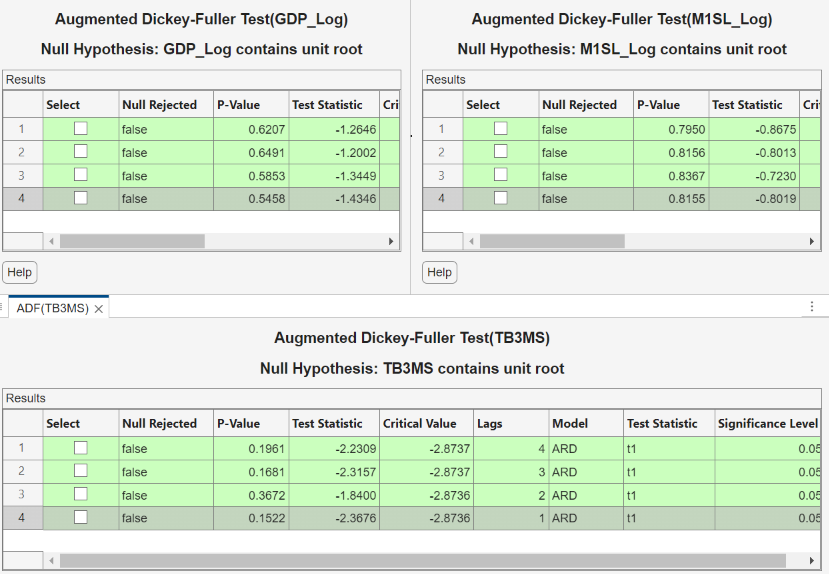
Test the null hypothesis that each series is a unit root process against a
stationary AR(p) with drift alternative, where
p = 4 through 1. For each series
GDP_Log, M1SL_Log, and
TB3MS:
On the Modeler tab, in the Time Series pane, double-click the series.
On the Modeler tab, in the Time Series pane, click Add Test > Augmented Dickey-Fuller Test.
On the ADF tab, in the Settings section, in the Number of Lags box, type
4. In the Model menu, choose Autoregressive with Drift.In the Tests section, click Run.
Repeat steps 3 and 4 for lags
3,2, and1.
The following figures show the results. The tests fail to reject the null hypotheses of a unit root series in all cases, which suggests that each series is difference stationary.
Stabilize the series by applying the first difference to each series.
Close all documents.
Click the Modeler tab, and then, in the Time Series pane, click
GDP_Logand Ctrl+clickM1SL_LogandTB3MS.In the Transforms section, click Difference. The transformed series
GDP_Log_Diff,M1SL_Log_Diff, andTB3MS_Diffappear in the Time Series pane, and their time series plot appears in the Plot(GDP_Log_Diff) figure window.Rename
GDP_Log_DiffandM1SL_Log_DifftoGDPRateandM1SLRateby clicking their names twice in the Time Series pane, and typing their new names.
Estimate VAR Models
Estimate 3-D VAR(p) models of the US quarterly GDP
growth rate series GDPRate, M1 money supply growth
rate series M1SLRate, and change in the 3-month
treasury bill rate series TB3MS_Diff, where
p = 1 through 4.
Close all documents.
In the Time Series pane, click
GDPRateand Ctrl+clickM1SLRateandTB3MS_Diff.In the Models section, click VAR.
Fit a VAR(1) model (the default) by clicking Estimate in the VAR Model Parameters dialog box.
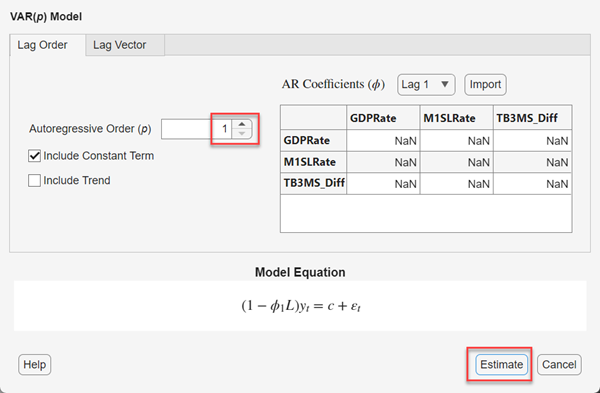
The model variable
VARappears in the Models pane, its value appears in the Preview pane, and its estimation summary appears in the Fit(VAR) document. Change the name of the model variableVARto VAR_1 by clickingVARtwice in the Models pane, and then typingVAR_1.Repeat steps 1 through 3 for each AR order
p= 2 through 4. In the Var Model Parameters dialog box, set the AR order by using the Autoregressive Order (p) box.Similar to the VAR(1) estimation, a variable for each model (
VAR_2,VAR_3, andVAR_4) appears in the Models pane, and their estimation summaries appear in their respective Fit(ModelName) document. You can view properties of an estimated model in the Preview pane by clicking the model in the Models pane. For example, clickVAR_4.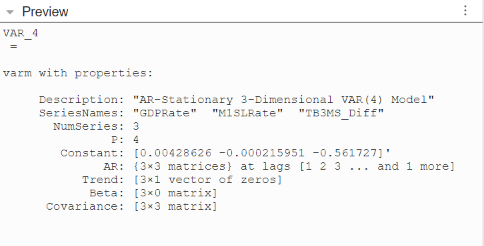
Select Model with Best In-Sample Fit
The estimation summary in each
Fit(VAR_p) tab contains a
plot of fitted values and residuals, with respect to the time series in the
Time Series list, a standard statistical table of
estimates and inferences, and a table of information criteria.
Compare the information criteria of each estimated model simultaneously by positioning the estimation summary documents so that they occupy the four quadrants of the right pane. The model with the lowest value has the best, parsimonious fit.
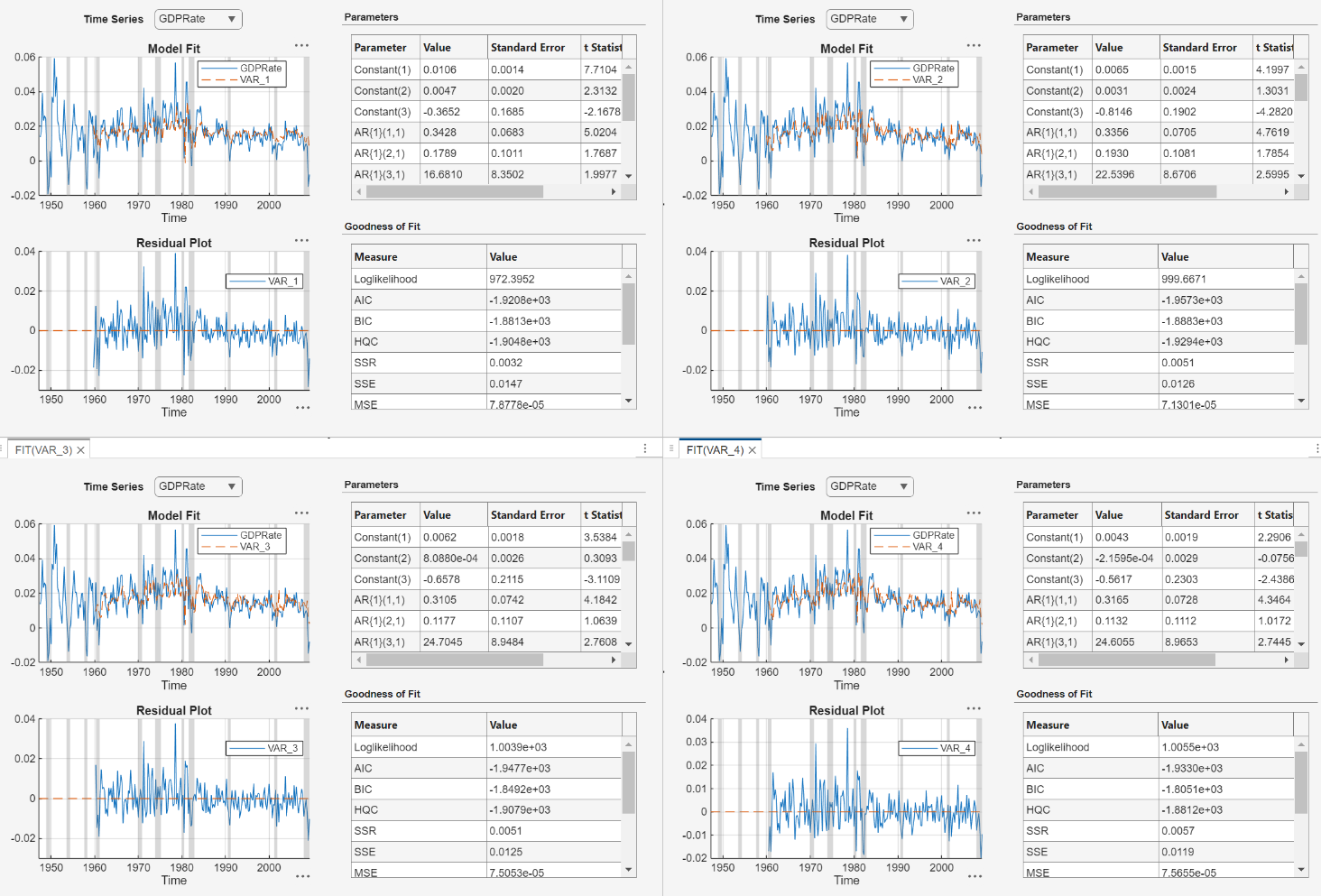
The VAR(2) model VAR_2 produces the lowest AIC and
BIC values. Choose this model for further analysis.
Check Goodness of Fit
Inspect the following VAR(2) plots of each residual series:
Histograms, for center, normality, and outliers
Quantile-quantile plots, for normality, skewness, and tails
Autocorrelation function (ACF), for serial correlation
ACF of squared residual series, for heteroscedasticity
This example diagnoses the residuals visually. Alternatively, you can conduct statistical tests to diagnose the residuals.
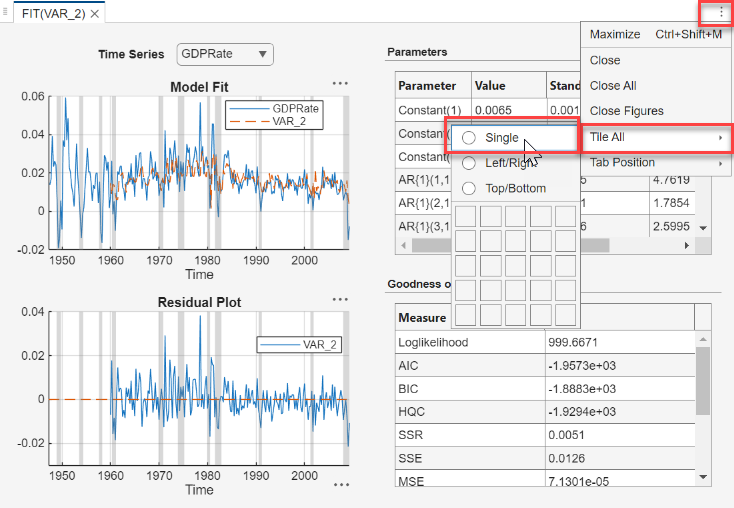
In the Fit(VAR_2) document, click Document Actions > Tile All, and then click the Single radio button.
On the Models pane, click
VAR_2.
Plot separate residual histograms. On the Modeler tab, in the Diagnostics section, click Model Fit Diagnostics > Residual Histogram. Histograms of the each residual series appear in the Hist(VAR_2) document.
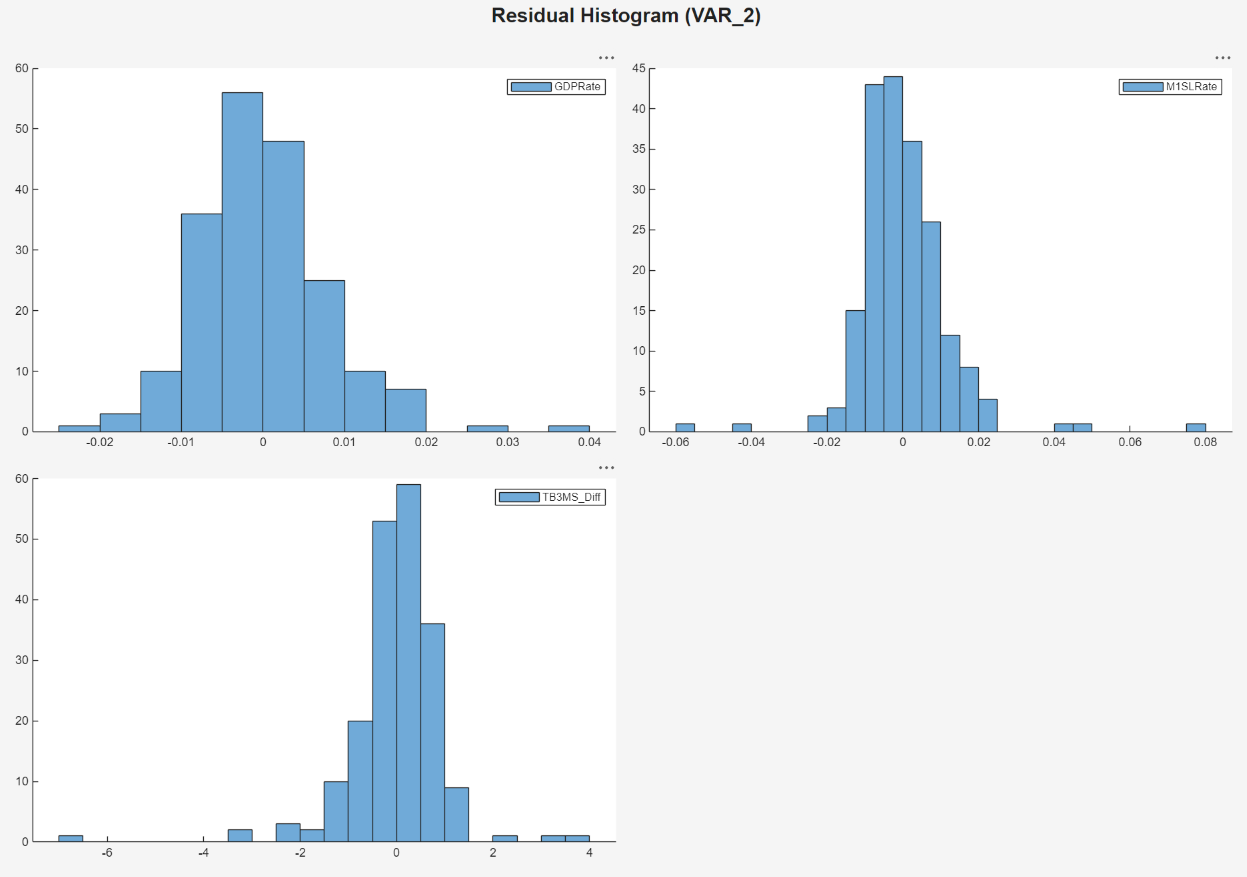
Each residual series appears centered around 0, with varying degrees of slight skewness and possible outliers. This example proceeds without addressing possible skewness and outliers.
Plot separate residual quantile-quantile plots. With
VAR_2 selected in the Time
Series pane, on the Modeler tab, in the
Diagnostics section, click Model Fit
Diagnostics > Residual Q-Q Plot.
Quantile-quantile plots of each residual series appear in the
QQ(VAR_2) document.
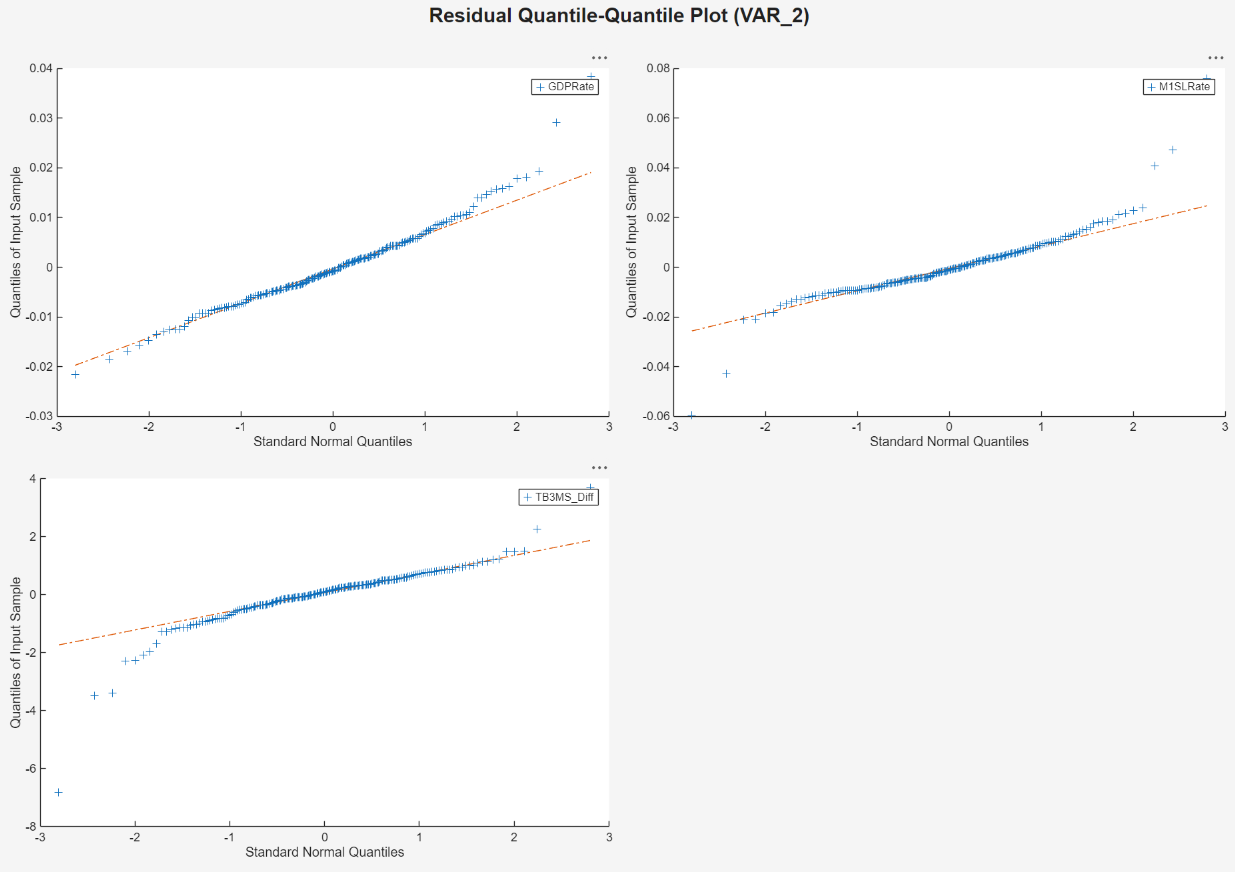
Each series has slightly fatter tails than what is expected by the normal distribution. This example proceeds without addressing possible kurtosis.
Plot separate ACF plots of each residual series. With
VAR_2 selected in the Time
Series pane, on the Modeler tab, in the
Diagnostics section, click Model Fit
Diagnostics > Residual
Autocorrelation. ACF plots of each residual series appear in
the ACF(VAR_2) document.
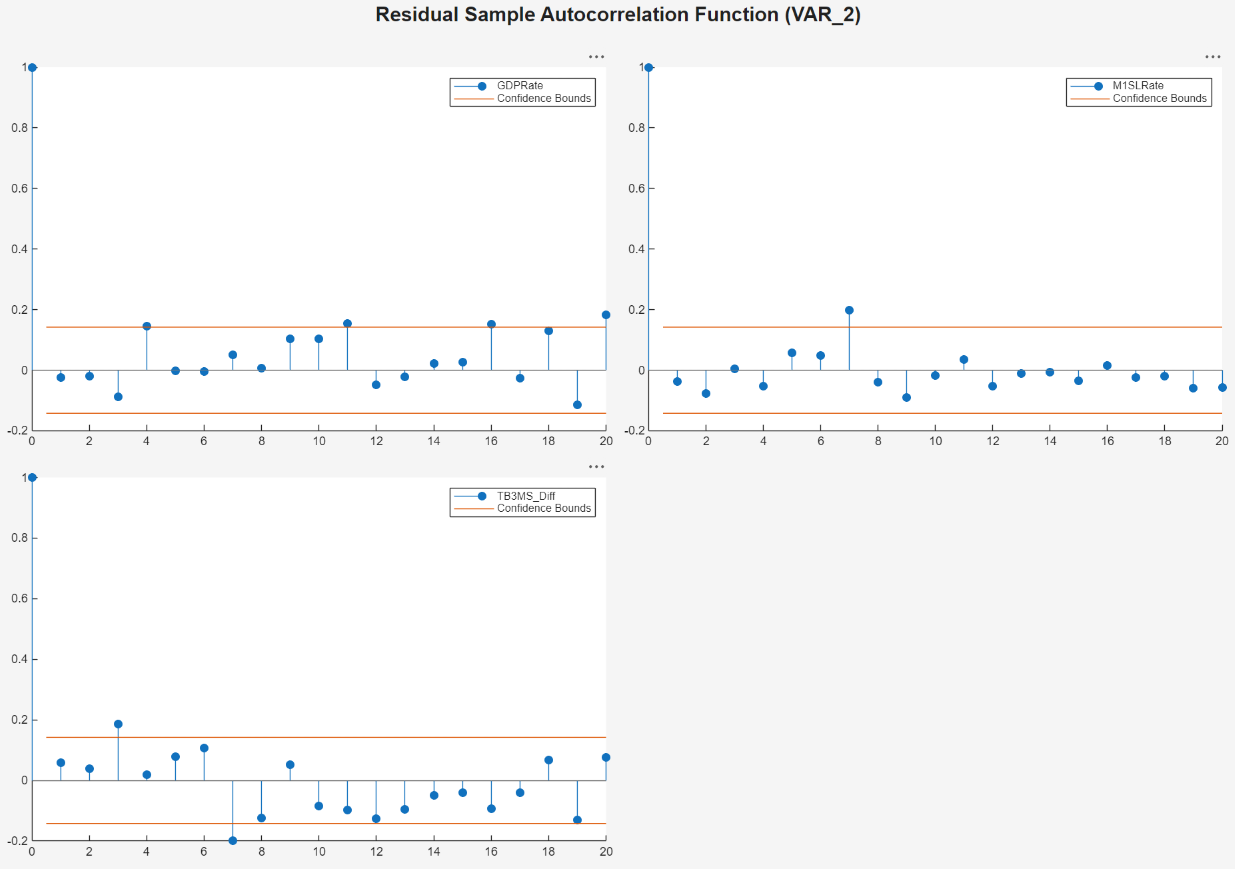
Each series has several significant, albeit small, autocorrelations. For
example, the GDPRate residual series has significant
autocorrelations at lags 4 and 16, and the M1SLRate and
TB3MS_Diff quarterly difference series both have
significant autocorrelations at lags 7. To address the autocorrelations, you can
include higher AR lags in the VAR model for estimation, but this example
proceeds without addressing the autocorrelations this way.
Plot separate ACF plots of each squared residual series. With
VAR_2 selected in the Time
Series pane, on the Modeler tab, in the
Diagnostics section, click Model Fit
Diagnostics > Squared Residual
Autocorrelation. ACF plots of the each squared residual series
appear in the ACF(VAR_2)_2 document.
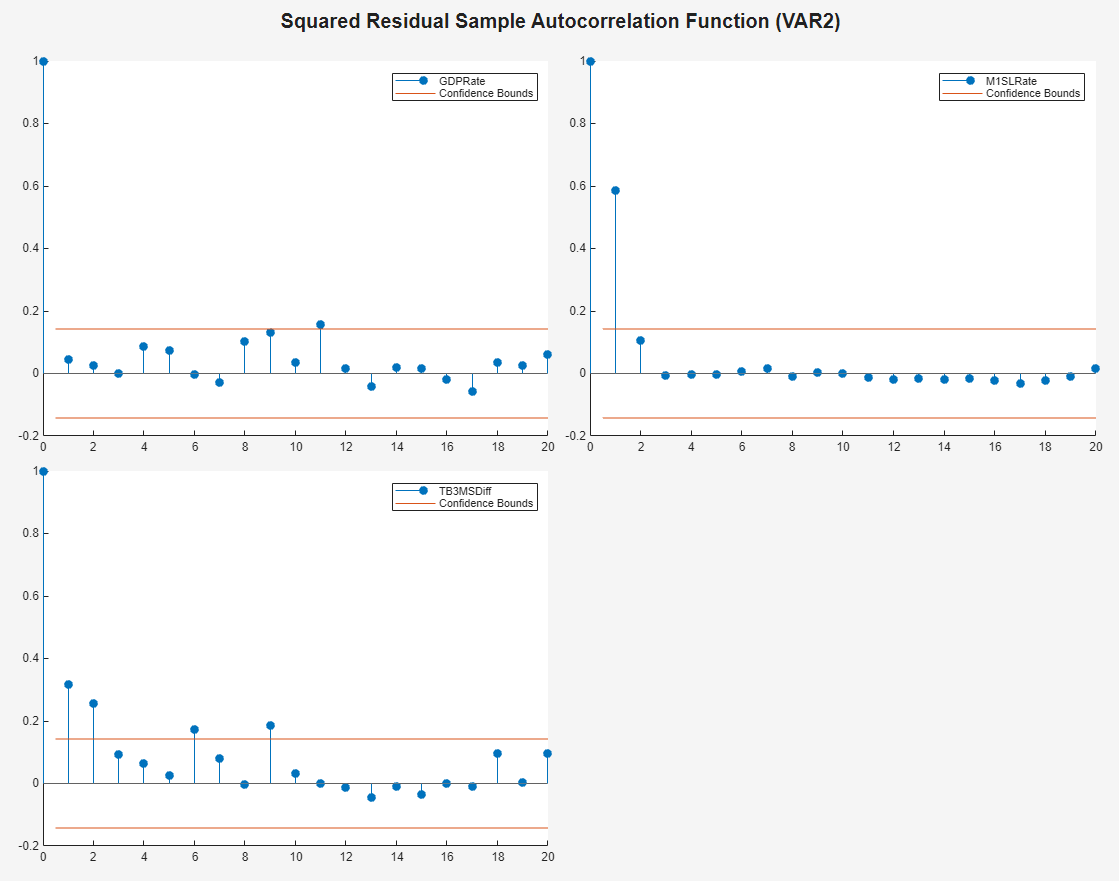
The M1SLRate and TB3MS_Diff series have
significant autocorrelations, which suggests that heteroscedasticity is present.
This example proceeds without addressing possible heteroscedasticity.
Export Model to Workspace
Export the model to the workspace.
With the
VAR_2model selected in the Models pane, on the Modeler tab, in the Export section, click Export > Export Variables.In the Export Variables dialog box, select the Select check box for
GDPRate,M1SLRate, andTB3MS_Diff.Click Export.
The variables GDPRate, M1SLRate,
TB3MS_Diff, and VAR_2 appear in the
workspace.
Conduct Causality Analysis at Command Line
Determine whether series in the system Granger-cause the other series by
conducting 1-step, leave-one-out Granger-causality tests. Pass the estimated
VAR(2) model to gctest.
gctest(VAR_2)
                          H0                                Decision         Distribution    Statistic      PValue      CriticalValue
    _______________________________________________    __________________    ____________    _________    __________    _____________

    "Exclude lagged M1SLRate in GDPRate equation"      "Reject H0"            "Chi2(2)"        8.3934       0.015045       5.9915
    "Exclude lagged TB3MSDiff in GDPRate equation"     "Reject H0"            "Chi2(2)"        16.924     0.00021133       5.9915
    "Exclude lagged GDPRate in M1SLRate equation"      "Cannot reject H0"     "Chi2(2)"        3.1528        0.20672       5.9915
    "Exclude lagged TB3MSDiff in M1SLRate equation"    "Reject H0"            "Chi2(2)"        20.855     2.9608e-05       5.9915
    "Exclude lagged GDPRate in TB3MSDiff equation"     "Reject H0"            "Chi2(2)"        20.565     3.4229e-05       5.9915
    "Exclude lagged M1SLRate in TB3MSDiff equation"    "Cannot reject H0"     "Chi2(2)"       0.41428        0.81291       5.9915
The null hypothesis of the 1-step leave-one-out Granger-causality test is that a series does not 1-step Granger-cause another series, conditioned on all other series being present in the system. The results suggest:
Given that the 3-month T-bill change is in the system, enough evidence exists to suggest that M1 money supply rate 1-step Granger-causes the GDP rate.
Given that the M1 money supply rate is in the system, enough evidence exists to suggest that the 3-month T-bill change 1-step Granger-causes the GDP rate.
Given that the 3-month T-bill change is in the system, not enough evidence exists to suggest that the GDP rate 1-step Granger-causes the M1 money supply rate.
Given that the GDP rate is in the system, enough evidence exists to suggest that the 3-month T-bill change 1-step Granger-causes the M1 money supply rate.
Given that the M1 money supply rate is in the system, enough evidence exists to suggest that the GDP rate 1-step Granger-causes the 3-month T-bill change.
Given that the GDP rate is in the system, not enough evidence exists to suggest that the 1-step M1 money supply rate Granger-causes the 3-month T-bill change.
Generate Forecasts Using Econometric Modeler
Generate MMSE forecasts and approximate 95% forecast intervals from the estimated VAR(2) model for the next four years (16 quarters).
From the Econometric Modeler app, in the Models pane, select the
VAR_2model.In the Modeler tab, in the Forecast section, click Forecast.
In the Forecast Model Response dialog box, set Number of periods in forecast horizon to
16. Then, click Forecast.
In the right pane, in the For(VAR_2) tab is a figure
window of a plot of the GDPRate series with forecasts
and 95% forecast intervals at the end of the series, generated from the VAR(2)
model.
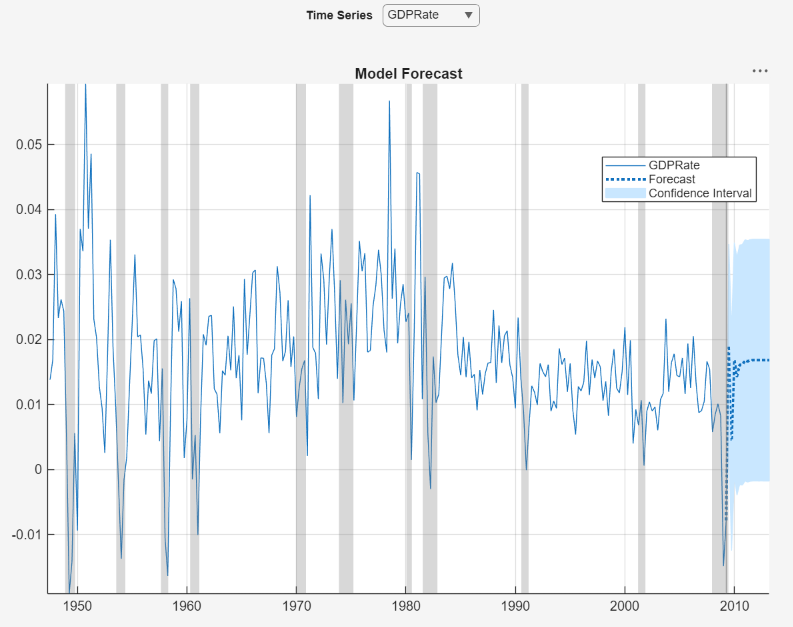
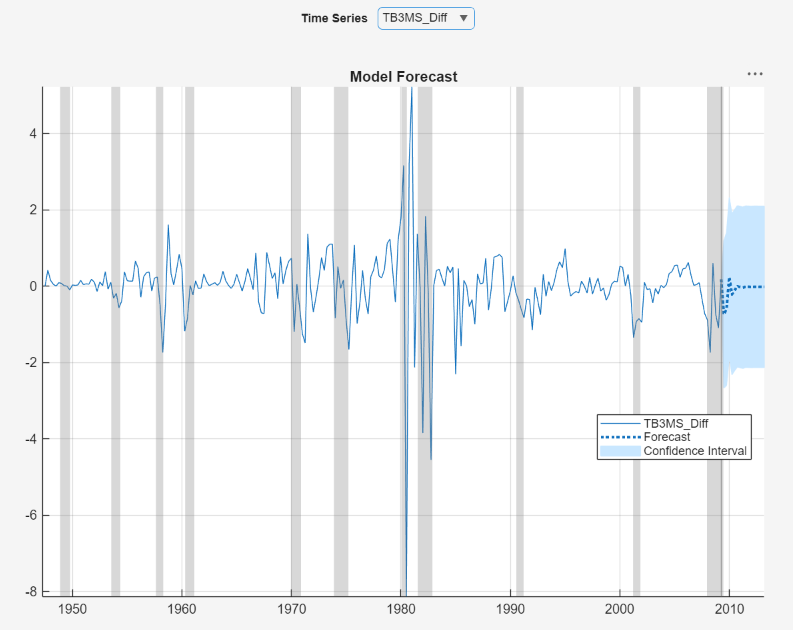
To display the forecasts of the other variables in the VAR(2) model, use the
Time Series menu in the figure window. For example,
display the forecasts of the TB3MS_Diff series, in
the figure window, click Time Series >
TB3MS_Diff.