Generate Code for MATLAB Functions That Use Value Classes
You can use a value class in MATLAB® code intended for code generation. By default, MATLAB classes are value classes. For more information about value classes in MATLAB, see Comparison of Handle and Value Classes.
When using value classes in MATLAB code for code generation, certain considerations apply. See Class Limitations for Code Generation.
This example shows how to use the codegen command to generate a standalone C static library for a MATLAB function that uses a value class. You can integrate the generated C code into custom C code.
Examine MATLAB Classes and Function
Examine the MATLAB class Shape. This class constructs a geometric shape centered around the coordinates specified by the properties centerX and centerY. The dependent property area computes the area using the abstract method getarea. The class constructor initializes the center coordinates. The static method distanceBetweenShapes calculates the Euclidean distance between the centers of two shape objects.
type Shape.mclassdef Shape
properties
centerX
centerY
end
properties (Dependent = true)
area
end
methods
function out = get.area(obj)
out = obj.getarea();
end
function obj = Shape(centerX,centerY)
obj.centerX = centerX;
obj.centerY = centerY;
end
end
methods(Abstract = true)
getarea(obj);
end
methods(Static)
function d = distanceBetweenShapes(shape1,shape2)
xDist = abs(shape1.centerX - shape2.centerX);
yDist = abs(shape1.centerY - shape2.centerY);
d = sqrt(xDist^2 + yDist^2);
end
end
end
Examine the MATLAB class Square, which is a subclass of Shape. The side property defines the length of each side of the square. The constructor initializes the side length and calls the Shape constructor to initialize the center position. The getarea method implements the abstract method from Shape to calculate the area of the square.
type Square.mclassdef Square < Shape
properties
side
end
methods
function obj = Square(side,centerX,centerY)
obj@Shape(centerX,centerY);
obj.side = side;
end
function Area = getarea(obj)
Area = obj.side^2;
end
end
end
Examine the MATLAB class Rhombus, which is a subclass of Shape. The properties diag1 and diag2 define the lengths of the two diagonals. The Rhombus constructor initializes the diagonals and calls the Shape constructor to initialize the center position. The getarea method implements the abstract method from Shape to calculate the area of the rhombus.
type Rhombus.mclassdef Rhombus < Shape
properties
diag1
diag2
end
methods
function obj = Rhombus(diag1,diag2,centerX,centerY)
obj@Shape(centerX,centerY);
obj.diag1 = diag1;
obj.diag2 = diag2;
end
function Area = getarea(obj)
Area = 0.5*obj.diag1*obj.diag2;
end
end
end
Examine the MATLAB function use_shape, which uses the Square and Rhombus classes. The function takes instances of the Square and Rhombus subclasses as input arguments. It calculates and sums the areas of the two objects, then calculates the distance between the centers of the two shapes by using the static method distanceBetweenShapes defined in the Shape superclass.
type use_shape.mfunction [totalArea,distance] = use_shape(s,r) %#codegen totalArea = s.area+r.area; distance = Shape.distanceBetweenShapes(s,r); end
Test the MATLAB function with sample inputs. In this example, pass the MATLAB function an instance of the Square subclass that is centered at coordinates (0,0) and has a side length of 2 and an instance of the Rhombus subclass that is centered at (10,10) and has diagonals of length 2 and 4.
s = Square(2,0,0);
r = Rhombus(2,4,10,10);
[totalarea,distance] = use_shape(s,r)
totalarea =
8
distance =
14.1421
Generate and Run MEX Function
Generate a MEX function for the use_shape function by using the codegen command. Then, run the generated MEX function to check that the generated code has the same behavior as the original MATLAB code.
It is a best practice to perform this step because you can run the generated MEX function to detect run-time errors that are harder to diagnose in standalone code. For example, the MEX function includes memory integrity checks by default.
By default, the codegen command generates a MEX function in C in the working folder. Specify input arguments by using the -args option and use the variables r and s as example values. Because r and s are value classes, you can use them as input arguments to the entry-point function.
codegen use_shape -args {s,r}
Code generation successful.
Test the MEX function with the same input that you passed to the original MATLAB function. The MEX function produces the same output.
[totalarea,distance] = use_shape_mex(s,r)
totalarea =
8
distance =
14.1421
Generate and Inspect C Code
Generate a C static library by using the codegen command with the -config:lib option. Use the same -args syntax that you used to generate the MEX function. Use the -launchreport option to create and open the code generation report.
codegen -config:lib -launchreport use_shape -args {s,r}
Warning: Code generation is using a coder.EmbeddedCodeConfig object. Because
Embedded Coder is not installed, this might cause some Embedded Coder features
to fail.


Code generation successful (with warnings): View report
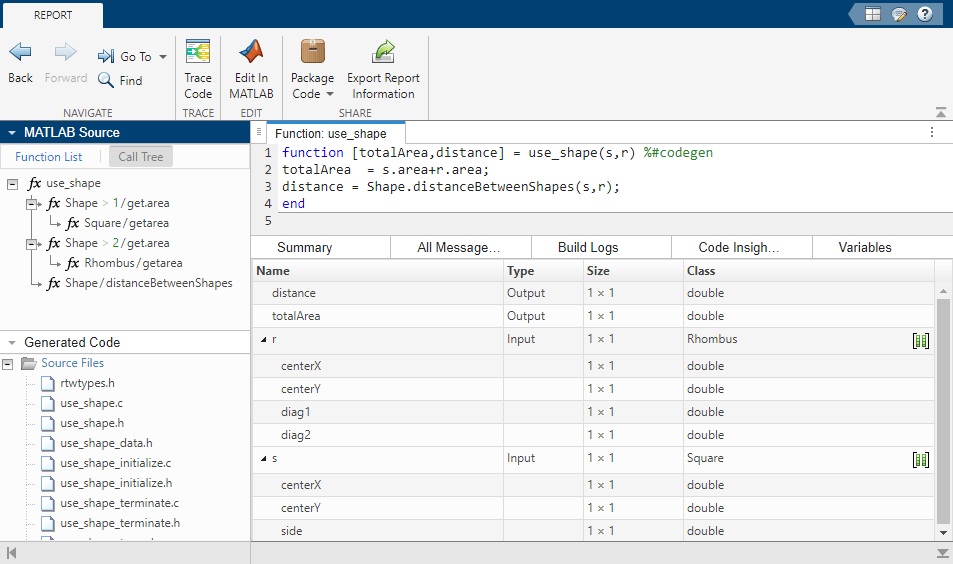
Examine the code generation report for use_shape. In the right pane, the Variables tab shows that r and s are instances of classes Rhombus and Square, respectively. In the left pane, the Call Tree tab shows that use_shape calls the getArea method of each subclass, as well as the distanceBetweenShapes method of the superclass.