Rounding Modes
R2026bWhen you represent numbers with finite precision, not every number in the available range can be represented exactly. The result of any operation on a fixed-point number is typically stored in a register that is longer than the original number format. To put the result back into the original format, a rounding method is used to cast the value to a representable number. The Fixed-Point Designer™ software provides seven rounding modes to offer flexibility between cost and accuracy when choosing a rounding mode for your design:
Ceiling— round toward positive infinity.Convergent— round toward the nearest representable value with ties rounding toward the nearest even integer.Floor— round toward negative infinity.Nearest— round to the nearest representable value.Round— round to the closest representable number with ties rounded based on the sign of the value.Simplest(Simulink® only) — combined rounding techniques for efficient generated code.Zero— drop digits beyond the required precision.
For more information on how to choose a rounding mode, see Choose a Rounding Mode.
Specify Rounding Modes
You can specify a rounding mode for fixed-point Simulink blocks, such as the Data Type Conversion block, using the Integer rounding mode parameter.

Functions that correspond to each rounding mode are available in MATLAB®:
You can also specify rounding modes when constructing a fimath object.
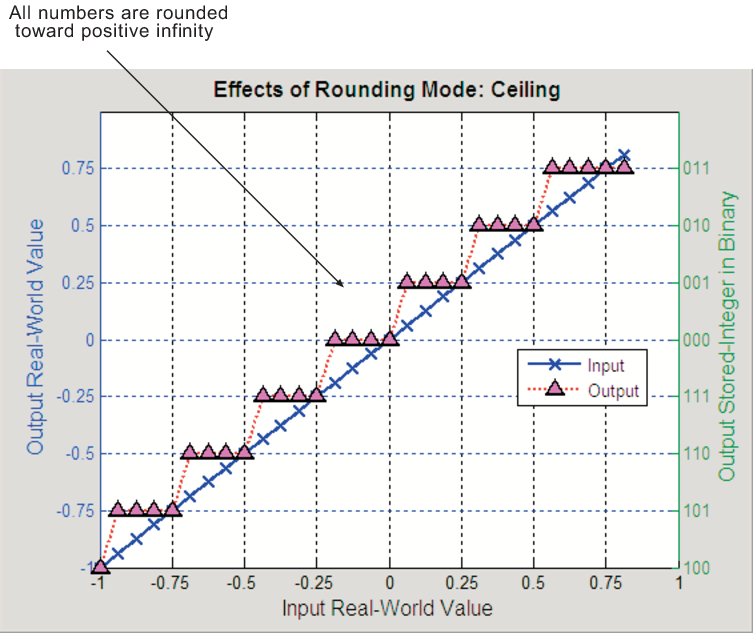
Ceiling
When you round toward ceiling, both positive and negative numbers are rounded toward positive infinity. As a result, a positive cumulative bias is introduced in the number.
You can round to ceiling using the ceil function.
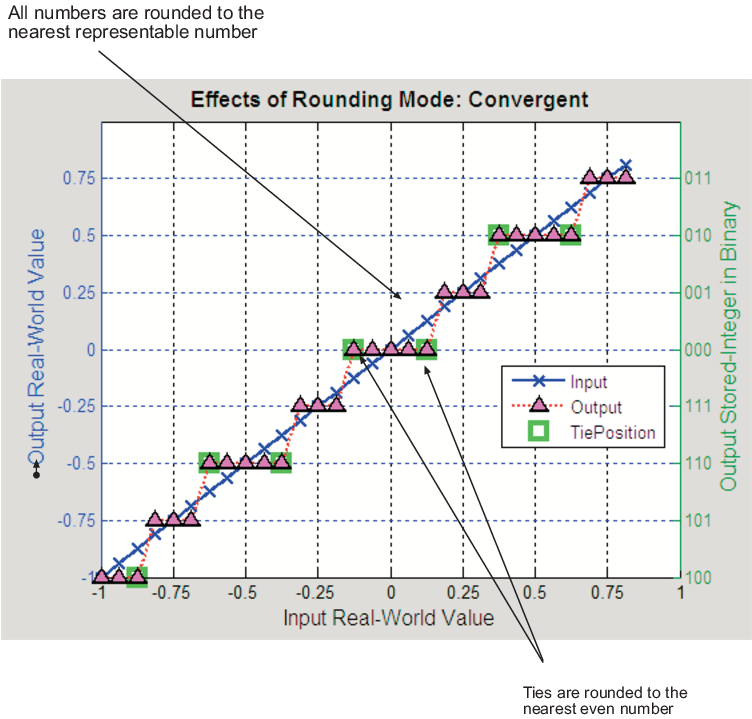
Convergent
Convergent rounding rounds toward the nearest representable value with ties rounding toward the nearest even integer and eliminates bias due to rounding. However, this rounding method introduces the possibility of overflow.
You can perform convergent rounding using the convergent function.
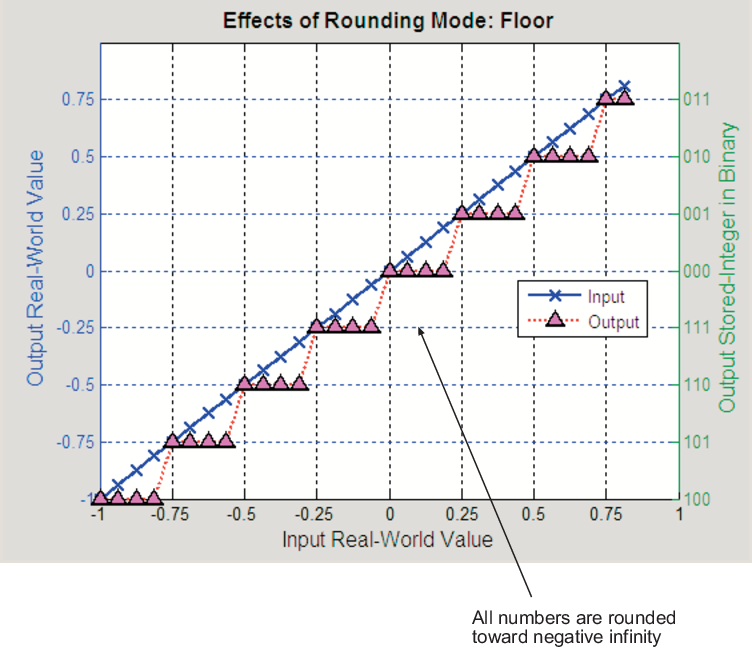
Floor
When you round toward floor, both positive and negative numbers are rounded to negative infinity. As a result, a negative cumulative bias is introduced in the number.
You can round to floor using the floor function.
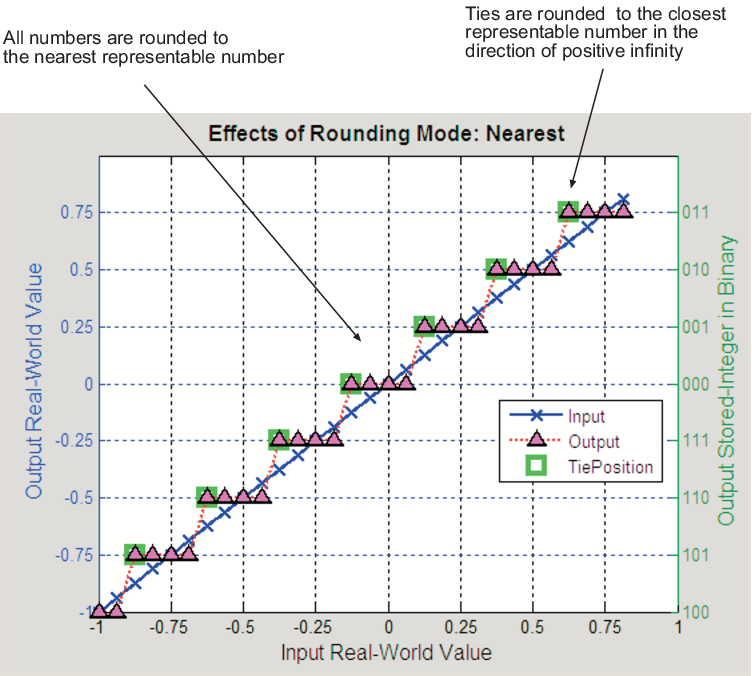
Nearest
When you round toward nearest, the number is rounded to the nearest representable value. In the case of a tie, nearest rounding rounds to the closest representable number in the direction of positive infinity.
You can round to nearest using the nearest function.
Round
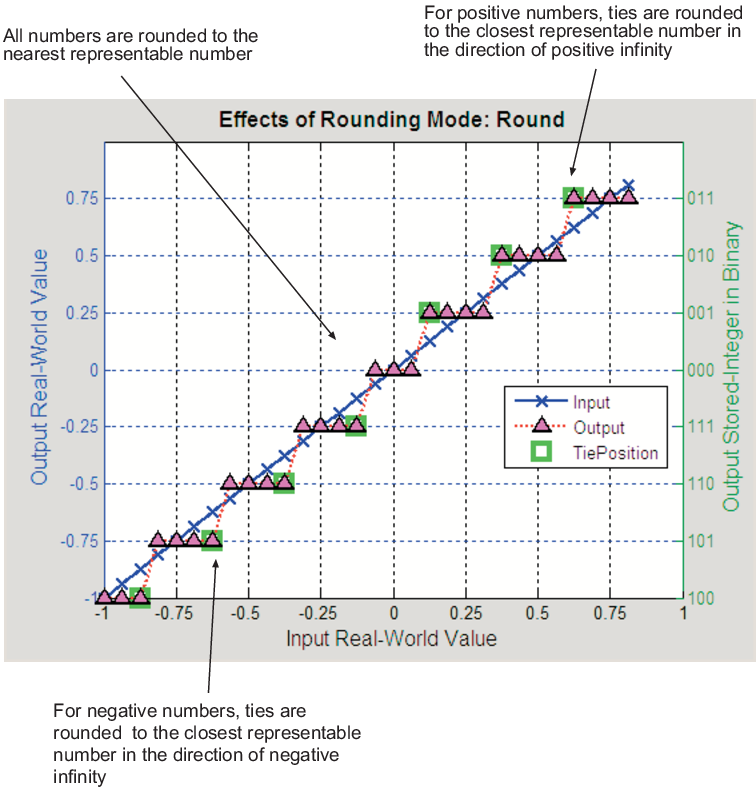
Round rounding rounds to the closest representable number. In the case of a tie:
Positive numbers are rounded to the closest representable number in the direction of positive infinity.
Negative numbers are rounded to the closest representable number in the direction of negative infinity.
As a result:
A small negative bias is introduced for negative samples.
No bias is introduced for samples with evenly distributed positive and negative values.
A small positive bias is introduced for positive samples.
You can perform this type of rounding using the round function.
Simplest
The Simplest rounding mode attempts to reduce or eliminate
extra rounding code in generated code. To learn more about how the
Simplest rounding mode adjusts rounding behavior, see Use Simplest Rounding for Efficient Generated Code. In nearly all cases, the simplest
rounding mode produces the most efficient generated code. This rounding mode is only
available in Simulink.
Zero
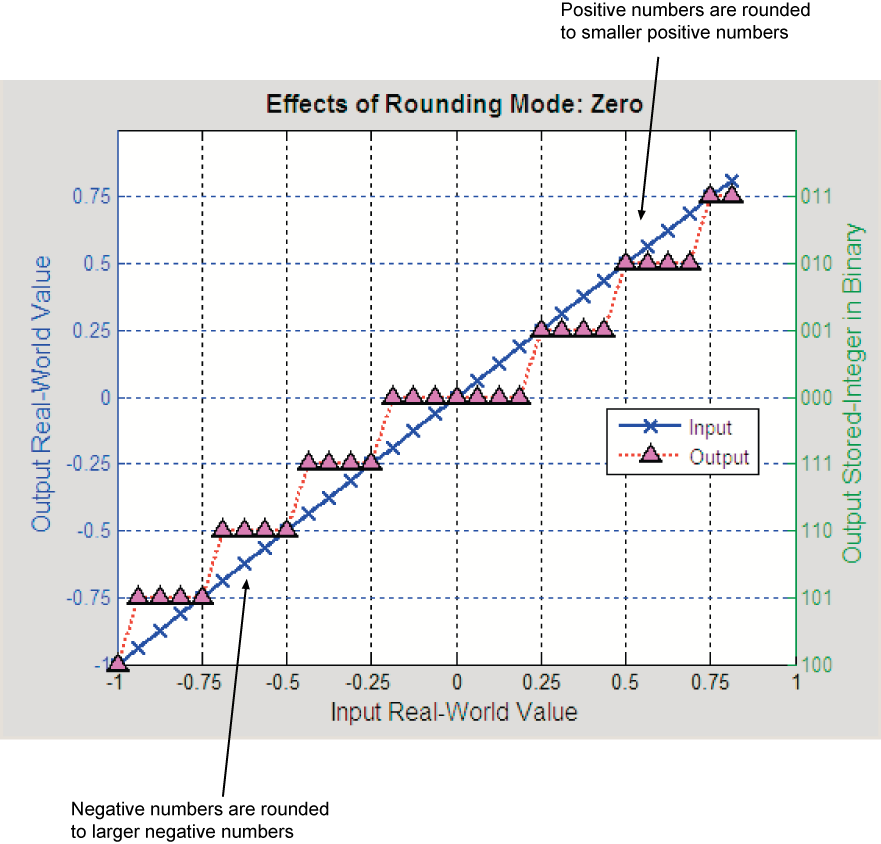
Rounding towards zero is the simplest rounding mode computationally. All digits beyond the number required are dropped. Rounding towards zero results in a number whose magnitude is always less than or equal to the more precise original value.
Rounding toward zero introduces a cumulative downward bias in the result for positive numbers and a cumulative upward bias in the result for negative numbers. That is, all positive numbers are rounded to smaller positive numbers, while all negative numbers are rounded to larger negative numbers.
You can round to zero using the fix function.
Rounding to Zero Versus Truncation
Rounding to zero and truncation or chopping are sometimes thought to mean the same thing. However, the results produced by rounding to zero and truncation are different for unsigned and two's complement numbers.
For example, consider rounding a 5-bit unsigned number to zero by truncating the two least significant bits. The unsigned number 100.01 = 4.25 is truncated to 100 = 4. Therefore, truncating an unsigned number is equivalent to rounding to zero or rounding to floor.
Now, consider rounding a 5-bit two's complement number by truncating the two least significant bits. The two's compliment number 100.01 = -3.75, rounding to zero yields -3.00. However, truncating the binary word by removing the last two digits 100.01 = -3.75 yields 100 = -4, the same as rounding to floor.
See Also
ceil | convergent | floor | nearest | round | fix

