Use Data Type Optimization to Minimize Operator Counts
This example shows how to use the ObjectiveFunction property of the
fxpOptimizationOptions class to minimize an estimated count of operators in
the generated code. This results in a lower program memory size for C code generated from
Simulink® models.
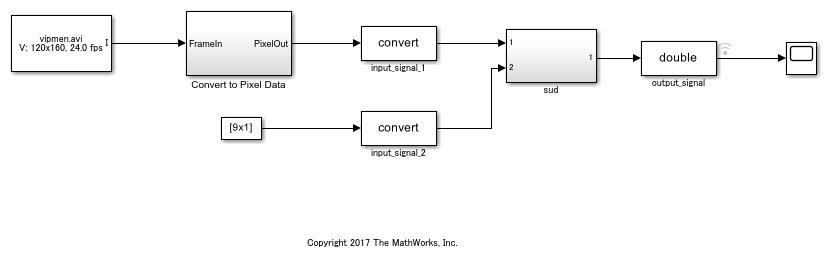
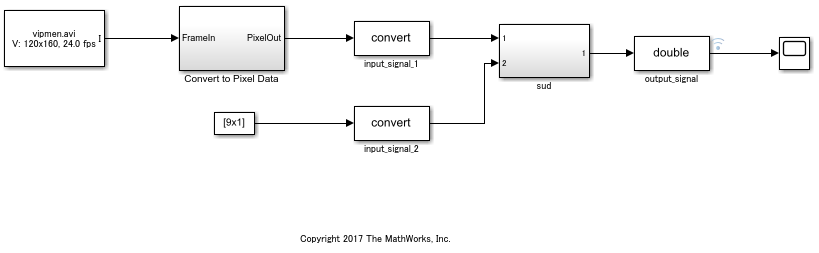
Open the Model
To begin, open the system for which you want to optimize the data types.
open_system("mFilter2D.slx")
Define Tolerances and Settings
Create an fxpOptimizationOptions object to define tolerances and
optimization settings.
opt = fxpOptimizationOptions();
Use the addTolerance method to define tolerances for the differences
between the original behavior of the system and the behavior using the optimized fixed-point
data types.
tol = 1e-4;
opt.addTolerance([model '/output_signal'],1,'AbsTol',tol);
Set the advanced option PerformNeighborhoodSearch to
true to perform a neighborhood search for the optimized
solution.
opt.AdvancedOptions.PerformNeighborhoodSearch = true;
Set the ObjectiveFunction property to
OperatorCount to instruct the optimization to minimize an estimated
count of operators in the generated code.
opt.ObjectiveFunction = 'OperatorCount';
Use the fxpopt function to run the optimization. The software
analyzes ranges of objects in the system under design and the constraints specified in the
fxpOptimizationOptions object to apply heterogeneous data types to your
system while minimizing the total operator count.
optRes = fxpopt(model,sud,opt);
+ Checking for unsupported constructs.
	+ Preprocessing
	+ Modeling the optimization problem
		- Constructing decision variables
	+ Running the optimization solver
		- Evaluating new solution: cost 87, does not meet the tolerances.
		- Evaluating new solution: cost 87, does not meet the tolerances.
		- Evaluating new solution: cost 87, does not meet the tolerances.
		- Evaluating new solution: cost 87, does not meet the tolerances.
		- Evaluating new solution: cost 87, does not meet the tolerances.
		- Evaluating new solution: cost 85, does not meet the tolerances.
		- Evaluating new solution: cost 81, does not meet the tolerances.
		- Evaluating new solution: cost 83, does not meet the tolerances.
		- Evaluating new solution: cost 83, does not meet the tolerances.
		- Evaluating new solution: cost 83, does not meet the tolerances.
		- Evaluating new solution: cost 83, does not meet the tolerances.
		- Evaluating new solution: cost 83, does not meet the tolerances.
		- Evaluating new solution: cost 83, does not meet the tolerances.
		- Evaluating new solution: cost 83, does not meet the tolerances.
		- Evaluating new solution: cost 81, does not meet the tolerances.
		- Evaluating new solution: cost 83, meets the tolerances.
		- Updated best found solution, cost: 83
		- Evaluating new solution: cost 90, meets the tolerances.
		- Evaluating new solution: cost 83, does not meet the tolerances.
		- Evaluating new solution: cost 85, does not meet the tolerances.
		- Evaluating new solution: cost 89, meets the tolerances.
		- Evaluating new solution: cost 85, does not meet the tolerances.
		- Evaluating new solution: cost 88, meets the tolerances.
		- Evaluating new solution: cost 92, meets the tolerances.
		- Evaluating new solution: cost 90, does not meet the tolerances.
		- Evaluating new solution: cost 83, does not meet the tolerances.
		- Evaluating new solution: cost 89, does not meet the tolerances.
	+ Optimization has finished.
		- Neighborhood search complete.
		- Reached limit of number of iterations without updates to the current best solution.
	+ Fixed-point implementation that met the tolerances found.
		- Total cost: 83
		- Maximum absolute difference: 0.000091
		- Use the explore method of the result to explore the implementation.
Use the explore method of the OptimizationResult
object, optRes, to open the Simulation Data Inspector and explore the
design containing the minimum number of operator counts while maintaining the numeric
tolerances specified in the opt object.
explore(optRes)
Use the openSimulationManager method of the
OptimizationResult object, optRes, to inspect the
simulations run during optimization in Simulation Manager.
openSimulationManager(optRes)

