Reduce GPU Memory Allocations By Using GPU Memory Manager
R2026bRepeated GPU memory allocations can slow the performance of generated CUDA® code. To manage allocated memory and minimize memory allocations, enable the GPU memory manager. The GPU memory manager creates reusable GPU memory pools and assigns chunks of memory in these pools to fulfill memory allocation and deallocation requests. This process can reduce the number of calls to CUDA memory APIs and improve run-time performance.
This example shows how to use the GPU memory manager in generated MEX functions and standalone code to reduce memory allocations. For CUDA MEX functions, GPU Coder™ creates a single memory manager that allocates memory pools shared by running CUDA MEX functions. Standalone targets, such as libraries or executables, create memory managers whose memory pools are private to the target.
Obtain Fog Rectification Example Files
This example uses the design file fog_rectification.m and the image
file foggyInput.png from the Generate GPU Code for Fog Rectification Algorithm example. To create a
folder that contains these files, run this command.
openExample("gpucoder/FogRectificationGPUExample")Profile Generated Code With Memory Manager Disabled
To demonstrate how the GPU memory manager reduces memory allocations, first, generate
code that does not use the GPU memory manager. Create a GPU configuration object by using
the coder.gpuConfig function, and set the EnableMemoryManager
property to
false.
cfg = coder.gpuConfig("mex");
cfg.GpuConfig.EnableMemoryManager = false;
Load the input image foggyInput.png into a variable named
imread, then generate and profile a CUDA MEX function using the gpuPerformanceAnalyzer function. The GPU
Performance Analyzer runs the generated code
for fog_rectification twice and shows the profiling data from the second
run.
inputImage = imread("foggyInput.png");
gpuPerformanceAnalyzer("fog_rectification",{inputImage},Config=cfg);
In the Profiling Timeline pane, in the CPU
Overhead row, the orange events denote time spent on memory allocations or
deallocations. The generated code for fog_rectification spends most of
its time on memory allocation and deallocation.

To reduce memory allocations on subsequent runs of fog_rectification,
enable the GPU memory manager.
Profile a CUDA MEX Function That Uses Memory Manager
When you first execute a CUDA MEX function that uses the GPU memory manager, MATLAB® allocates reusable GPU memory pools and reuses these pools for subsequent calls to MEX functions generated by GPU Coder. The pools are shared across the running CUDA MEX functions.
To enable the memory manager, in the configuration object, set
EnableMemoryManager to true. Then, generate and
profile the CUDA MEX function again. The analyzer shows the results from the second run of
fog_rectification.
cfg.GpuConfig.EnableMemoryManager = true;
gpuPerformanceAnalyzer("fog_rectification",{inputImage},Config=cfg);
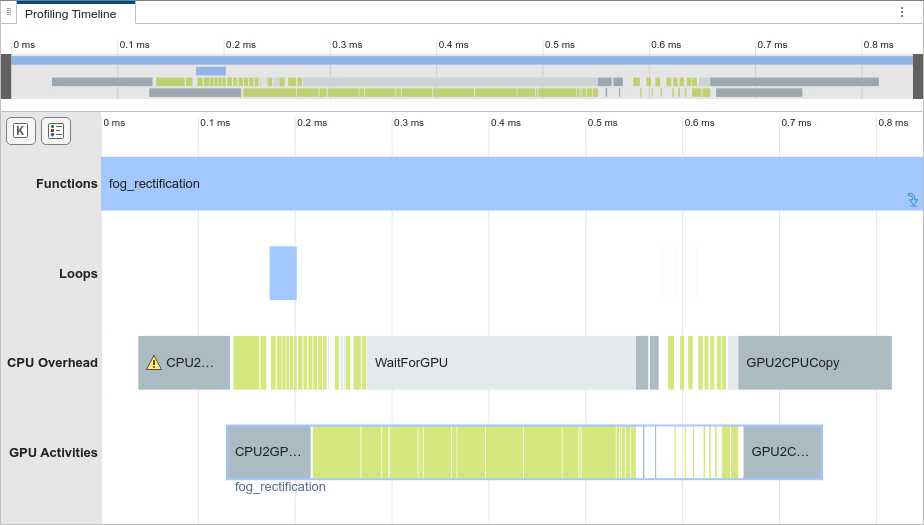
The Profiling Timeline does not contain memory allocation or
deallocation events. The second run of fog_rectification uses the memory
pools allocated by the memory manager, so it does not allocate memory. Therefore, the
generated MEX has improved run-time performance.
Examine Memory Usage of GPU Memory Manager
To see when the GPU memory manager allocates the shared GPU memory pools, in the
toolstrip, in the Filters section, select Show Single
Run and select (1) fog_rectification.

Compared to the second run, the first run has GPU memory allocation events in the
timeline graph. These events correspond to the allocation of memory pools by the GPU
memory manager. Subsequent runs of fog_rectification_mex reuse the
memory pools allocated in the first run, which improves the run-time
performance.
For MEX code generation, the GPU memory manager preserves the memory pools allocated
for fog_rectification_mex after
fog_rectification_mex finishes its first execution. Consequently, the
second run of fog_rectification_mex and other calls to CUDA MEX functions can reuse the memory pools. To check the memory usage of the
memory manager, create a cudaMemoryManager object. The
TotalReservedMemory property shows the amount of memory the memory
manager reserves for the MATLAB
session.
>> memMgr = cudaMemoryManager
memMgr =

  MemoryManager with properties:

    TotalReservedMemory: 58720256 (59.00 MB)
            MemoryInUse: 0
         MemoryNotInUse: 58720256 (59.00 MB)
To free the memory reserved by the memory manager, use the
freeUnusedMemory
function.
freeUnusedMemory(memMgr);
Profile Standalone CUDA Code That Uses Memory Manager
The memory manager can reduce memory allocations for standalone CUDA code by creating reusable memory pools that are private to the target during the first run of standalone code. The code reuses the memory pools, including on subsequent runs. The memory manager deallocates the memory pools when the application is unloaded from memory.
To generate a library that uses the GPU memory manager, use the
coder.gpuConfig function to select the static library build type. The
GPU memory manager is enabled by default. Profile the code using the
gpuPerformanceAnalyzer function. The Profiling
Timeline pane of the generated report shows there are
no memory allocation or deallocation events for the
second run of fog_rectification because of the memory manager.
cfg = coder.gpuConfig("lib");
gpuPerformanceAnalyzer("fog_rectification",{inputImage},Config=cfg);