R2026b
Installation Changes
Simplified installation for specific licenses
Users with specific licenses, such as a Campus-Wide license, now see a simplified installation workflow that consolidates all installation options to a single page.
Reduced size of offline installation update packages
Update packages for offline installations are now smaller, making updates easier to download, store, and distribute. For more information, see Update MATLAB on Offline Computer.
Java Runtime no longer installed by default
MATLAB® installations on Windows® and Linux® no longer include Oracle® Java® by default. After installing MATLAB, you might need to install a compatible OpenJDK® distribution to access Java functionality from MATLAB. MATLAB continues to support OpenJDK on all platforms. For information about supported versions and how to get one, see Versions of OpenJDK Compatible with MATLAB by Release.
Product Changes
MATLAB Copilot
MATLAB Copilot now includes MATLAB as a dependency and will be an add-on product on the same license as MATLAB.
Simulink
Variant Manager for Simulink® is now part of the new Simulink Variant Manager™.
Simulink Copilot
Simulink Copilot now includes Simulink as a dependency and will be an add-on product on the same license as MATLAB.
Automated Driving Toolbox
Ground Truth labeling functionality moved from Automated Driving Toolbox™ to Point Cloud Toolbox™.
Computer Vision Toolbox
Point Cloud Processing functionality moved from Computer Vision Toolbox™ to Point Cloud Toolbox.
Deep Learning HDL Toolbox
Deep Learning HDL Toolbox™ Support Package for AMD FPGA and SoC Devices is now part of the SoC Blockset™ Support Package for AMD FPGA and SoC Devices.
Deep Learning HDL Toolbox Support Package for Intel® FPGA and SoC Devices is now part of the HDL Coder™ Support Package for Intel FPGA and SoC Devices.
Deep Learning HDL Toolbox now requires HDL Coder as a dependency.
Embedded Coder
Embedded Coder® Support Package for Intel SoC Devices is now part of the HDL Coder Support Package for Intel FPGA and SoC Devices.
HDL Coder
HDL Coder Support Package for AMD FPGA and SoC Devices is now part of the SoC Blockset Support Package for AMD FPGA and SoC Devices.
VMC and Vitis HLS support moved from HDL Coder to the SoC Blockset Support Package for AMD FPGA and SoC Devices.
HDL Verifier
HDL Verifier™ Support Package for AMD FPGA and SoC Devices is now part of the SoC Blockset Support Package for AMD FPGA and SoC Devices.
HDL Verifier Support Package for Intel FPGA Boards is now part of the SoC Blockset Support Package for AMD FPGA and SoC Devices.
HDL Verifier Support Package for Microchip FPGA Boards is now part of the HDL Coder Support Package for Microchip FPGA and SoC Devices.
Lidar Toolbox
Point Cloud Toolbox no longer lists the Computer Vision Toolbox and Image Processing Toolbox™ as dependencies.
Lidar Toolbox™ is renamed to Point Cloud Toolbox.
SoC Blockset
HDL Coder Support Package for Intel FPGA and SoC Devices is now part of the HDL Coder Support Package for Intel FPGA and SoC Devices.
SoC Blockset for AMD removed Simulink as a dependency. Simulink is still be required for modeling hardware behavior.
SoC Blockset is renamed to SoC Blockset (for AMD).
R2026a
Installation Changes
Java Runtime will no longer be installed by default in a future release
Currently, MATLAB installations on Windows and Linux platforms include Oracle Java. However, in a future release, MATLAB will no longer include Oracle Java as part of its installation. Instead, you will need to download and install a compatible OpenJDK distribution after installing MATLAB. MATLAB will continue to support OpenJDK on all platforms. For information about supported versions, see Versions of OpenJDK Compatible with MATLAB by Release.
Downloading and installing products on Intel Macs is no longer supported
Starting in R2026a, downloading and installing MATLAB and other MathWorks® products on Intel Mac platforms is not supported. Intel Mac support is still available in R2025b and earlier. Downloading and installing products on Apple silicon Mac platforms is supported for R2023b and later. This diagram shows the supported Mac platforms by release.
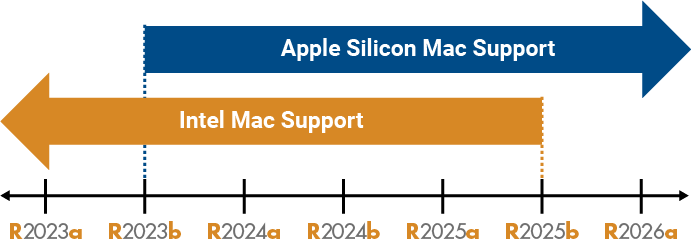
For more details on MATLAB support for Mac platforms, see MATLAB System Requirements for Mac.
Install MATLAB using a keyboard and screen reader
The Install MATLAB Using Keyboard and Screen Reader topic shows how to install
MATLAB with a focus on accessibility, specifically the use of a keyboard and screen
reader, using the command-line tool MATLAB Package Manager (mpm).
Licensing Changes
Required license manager update for network licenses
In R2026a, the license manager software has been updated to FlexNet® 11.19.7. To enable users on a network license to access the R2026a release of MathWorks products, update your license manager software. See Update Network License Manager Software.
Product Changes
MATLAB Support Package for Raspberry Pi Hardware moved to Raspberry Pi Blockset
MATLAB Support Package for Raspberry Pi® Hardware is now part of the new Raspberry Pi Blockset product.
If you downloaded and installed MATLAB Support Package for Raspberry Pi Hardware, your licenses are updated to include Raspberry Pi Blockset at no initial cost.
If you subscribed to Software Maintenance Service (SMS) as of R2026a for MATLAB, then Raspberry Pi Blockset will appear on future SMS renewal invoices. Otherwise, you will need to renew your SMS subscription to access the updated product.
Simulink Support Package for Raspberry Pi Hardware moved to Raspberry Pi Blockset
Simulink Support Package for Raspberry Pi Hardware is now part of the new Raspberry Pi Blockset product.
If you downloaded and installed Simulink Support Package for Raspberry Pi Hardware, your licenses are updated to include Raspberry Pi Blockset at no initial cost.
If you subscribed to Software Maintenance Service (SMS) as of R2026a for Simulink, then Raspberry Pi Blockset will appear on future SMS renewal invoices. Otherwise, you will need to renew your SMS subscription to access the updated product.
Communications Toolbox Wireless Network Simulation Library moved to Wireless Network Toolbox
Communications Toolbox™ Wireless Network Simulation Library is now part of the new Wireless Network Toolbox™ product.
If you downloaded and installed Communications Toolbox Wireless Network Simulation Library, your licenses are updated to include Wireless Network Toolbox at no initial cost.
If you subscribed to Software Maintenance Service (SMS) as of R2026a for Communications Toolbox, then Wireless Network Toolbox will appear on future SMS renewal invoices. Otherwise, you will need to renew your SMS subscription to access the updated product.
Embedded Coder Support Package for STMicroelectronics STM32 Processors moved to STM32 Microcontroller Blockset
Embedded Coder Support Package for STMicroelectronics® STM32 Processors is now part of the new STM32™ Microcontroller Blockset product.
If you downloaded and installed Embedded Coder Support Package for STMicroelectronics STM32 Processors, your licenses are updated to include STM32 Microcontroller Blockset at no initial cost.
If you subscribed to Software Maintenance Service (SMS) as of R2026a for Embedded Coder, then STM32 Microcontroller Blockset will appear on future SMS renewal invoices. Otherwise, you will need to renew your SMS subscription to access the updated product.
Simulink Coder Support Package for STMicroelectronics Nucleo Boards moved to STM32 Microcontroller Blockset
Simulink Coder™ Support Package for STMicroelectronics Nucleo Boards is now part of the new STM32 Microcontroller Blockset product.
If you downloaded and installed Simulink Coder Support Package for STMicroelectronics Nucleo Boards, your licenses are updated to include STM32 Microcontroller Blockset at no initial cost.
If you subscribed to Software Maintenance Service (SMS) as of R2026a for Simulink Coder, then STM32 Microcontroller Blockset will appear on future SMS renewal invoices. Otherwise, you will need to renew your SMS subscription to access the updated product.
Polyspace as You Code plugin in Polyspace Access moved to Polyspace as You Code standalone product
The Polyspace® as You Code™ plugin for IDEs in Polyspace Access™ is now part of the new Polyspace as You Code product.
Any of your licenses that include Polyspace Access have been updated to include Polyspace as You Code at no initial cost.
If you subscribed to Software Maintenance Service (SMS) as of R2026a for Polyspace Access, then Polyspace as You Code will appear on future SMS renewal invoices. Otherwise, you will need to renew your SMS subscription to access the updated product.
FMU Builder for Simulink support package in Simulink Compiler moved to Simulink FMU Builder
The FMU Builder for Simulink support package in Simulink Compiler™ is now part of the new Simulink FMU Builder product
If you downloaded and installed FMU Builder for Simulink, your licenses are updated to include Simulink FMU Builder at no initial cost.
If you subscribed to Software Maintenance Service (SMS) as of R2026a for Simulink Compiler, then Simulink FMU Builder will appear on future SMS renewal invoices. Otherwise, you will need to renew your SMS subscription to access the updated product.
PCAP feature in WLAN Toolbox moved to Wireless Network Toolbox
The PCAP feature in WLAN Toolbox™ is now part of the new Wireless Network Toolbox product.
PCAP feature in Bluetooth Toolbox moved to Wireless Network Toolbox
The PCAP feature in Bluetooth® Toolbox is now part of the new Wireless Network Toolbox product.
R2025b
Quality and stability improvements
R2025b delivers quality and stability improvements, building on the new features introduced in R2025a.
R2025a
Installation Changes
Updated procedure for installing support packages on offline computers
To download support packages and install them on offline computers, the recommended
procedure now is to use MATLAB Package Manager ( mpm ). Previously, the recommended
procedure was to use the Support Software Downloader. For instructions on downloading
support packages and installing them on offline computers, see Install Support Packages on Offline Computer.
Licensing Changes
Required license manager update for network licenses
The license manager software for managing network licenses has been updated for R2025a. On Linux and Windows platforms, the license manager now uses FlexNet version 11.19.6.2. On Mac platforms, the license manager continues to use FlexNet version 11.19.5. To enable users on a network license to access the R2025a release of MathWorks products, update your license manager software. See Update Network License Manager Software.
Product Changes
Filter Design HDL Coder discontinued
As of R2025a, Filter Design HDL Coder™ is discontinued and no longer available for purchase.
MathWorks recommends the use of DSP HDL Toolbox, which encompasses the filter structures available in Filter Design HDL Coder, while also offering advanced and high-performance filters and signal processing support for FPGAs and ASICs. It includes templates for interfacing MATLAB and Simulink as well as reference examples. To generate synthesizable VHDL® or Verilog® code you will require HDL Coder.
R2024b
Licensing Changes
Required license manager update for network licenses on Linux and Windows (R2024b Update)
The license manager software has been updated for R2024b Update 2. On Linux and Windows platforms, the license manager now uses FlexNet version 11.19.6.2. If you previously installed FlexNet version 11.9.5 of the license manager for use with R2024b, update your license manager software. See Update Network License Manager Software.
Mac platforms continue to use FlexNet version 11.19.5. If you previously installed this version of the license manager for use with R2024b, you do not need to perform this update.
Required license manager update for network licenses
In R2024b, the license manager software has been updated to FlexNet 11.19.5. To enable users on a network license to access the R2024b release of MathWorks products, update your license manager software. See Update Network License Manager Software.
Product Changes
SoC Blockset for AMD support package merged into Embedded Coder support package
As of R2024b, the SoC Blockset Support Package for Infineon® AURIX™ Microcontrollers has been merged into the Embedded Coder Support Package for Infineon AURIX TC4x Microcontrollers.
| Subscribed to Software Maintenance Service as of R2024b for SoC Blockset for AMD | License(s) are updated to include the following product at no initial cost: Embedded Coder They will appear on future Software Maintenance Service renewal invoices. |
| Not subscribed to Software Maintenance Service as of R2024b for SoC Blockset for AMD | License(s) are updated to include the following product at no initial cost: Embedded Coder They will appear on future Software Maintenance Service renewal invoices. |
Communications Toolbox functionality moved into Satellite Communications Toolbox
As of R2024b, the following modulation functions and blocks in Communications Toolbox have moved into Satellite Communications Toolbox:
dvbsapskmod(function)dvbsapskdemod(function)DVBS-APSK Modulator Baseband (block)
DVBS-APSK Demodulator Baseband (block)
R2024a
Installation Changes
MATLAB Package Manager: Install MathWorks products and support packages from operating system command line
Use MATLAB Package Manager ( mpm ) to install MATLAB, Simulink, and other MathWorks products or support packages from the operating system command line.
mpm manages all dependencies, installing all required products and
omitting products already installed. By running mpm from a script, you
can automate the installation of products on multiple computers. If you run
mpm from the MATLAB Dockerfile, you can build a customized MATLAB
Docker® container.
For the full list of features that mpm supports, see MATLAB Package Manager on GitHub®.
Changes to MATLAB uninstallation on Windows
On Windows, the application used to uninstall MATLAB has changed. Below is the default location of the application by release,
where R20XXy
Before R2024a —
 C:\Program
                  Files\MATLAB\R20XXy\uninstall\bin\win64\uninstall.exe
Since R2024a —
 C:\Program
                  Files\MATLAB\R20XXy\bin\win64\MathWorksProductUninstaller.exe
Run the uninstaller from this location if the uninstaller fails when you run it from the list of installed apps in Windows, or if the MATLAB release you want to uninstall is not in this list.
The process for silently uninstalling MATLAB from Windows, without opening the uninstaller UI, has also changed. In R2024a and later, uninstalling a selection of products from MATLAB by using the uninstaller properties file is not supported. The properties file continues to work for silently uninstalling MATLAB R2023b and earlier.
To silently uninstall all products from MATLAB R2024a or later, run the uninstaller from the command line with the
mode option set to silent. For example:
"C:\Program Files\MATLAB\R2024a\bin\win64\MathWorksProductUninstaller.exe" --mode silent
For more details on uninstalling MATLAB, see Uninstall MATLAB.
Licensing Changes
Changes to MATLAB license deactivation on Windows and Linux
On Windows and Linux, the application used to deactivate MATLAB licenses has changed. Below is the default location of the application by
platform and release, where R20XXy
Windows default location:
Before R2024a —
 C:\Program
                    Files\MATLAB\R20XXy\uninstall\bin\win64\deactivate_matlab.exe
Since R2024a —
 C:\Program
                    Files\MATLAB\R20XXy\bin\win64\MathWorksLicenseDeactivation.exe
Linux default location:
Before R2024a —
/usr/local/MATLAB/R20XXy/bin/deactivate_matlab.shSince R2024a —
/usr/local/MATLAB/R20XXy/bin/glnxa64/MathWorksLicenseDeactivation
The macOS default location for all releases is still
/Applications/MATLAB_. R20XXy.app/Deactivate.app
Run the application when you want to deactivate MATLAB licenses from computers that no longer have MATLAB installed.
For more details on deactivating MATLAB licenses, see Deactivate MATLAB License.
Product Changes
Aerospace Blockset use of Unreal Engine features requires Simulink 3D Animation
As of R2024a, Aerospace Blockset’s use of Unreal Engine® features will require Simulink 3D Animation™.
Subscribed to Software Maintenance Service as of R2024a for Aerospace Blockset™ and opted into the offer to add Simulink 3D Animation | License(s) are updated to include the following product at no initial cost: Simulink 3D Animation They will appear on future Software Maintenance Service renewal invoices. |
Not subscribed to Software Maintenance Service as of R2024a for Aerospace Blockset and opted into the offer to add Simulink 3D Animation | License(s) are updated to include the following product at no initial cost: Simulink 3D Animation You need to renew your Software Maintenance Service subscription to access the updated product. |
Automated Driving Toolbox use of Unreal Engine features requires Simulink 3D Animation
As of R2024a, Automated Driving Toolbox’s use of Unreal Engine features will require Simulink 3D Animation.
Subscribed to Software Maintenance Service as of R2024a for Automated Driving Toolbox | License(s) are updated to include the following product at no initial cost: Simulink 3D Animation They will appear on future Software Maintenance Service renewal invoices. |
Not subscribed to Software Maintenance Service as of R2024a for Automated Driving Toolbox | License(s) are updated to include the following product at no initial cost: Simulink 3D Animation You need to renew your Software Maintenance Service subscription to access the updated product. |
UAV Toolbox use of Unreal Engine features requires Simulink 3D Animation
As of R2024a, UAV Toolbox’s use of Unreal Engine features will require Simulink 3D Animation.
Subscribed to Software Maintenance Service as of R2024a for UAV Toolbox | License(s) are updated to include the following product at no initial cost: Simulink 3D Animation They will appear on future Software Maintenance Service renewal invoices. |
Not subscribed to Software Maintenance Service as of R2024a for UAV Toolbox | License(s) are updated to include the following product at no initial cost: Simulink 3D Animation You need to renew your Software Maintenance Service subscription to access the updated product. |
Vehicle Dynamics Blockset use of Unreal Engine features requires Simulink 3D Animation
As of R2024a, Vehicle Dynamics Blockset’s use of Unreal Engine features will require Simulink 3D Animation.
Subscribed to Software Maintenance Service as of R2024a for Vehicle Dynamics Blockset™ | License(s) are updated to include the following product at no initial cost: Simulink 3D Animation They will appear on future Software Maintenance Service renewal invoices. |
Not subscribed to Software Maintenance Service as of R2024a for Vehicle Dynamics Blockset | License(s) are updated to include the following product at no initial cost: Simulink 3D Animation You need to renew your Software Maintenance Service subscription to access the updated product. |
Communications Toolbox support package functionality for NI USRP radios moved into Wireless Testbench support package
As of R2024a, live data I/O support for these NI USRP™ radios has moved from Communications Toolbox Support Package for USRP Radio to Wireless Testbench™ Support Package for NI™ USRP Radios:
USRP N300
USRP N310
USRP N320
USRP X300
USRP X310
Subscribed to Software Maintenance Service as of R2024a for Communications Toolbox and have downloaded and installed Communications Toolbox Support Package for USRP Radio | License(s) are updated to include the following product at no initial cost: Wireless Testbench They will appear on future Software Maintenance Service renewal invoices. |
Not subscribed to Software Maintenance Service as of R2024a for Communications Toolbox and have downloaded and installed Communications Toolbox Support Package for USRP Radio | License(s) are updated to include the following product at no initial cost: Wireless Testbench You need to renew your Software Maintenance Service subscription to access the updated product. |
Communications Toolbox support package merged into SoC Blockset for AMD support package
In addition, the Communications Toolbox Support Package for Xilinx® Zynq®-Based Radio has been merged into the SoC Blockset Support Package for AMD FPGA and SoC Devices.
Subscribed to Software Maintenance Service as of R2024a for Communications Toolbox and have downloaded and installed Communications Toolbox Support Package for Xilinx Zynq-Based Radio | License(s) are updated to include the following product at no initial cost: SoC Blockset for AMD They will appear on future Software Maintenance Service renewal invoices. |
Not subscribed to Software Maintenance Service as of R2024a for Communications Toolbox and have downloaded and installed Communications Toolbox Support Package for Xilinx Zynq-Based Radio | License(s) are updated to include the following product at no initial cost: SoC Blockset for AMD You need to renew your Software Maintenance Service subscription to access the updated product. |
Vision HDL Toolbox support package merged into SoC Blockset for AMD
As of R2024a, the Vision HDL Toolbox™ Support Package for Xilinx Zynq-Based Hardware has been merged into the SoC Blockset Support Package for AMD FPGA and SoC Devices.
Subscribed to Software Maintenance Service as of R2024a for Vision HDL Toolbox and have downloaded and installed Vision HDL Toolbox Support Package for Xilinx Zynq-Based Hardware | License(s) are updated to include the following product at no initial cost: SoC Blockset for AMD They will appear on future Software Maintenance Service renewal invoices. |
Not subscribed to Software Maintenance Service as of R2024a for Vision HDL Toolbox and have downloaded and installed Vision HDL Toolbox Support Package for Xilinx Zynq-Based Hardware | License(s) are updated to include the following product at no initial cost: SoC Blockset for AMD You need to renew your Software Maintenance Service subscription to access the updated product. |
R2023b
Product Changes
Deep Learning Toolbox app moved to MATLAB
As of R2023b, the Experiment Manager app has moved from Deep Learning Toolbox™ into MATLAB.
R2023a
Installation Changes
Help Center: Reduce installation footprint by not installing the documentation
Starting in R2023a, the documentation will not be installed as part of a product installation. This change significantly reduces the installation footprint of products. In most cases, not installing the documentation has no effect on the displayed documentation, as the Help Center displays the web documentation by default.
If you run MATLAB on a system with no internet connection (permanently offline), or if you plan to occasionally work offline on an otherwise internet-connected machine, you can install the documentation on your computer after installing products. For more information, see Install Documentation.
Offline Updates: Command to install offline updates has changed
Starting in R2023a, the command to install
MATLAB
updates on an offline machine has changed. Previously, after downloading a
MATLAB
update package and copying it to an offline machine, you ran the update installer from your
MATLAB
installation, specifying the path to the update package with the
updatepackage
option. Now, you run the update installer from the update package, specifying the path to the
MATLAB
installation folder with the
destination
option. To install offline updates, follow the steps for your release.
Since R2023a
From the operating system command line, navigate to this folder:
cd
updatePackageFolder\bin\archupdatePackageFolderarchwin64,glnxa64, ormaci64.
Run the update installer with the
destinationoption. Specify the full path to the folder where MATLAB is installed on the offline computer,matlabInstallFolderWindows:
MathWorksUpdateInstaller.exe --destinationmatlabInstallFolderLinux:
./MathWorksUpdateInstaller.sh --destinationmatlabInstallFoldermacOS:
./MathWorksUpdateInstaller --destinationmatlabInstallFolder
Before R2023a
From the operating system command line, navigate to this folder:
cd
matlabInstallFolder/bin/archmatlabInstallFolderarchwin64,glnxa64, ormaci64.
Run the update installer with the
updatepackageoption. Specify the full path to the folder where you unzipped the update package,updatePackageFolderWindows:
update_installer.exe -updatepackageupdatePackageFolderLinux:
./update_installer.sh -updatepackageupdatePackageFoldermacOS:
./update_installer -updatepackageupdatePackageFolder
For additional details on installing offline updates, see Update MathWorks Software on Offline Computer.
Product Changes
Embedded Coder support package moved into C2000 Microcontroller Blockset
As of R2023a, Embedded Coder Support Package for Texas Instruments® C2000™ Processors has moved into the new C2000 Microcontroller Blockset.
Subscribed to Software Maintenance Service as of R2023a for Embedded Coder and have downloaded and installed Embedded Coder Support Package for Texas Instruments C2000 Processors | License(s) are updated to include the following product at no initial cost: C2000 Microcontroller Blockset They will appear on future Software Maintenance Service renewal invoices. |
Not subscribed to Software Maintenance Service as of R2023a for Embedded Coder and have downloaded and installed Embedded Coder Support Package for Texas Instruments C2000 Processors | License(s) are updated to include the following product at no initial cost: C2000 Microcontroller Blockset You need to renew your Software Maintenance Service subscription to access the updated product. |
SoC Blockset for AMD support package moved into C2000 Microcontroller Blockset
As of R2023a, SoC Blockset Support Package for Texas Instruments C2000 Processors has moved into the new C2000 Microcontroller Blockset.
Subscribed to Software Maintenance Service as of R2023a for SoC Blockset for AMD and have downloaded and installed SoC Blockset Support Package for Texas Instruments C2000 Processors | License(s) are updated to include the following product at no initial cost: C2000 Microcontroller Blockset They will appear on future Software Maintenance Service renewal invoices. |
Not subscribed to Software Maintenance Service as of R2023a for SoC Blockset for AMD and have downloaded and installed SoC Blockset Support Package for Texas Instruments C2000 Processors | License(s) are updated to include the following product at no initial cost: C2000 Microcontroller Blockset You need to renew your Software Maintenance Service subscription to access the updated product. |
R2022b
Product Changes
Simulink feature moved Variant Manager for Simulink support package
As of R2022b, the Variant Manager feature in Simulink has been moved into Variant Manager for Simulink, a new support package for Simulink.
Simulink Design Verifier features moved into Variant Manager for Simulink support package
As of R2022b, the Variant Reducer and Variant Analysis Tool features in Simulink Design Verifier™ have been moved into Variant Manager for Simulink, a new support package for Simulink.
SimBiology requires Statistics and Machine Learning Toolbox
As of R2022b, Statistics and Machine Learning Toolbox™ has been added as an additional required product for SimBiology®.
R2022a
Licensing Changes
Required update for license manager
In R2022a, the license manager software has been updated to FlexNet 11.18.1. To use MATLAB and Simulink R2022a, you are required to update your license manager software. For installation instructions, see Administer Network Licenses.
Product Changes
DSP System Toolbox HDL-optimized blocks moved to DSP HDL Toolbox
As of R2022a, the HDL-optimized blocks have moved from DSP System Toolbox™ to the new product DSP HDL Toolbox™.
If you are:
|
Subscribed to Software Maintenance Service as of R2022a for DSP System Toolbox |
License(s) used in conjunction with HDL Coder and Fixed-Point Designer™ were updated to include the following product at no initial cost: DSP HDL Toolbox They will appear on future Software Maintenance Service renewal invoices. |
|
Not subscribed to Software Maintenance Service as of R2022a for DSP System Toolbox |
License(s) used in conjunction with HDL Coder and Fixed-Point Designer were updated to include the following product at no initial cost: DSP HDL Toolbox You need to renew your Software Maintenance Service subscription to access the updated product. |
Wireless HDL Toolbox requires DSP HDL Toolbox
As of R2022a, the new product, DSP HDL Toolbox, has been added as an additional required product for Wireless HDL Toolbox™.
If you are:
|
Subscribed to Software Maintenance Service as of R2022a for Wireless HDL Toolbox |
License(s) were updated to include the following product at no initial cost: DSP HDL Toolbox They will appear on future Software Maintenance Service renewal invoices. |
|
Not subscribed to Software Maintenance Service as of R2022a for Wireless HDL Toolbox |
License(s) were updated to include the following product at no initial cost: DSP HDL Toolbox You need to renew your Software Maintenance Service subscription to access the updated product. |
Communications Toolbox Library for the Bluetooth Protocol merged into Bluetooth Toolbox
As of R2022a, Communications Toolbox Library for the Bluetooth Protocol has merged into a new product: Bluetooth Toolbox.
If you are:
|
Subscribed to Software Maintenance Service as of R2022a for Communications Toolbox and have downloaded and installed Communications Toolbox Library for the Bluetooth Protocol |
License(s) are updated to include the following product at no initial cost: Bluetooth Toolbox They will appear on future Software Maintenance Service renewal invoices. |
|
Not subscribed to Software Maintenance Service as of R2022a for Communications Toolbox and have downloaded and installed Communications Toolbox Library for the Bluetooth Protocol |
License(s) are updated to include the following product at no initial cost: Bluetooth Toolbox You need to renew your Software Maintenance Service subscription to access the updated product. |
OPC Toolbox renamed to Industrial Communication Toolbox
As of R2022a, OPC Toolbox™ has been renamed Industrial Communication Toolbox™.
Instrument Control Toolbox functionality moved to Industrial Communication Toolbox
As of R2022a, the Modbus feature has moved from Instrument Control Toolbox™ to Industrial Communication Toolbox (formerly OPC Toolbox ).
If you are:
|
Subscribed to Software Maintenance Service as of R2022a for Instrument Control Toolbox and opted in to the offer to add OPC Toolbox |
License(s) are updated to include the following product at no initial cost: Industrial Communication Toolbox They will appear on future Software Maintenance Service renewal invoices. |
|
Not subscribed to Software Maintenance Service as of R2022a for Instrument Control Toolbox and opted in to the offer to add OPC Toolbox |
License(s) are updated to include the following product at no initial cost: Industrial Communication Toolbox You need to renew your Software Maintenance Service subscription to access the updated product. |
Simulink Requirements renamed to Requirements Toolbox and no longer requires Simulink
As of R2022a, Simulink Requirements™ no longer requires Simulink and has been renamed Requirements Toolbox™ to author, link and validate requirements implemented by MATLAB algorithms.
Polyspace Bug Finder Access and Polyspace Code Prover Access merged into Polyspace Access
As of R2022a, Polyspace Bug Finder™ Access and Polyspace Code Prover™ Access have merged into a single product: Polyspace Access.
Financial Toolbox date and time functions moved to MATLAB
As of R2022a, the generic date and time functions have moved from Financial Toolbox™ to MATLAB.
R2021b
Installation Changes
Latest release available with download-only workflow
With R2021b, when you download a new release without installing it, you get the most recent release of your products by default. This default is a change from previous releases, when download-only contained only the general release, without the updates that had been released since.