Main Content

Point Cloud Analyzer

View, edit, and analyze point cloud data

Renamed from Lidar Viewer in R2026a

Description

The Point Cloud Analyzer app enables you to visualize, analyze, and preprocess point cloud data. The app provides these features:

  • Load and visualize point cloud data. The app can import pointCloud objects from the workspace and read point cloud data from PLY, PCAP, LAS, LAZ, PCD, E57, rosbag files, or any custom source. You can export the processed point clouds as PCD, PLY, LAS, or LAZ files.

  • Measure point cloud attributes such as distance, elevation, location, and volume.

  • View and analyze point cloud data using the built-in camera views, color maps, and clustering options. You can also create and save custom camera views.

  • Use built-in preprocessing algorithms to denoise, downsample, filter, crop, and remove ground from point cloud data.

  • Create and import custom preprocessing algorithms to edit point clouds. You can also create a user interface to interactively tune the algorithm parameters.

  • Export the preprocessing operations performed on a point cloud as a MATLAB® function to reuse them.

  • Compare two or more point clouds using an overlay and compute point-to-point and point-to-plane metrics between them.
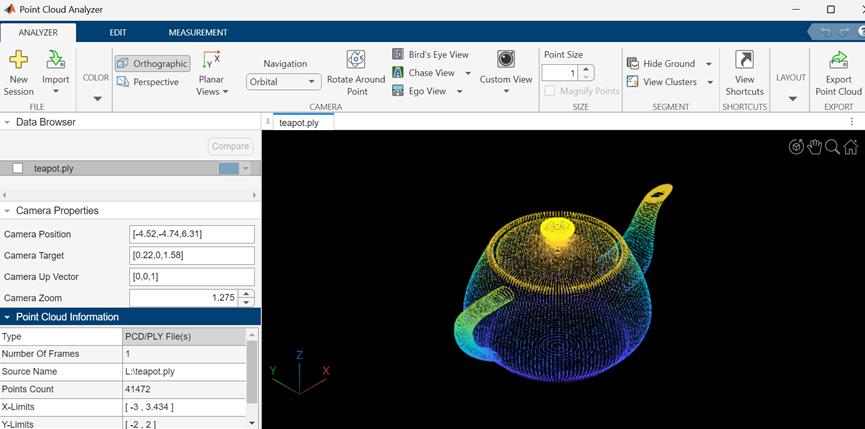
Point Cloud Analyzer App Session

Open the Point Cloud Analyzer App

  • MATLAB Toolstrip: On the Apps tab, click on the app icon under the Image Processing and Computer Vision section.

  • MATLAB command window: Enter pointCloudAnalyzer. This opens a new session of the Point Cloud Analyzer app.

Examples

expand all

After running the command to launch the app, you can use its interface to load and explore your point cloud data.

On the MATLAB command line, type:

pointCloudAnalyzer

On the app toolstrip, select Import > From File. Choose a data source from the list.

Parameters

expand all

File

Start a new session. A new session will delete the data in the existing session.

Import point cloud data from a file or folder, specified as one of: PLY, PCAP, LAS, LAZ, PCD, E57, or rosbag files, or any custom source. For more details, see Import, View, and Export Point Cloud.

Color

Assign a colormap to use for rendering the point cloud as one of:

  • X — Color the points based on the x-coordinate values of the input point cloud. The color changes as the distance between points increases.

  • Y — Color the points based on the y-coordinate values of the input point cloud. The color changes as the distance between points increases.

  • Z — Color the points based on the z-coordinate values of the input point cloud. The color changes as the distance between points increases.

  • "Intensity" — Use the Intensity values of the input point cloud to color the points. The color changes as the intensity value of points increases.

  • "Single Color" — One color is used to render the point cloud.

  • "Radial Distance" — Color the point cloud based on radial distance. The color changes as the distance between points and the ego vehicle increases.

For more details, see Visualize Point Cloud Using Color and Camera Views.

Color profile for the point cloud data, specified as one of:

  • Solid Color

  • Red to Blue

  • Parula

  • Jet

  • Spring

  • Hot

  • Color

Click the restore arrow, to reset the selection to Parula. For more details, see colormap.

Note

The app displays the Color option only when the input point cloud has color information.

Background color, specified by selecting from the palette of standard colors.

Camera

Camera projection for 3-D views, specified as Perspective or Orthographic. For more details, see Visualize Point Cloud Using Color and Camera Views.

2-D plane to the visualize point cloud, specified as one of:

  • XY — View the xy-axes of a point cloud. This is the top view of the scene, and line of sight is along the z-axis.

  • YX — View the yx-axes of a point cloud. This view is the mirror image of the XY View with respect to the y-axis.

  • YZ — View the yz-axes of a point cloud. This is the front view of the scene, and line of sight is along the x-axis.

  • ZY — View the yz-axes of a point cloud. This view is the mirror image of the YZ with respect to the z-axis.

  • XZ — View the xz-axes of a point cloud. This is a side view of the scene, and line of sight is along the y-axis.

  • ZX — View the zx-axes of a point cloud. This view is the mirror image of the XZ with respect to the z-axis.

Projection used to display 3-D point cloud, specified as Orbital or First person. For more details, see Visualize Point Cloud Using Color and Camera Views.

Rotate around point, specified by selecting any point as the center of rotation. When the Rotate Around Point is disabled, the center of rotation is the axes center. The Rotate Around Point mode can only be used with the Orbital Navigation mode.

Birds Eye, Chase, and Ego Views, specified as one of:

  • Bird's Eye View — View from a high angle above a point cloud.

  • Chase View — View the point cloud from a fixed distance behind the ego vehicle (actor). You can specify the ego direction by using the drop down menu.

  • Ego View — View a point cloud from the perspective of the ego vehicle. You can specify the ego direction by using the drop down menu.

Custom camera view, specified as Save Camera View or Manage Camera Views. To save a view, click Custom View > Save Camera View, specify a name for the view, and click OK. You can return to the saved view at any time by clicking Custom View and then selecting the view from the Saved Camera Views list, which appears after a view is saved. To delete or rename saved views, click Custom View > Manage Camera Views.

Size

Size of points, specified in pixels.

Point display magnification as it would appear from the position of the camera, specified by selecting the checkbox.

Segment

Hide ground to remove ground points from point cloud, specified as one of:

  • Segment ground SMRF — Segment the ground points using the segmentGroundSMRF function.

  • Fit ground plane — Fit and filter the ground plane using the pcfitplane function.

  • Range-based floodfill — Remove ground points using the segmentGroundFromLidarData function. The app enables this option for only organized point clouds.

To visualize the segmented ground and nonground planes on the point cloud, select View Ground Data.

View point cloud clusters as one of:

  • Select Range-based clustering to cluster point cloud data using the segmentLidarData function.

  • Select Distance-based clustering to cluster point cloud data using the pcsegdist function.

Programmatic Use

pointCloudAnalyzer opens a new session of the Point Cloud Analyzer app.

pointCloudAnalyzer(ptCloud) opens a new session of the app, loads the pointCloud object ptCloud from the workspace, and displays the point cloud data stored in the object.

pointCloudAnalyzer(fileName) opens a new session of the app, loads the specified file, and displays the point cloud data.

The fileName input must specify a file in the current folder, a file on the MATLAB search path, or a full path to a file.

fileName must end with one of these supported file extensions: .pcd, .ply, .las, or .laz.

Example: pointCloudAnalyzer("C:\Desktop\car.ply");

Version History

Introduced in R2021b

expand all