Troubleshoot Slow Network Connection
R2026bIssue
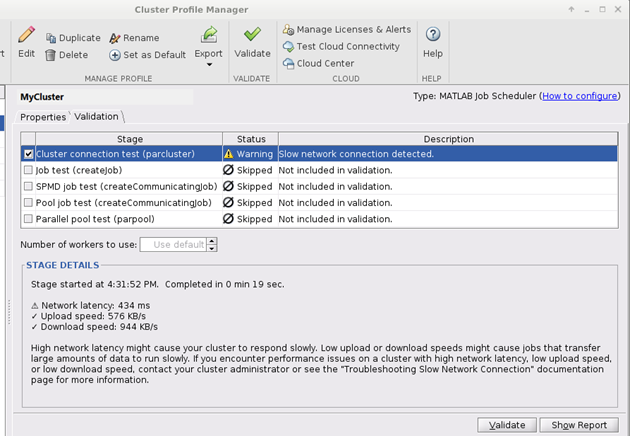
Several factors can affect the responsiveness of the connection between a client and a MATLAB® Job Scheduler cluster. The first stage of validating a cluster profile is a cluster connection test that the software uses to assess the quality and performance of your connection to a MATLAB Job Scheduler cluster. This test measures the network latency, upload speed, and download speed to identify potential issues that can affect the connection to the cluster.
If the software detects an issue with the network connection, the
Status column for the cluster connection test displays a warning. The
Description column displays the message: Slow network connection detected. The Stage Details
section displays individual warnings for high network latency, slow upload speed, or slow
download speed.
Possible Solutions
Identify and eliminate factors that contribute to high latency, slow upload speed, or slow download speed. You can contact your internet service provider or network administrator for assistance.
High Network Latency
Network latency is the time it takes for a data packet to travel from your MATLAB client to the cluster and back. It is typically measured in milliseconds (ms). During the cluster connection test, a latency of more than 300 ms results in a low latency stage warning.
Low latency indicates a fast and responsive connection to the cluster, while high latency can cause delays during data transmission and slower response times. High latency can manifest as slow or unresponsive cluster interactions, which are particularly noticeable when you use interactive parallel pools. While high latency can be acceptable for certain applications, it can significantly impact real-time interactions.
To improve your network latency, try eliminating these factors:
Overcrowded or overloaded network
Network interference or packet loss
Poor network infrastructure
Long physical distance between the MATLAB client and the cluster
Low Upload Speed
Upload speed is the rate at which your device transmits data to the cluster, measured in kilobits per second (Kbps). During the cluster connection test, an upload speed of less than 100 Kbps results in a low upload speed warning.
Poor upload speed can reduce data transfer capabilities, slow down the process of uploading files or data to the cluster, and affect the performance of real-time interactions with the cluster. If your workflow does not require you to upload data, then a low upload speed might not affect your interactions with the cluster.
To improve your upload speed, try eliminating these factors:
Limited bandwidth provided by your internet service provider
Network congestion and high usage during peak hours
Network interference or poor signal strength
Hardware limitations of your device
Low Download Speed
Download speed is the rate at which your device receives data from the cluster. Like upload speed, it is measured in Kbps. During the cluster connection test, a download speed of less than 100 Kbps results in a low download speed stage warning. A poor download speed can slow down the process of receiving data from the cluster.
To improve your download speed, try eliminating these factors:
Limited bandwidth provided by your internet service provider
Network congestion and high usage during peak hours
Network interference or poor signal strength
Cluster hardware limitations or bottlenecks

