Find Local Extrema
R2026bFind local maxima and minima in the Live Editor
Description
The Find Local Extrema task lets you interactively find local maxima and local minima in data. The task automatically generates MATLAB® code for your live script.
Using this task, you can:
Find local maxima, minima, or both in data from a workspace variable.
Adjust parameters to locate fewer or more extrema.
Visualize the detected extrema.
For more information on Live Editor tasks, see Add Interactive Tasks to Live Scripts.
Related Functions
Find Local Extrema generates code that uses the
islocalmin and
islocalmax
functions.
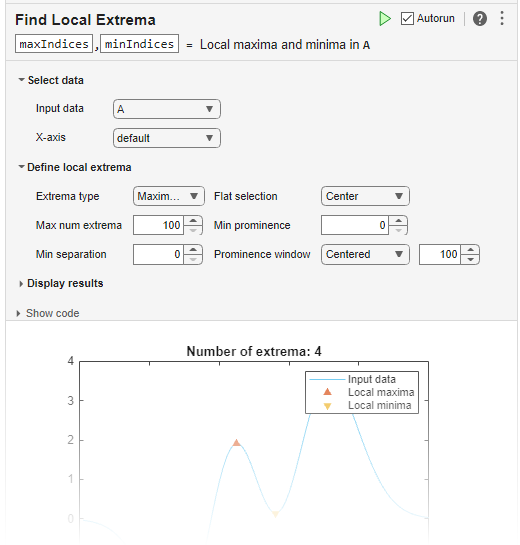
Open the Task
To add the Find Local Extrema task to a live script in the MATLAB Editor:
On the Live Editor tab, select Task > Find Local Extrema.
In a code block in the script, type a relevant keyword, such as
extrema,find,islocalmin, ormax. SelectFind Local Extremafrom the suggested command completions. For some keywords, the task automatically updates one or more corresponding parameters.
Examples
Interactively find local minima in a vector of data using the Find Local Extrema task in the Live Editor.
Create a vector of data relative to the timestamps in the vector t.
t = hours(linspace(0,3,15));
data = [2 4 6 4 3 7 5 6 5 10 4 -1 -3 -2 0];
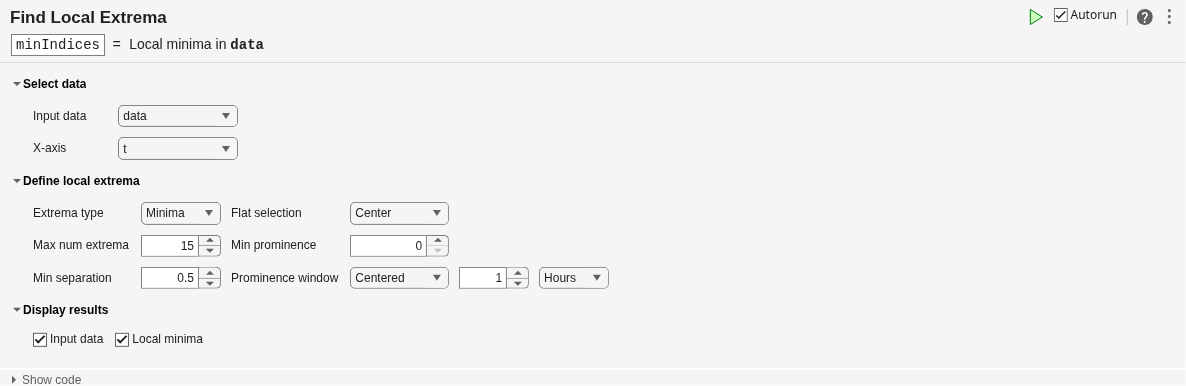
Open the Find Local Extrema task in the Live Editor. Select data as the input data and t as the x-axis coordinates of the data.
Specify the extrema type as Minima in the Extrema type field. Then, specify the minimum separation between local minima as 0.5 hours and the prominence window as 1 hour using the Min separation field, the Prominence window field, and the units drop-down.
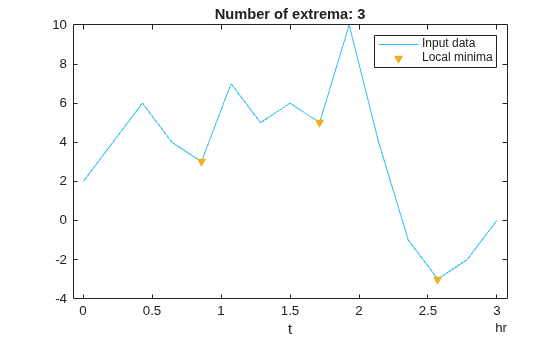
The title of the plot indicates that there are three local minima in data that are at least 0.5 hours apart.
You can use the output arguments of a Live Editor task in subsequent code. Use the indices returned by the task to determine the values of the local minima.
vals = data(minIndices)
vals = 1×3

     3     5    -3

