Main Content

mergevars

Combine table or timetable variables into multicolumn variable

Description

T2 = mergevars(T1,vars) combines the table variables specified by vars to create one multicolumn variable in T2. All other variables from T1 are unaltered. You can specify variables by name, by position, or using logical indices.

For example, if T1 has variables named var3 and var5, then you can combine them into a variable that has two columns by using T2 = mergevars(T1,["var3" "var5"]).
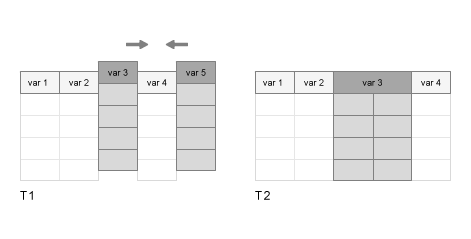
By default, the name of the merged variable in T2 takes the form VarN, where N is the position of the merged variable. For example, if the merged variable is the third variable in T2, then its name is Var3.

To split multicolumn variables, use the splitvars function.

example

T2 = mergevars(T1,vars,Name=Value) specifies options using one or more name-value arguments in addition to the input arguments in the previous syntax. For example, to specify a name for the merged variable, set NewVariableName to the name that you specify.

example

Examples

collapse all

Create a table from workspace variables.

A = [1:3]';
B = [5 11 12]';
C = [3.14 2.72 1.37]';
D = ["a";"b";"c"];
T1 = table(A,B,C,D)
T1=3×4 table
    A    B      C       D 
    _    __    ____    ___

    1     5    3.14    "a"
    2    11    2.72    "b"
    3    12    1.37    "c"

Merge the second and third variables. The new variable has two columns.

T2 = mergevars(T1,[2 3])
T2=3×3 table
    A       Var2        D 
    _    __________    ___

    1     5    3.14    "a"
    2    11    2.72    "b"
    3    12    1.37    "c"

Create a table using arrays of data from the patients.mat file.

load patients
T1 = table(Age,Height,Weight,Systolic,Diastolic)
T1=100×5 table
    Age    Height    Weight    Systolic    Diastolic
    ___    ______    ______    ________    _________

    38       71       176        124          93    
    43       69       163        109          77    
    38       64       131        125          83    
    40       67       133        117          75    
    49       64       119        122          80    
    46       68       142        121          70    
    33       64       142        130          88    
    40       68       180        115          82    
    28       68       183        115          78    
    31       66       132        118          86    
    45       68       128        114          77    
    42       66       137        115          68    
    25       71       174        127          74    
    39       72       202        130          95    
    36       65       129        114          79    
    48       71       181        130          92    
      ⋮

Merge the variables Systolic and Diastolic into one variable with two columns. Name it BloodPressure.

T2 = mergevars(T1,["Systolic" "Diastolic"], ...
               NewVariableName="BloodPressure")
T2=100×4 table
    Age    Height    Weight    BloodPressure
    ___    ______    ______    _____________

    38       71       176       124     93  
    43       69       163       109     77  
    38       64       131       125     83  
    40       67       133       117     75  
    49       64       119       122     80  
    46       68       142       121     70  
    33       64       142       130     88  
    40       68       180       115     82  
    28       68       183       115     78  
    31       66       132       118     86  
    45       68       128       114     77  
    42       66       137       115     68  
    25       71       174       127     74  
    39       72       202       130     95  
    36       65       129       114     79  
    48       71       181       130     92  
      ⋮

Read a table from a spreadsheet.

T1 = readtable("outages.csv",TextType="string")
T1=1468×6 table
      Region          OutageTime        Loss     Customers     RestorationTime           Cause      
    ___________    ________________    ______    __________    ________________    _________________

    "SouthWest"    2002-02-01 12:18    458.98    1.8202e+06    2002-02-07 16:50    "winter storm"   
    "SouthEast"    2003-01-23 00:49    530.14    2.1204e+05                 NaT    "winter storm"   
    "SouthEast"    2003-02-07 21:15     289.4    1.4294e+05    2003-02-17 08:14    "winter storm"   
    "West"         2004-04-06 05:44    434.81    3.4037e+05    2004-04-06 06:10    "equipment fault"
    "MidWest"      2002-03-16 06:18    186.44    2.1275e+05    2002-03-18 23:23    "severe storm"   
    "West"         2003-06-18 02:49         0             0    2003-06-18 10:54    "attack"         
    "West"         2004-06-20 14:39    231.29           NaN    2004-06-20 19:16    "equipment fault"
    "West"         2002-06-06 19:28    311.86           NaN    2002-06-07 00:51    "equipment fault"
    "NorthEast"    2003-07-16 16:23    239.93         49434    2003-07-17 01:12    "fire"           
    "MidWest"      2004-09-27 11:09    286.72         66104    2004-09-27 16:37    "equipment fault"
    "SouthEast"    2004-09-05 17:48    73.387         36073    2004-09-05 20:46    "equipment fault"
    "West"         2004-05-21 21:45    159.99           NaN    2004-05-22 04:23    "equipment fault"
    "SouthEast"    2002-09-01 18:22    95.917         36759    2002-09-01 19:12    "severe storm"   
    "SouthEast"    2003-09-27 07:32       NaN    3.5517e+05    2003-10-04 07:02    "severe storm"   
    "West"         2003-11-12 06:12    254.09    9.2429e+05    2003-11-17 02:04    "winter storm"   
    "NorthEast"    2004-09-18 05:54         0             0                 NaT    "equipment fault"
      ⋮

Merge Cause, Loss, and RestorationTime. Because these variables have different data types, merge them into a table that is nested in the output table.

T2 = mergevars(T1,["Cause" "Loss" "RestorationTime"], ...
               NewVariableName="LossData",MergeAsTable=true)
T2=1468×4 table
      Region          OutageTime       Customers                        LossData                    
    ___________    ________________    __________    _______________________________________________

                                                           Cause           Loss     RestorationTime 
                                                     _________________    ______    ________________
                                                                                                    
    "SouthWest"    2002-02-01 12:18    1.8202e+06    "winter storm"       458.98    2002-02-07 16:50
    "SouthEast"    2003-01-23 00:49    2.1204e+05    "winter storm"       530.14                 NaT
    "SouthEast"    2003-02-07 21:15    1.4294e+05    "winter storm"        289.4    2003-02-17 08:14
    "West"         2004-04-06 05:44    3.4037e+05    "equipment fault"    434.81    2004-04-06 06:10
    "MidWest"      2002-03-16 06:18    2.1275e+05    "severe storm"       186.44    2002-03-18 23:23
    "West"         2003-06-18 02:49             0    "attack"                  0    2003-06-18 10:54
    "West"         2004-06-20 14:39           NaN    "equipment fault"    231.29    2004-06-20 19:16
    "West"         2002-06-06 19:28           NaN    "equipment fault"    311.86    2002-06-07 00:51
    "NorthEast"    2003-07-16 16:23         49434    "fire"               239.93    2003-07-17 01:12
    "MidWest"      2004-09-27 11:09         66104    "equipment fault"    286.72    2004-09-27 16:37
    "SouthEast"    2004-09-05 17:48         36073    "equipment fault"    73.387    2004-09-05 20:46
    "West"         2004-05-21 21:45           NaN    "equipment fault"    159.99    2004-05-22 04:23
    "SouthEast"    2002-09-01 18:22         36759    "severe storm"       95.917    2002-09-01 19:12
    "SouthEast"    2003-09-27 07:32    3.5517e+05    "severe storm"          NaN    2003-10-04 07:02
    "West"         2003-11-12 06:12    9.2429e+05    "winter storm"       254.09    2003-11-17 02:04
    "NorthEast"    2004-09-18 05:54             0    "equipment fault"         0                 NaT
      ⋮

Input Arguments

collapse all

Input table, specified as a table or timetable.

Variables in the input table, specified as a string array, character vector, cell array of character vectors, pattern scalar, numeric array, or logical array.

Name-Value Arguments

collapse all

Specify optional pairs of arguments as Name1=Value1,...,NameN=ValueN, where Name is the argument name and Value is the corresponding value. Name-value arguments must appear after other arguments, but the order of the pairs does not matter.

Example: T2 = mergevars(T1,vars,NewVariableName="MergedResults")

Name of the merged variable, specified as a string scalar or character vector.

Flag to merge variables into a table, specified as a numeric or logical 1 (true) or 0 (false). Set this flag to true or 1 to merge the specified variables into a table that is nested into a variable of the output table. Use this argument to combine variables that cannot be concatenated into an array.

The default value of false causes mergevars to merge the specified variables into one multicolumn array that is a variable of the output table.

Output Arguments

collapse all

Output table with merged variables, returned as a table or timetable.

Extended Capabilities

expand all

Version History

Introduced in R2018a