Main Content

Total Harmonic Distortion

R2026b

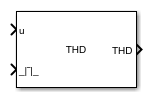
Measure total harmonic distortion or distortion factor of input signal

Since R2026b

Libraries:
Power Converter Control with Motor Control Blockset / Measurement

Description

The Total Harmonic Distortion block measures the total harmonic distortion (THD) or distortion factor (DF) of an input signal. Use this block to evaluate power quality and quantify harmonic content in voltage or current waveforms. You can configure the block to accept the fundamental frequency from an input port or specify it directly in the block dialog box, and select a moving window or fixed window measurement mode.

The block calculates THD and DF as follows:

  1. Computes signal power (MS)

    uP=uMS(t)=f∫t−1ftu(t)2dt

  2. Extracts and computes fundamental signal power

    a1(t)=f∫t−1f1fu(t)sin(2πft)dtb1(t)=f∫t−1f1fu(t)cos(2πft)dtu1p=u12=a12+b12

  3. Computes THD and DF from these values

    THD=(uRMSu1)2−1=uMSu12−1DF=u1uRMS=u12uMS

Note

The block back-calculates THD from the distortion factor using total signal power and fundamental power. It does not measure individual harmonic amplitudes. This approach reduces computational cost and is designed for signals that contain only harmonic components relative to the fundamental frequency. If the input signal has a DC offset, the block includes the DC power in the total signal power calculation, which produces inflated THD and DF values. To measure THD accurately on a signal with a DC component, add a high-pass filter at the input port before connecting to this block.

Ports

Input

expand all

Input signal to analyze for harmonic content, specified as a scalar. Connect the voltage or current waveform whose total harmonic distortion you want to measure.

Data Types: single | double

Fundamental frequency of the input signal in Hz, specified as a positive scalar.

Dependencies

To enable this port, set Fundamental input frequency type to Input port.

Data Types: single | double

Reset trigger signal, specified as a scalar. A rising edge on this port resets the internal measurement window.

Dependencies

To enable this port, set Measurement mode to Moving window (default).

Data Types: single | double | Boolean

Measurement restart trigger signal, specified as a scalar. A rising edge on this port restarts the fixed window measurement.

Dependencies

To enable this port, set Measurement mode to Fixed window.

Data Types: single | double | Boolean

Output

expand all

Total harmonic distortion measurement, returned as a scalar. The block computes THD relative to the fundamental frequency you specify. If the specified frequency does not match the true fundamental frequency of the input signal, the output is incorrect. When the input signal has no energy at the fundamental frequency, the block outputs 0.

Dependencies

To enable this port, set Block output to THD (default).

Data Types: single | double

Distortion factor measurement, returned as a scalar.

Dependencies

To enable this port, set Block output to DF.

Data Types: single | double

Measurement completion status, returned as a scalar. Indicates whether the fixed window measurement is complete.

Dependencies

To enable this port, set Measurement mode to Fixed window.

Data Types: single | double | Boolean

Parameters

expand all

To edit block parameters interactively, use the Property Inspector. From the Simulink® Toolstrip, on the Simulation tab, in the Prepare gallery, select Property Inspector.

Select the type of harmonic measurement to output. If you select THD, the block outputs the total harmonic distortion. If you select DF, the block outputs the distortion factor.

Programmatic Use

To set the block parameter value programmatically, use the set_param function.

Parameter: BlkOutput
Values: "THD" (default) | "DF"

Example: set_param(gcb,"BlkOutput","DF")

Simulation discrete sample time, specified in seconds. This value determines how often the block executes and updates the measurement output. Set this to match the fixed-step solver step size of your model. A smaller value increases measurement resolution but adds computational cost.

Programmatic Use

To set the block parameter value programmatically, use the set_param function.

Parameter: BlkSampleTime
Values: "50e-6" (default) | positive scalar in quotes
Data Types: char | string

Example: set_param(gcb,"BlkSampleTime","100e-6")

Select the source of the fundamental frequency value. If you select Specify via dialog, you specify the frequency using the Fundamental frequency value (Hz), f₁ parameter. If you select Input port, the block accepts the fundamental frequency from the f1 input port.

Programmatic Use

To set the block parameter value programmatically, use the set_param function.

Parameter: InputFrequencyType
Values: "Specify via dialog" (default) | "Input port"

Example: set_param(gcb,"InputFrequencyType","Input port")

Fundamental frequency of the input signal in Hz, specified as a positive scalar. The block uses this frequency to define the measurement window and to identify the fundamental component for THD computation. For a 50 Hz grid, set this to 50; for a 60 Hz grid, set this to 60.

Dependencies

This parameter is visible when Fundamental input frequency type is set to Specify via dialog.

Programmatic Use

To set the block parameter value programmatically, use the set_param function.

Parameter: FundamentalFrequency
Values: "50" (default) | positive scalar in quotes
Data Types: char | string

Example: set_param(gcb,"FundamentalFrequency","60")

Harmonic order up to which the block measures distortion, specified as a positive integer. The block computes the THD or DF using harmonics up to and including this order. Increasing this value captures more high-frequency harmonic content in the measurement, but requires more computation per sample.

Programmatic Use

To set the block parameter value programmatically, use the set_param function.

Parameter: OrderMeasure
Values: "1" (default) | positive integer in quotes
Data Types: char | string

Example: set_param(gcb,"OrderMeasure","5")

Select the windowing method for harmonic analysis. If you select Moving window, the block continuously updates the measurement using a sliding window. If you select Fixed window, the block computes the measurement over a fixed number of cycles and outputs a status signal.

Programmatic Use

To set the block parameter value programmatically, use the set_param function.

Parameter: MeasurementMode
Values: "Moving window" (default) | "Fixed window"

Example: set_param(gcb,"MeasurementMode","Fixed window")

Minimum expected frequency in Hz, specified as a positive scalar. The block uses this value to allocate the internal buffer that stores samples for one measurement window. A lower frequency requires more buffer memory because the measurement window spans more samples. Set this to the lowest frequency your application needs to measure accurately.

Dependencies

This parameter is visible when Fundamental input frequency type is set to Input port.

Programmatic Use

To set the block parameter value programmatically, use the set_param function.

Parameter: MinimumFrequency
Values: "50" (default) | positive scalar in quotes
Data Types: char | string

Example: set_param(gcb,"MinimumFrequency","45")

Number of fundamental cycles in the measurement window, specified as a positive integer. Increasing this value improves measurement accuracy by averaging over more cycles, but increases latency before the first valid output is available.

Dependencies

This parameter is visible when Measurement mode is set to Fixed window.

Programmatic Use

To set the block parameter value programmatically, use the set_param function.

Parameter: NumCycle
Values: "2" (default) | positive integer in quotes
Data Types: char | string

Example: set_param(gcb,"NumCycle","4")

Extended Capabilities

expand all

C/C++ Code Generation
Generate C and C++ code using Simulink® Coder™.

Version History

Introduced in R2026b