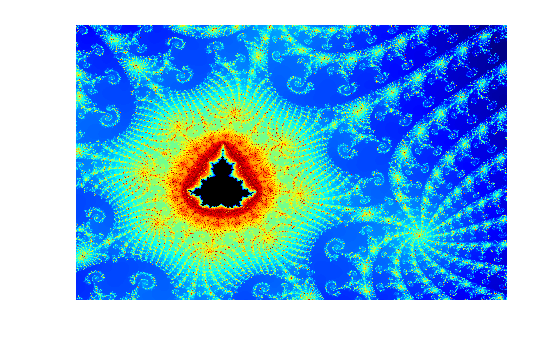
Compute the Mandelbrot Set Using GPU-Enabled Functions
R2026bThis example shows how to use GPU-enabled MATLAB® functions to compute a well-known mathematical construction: the Mandelbrot set.
The Mandelbrot algorithm iterates over a grid of real and imaginary parts. Define the number of iterations, grid size, and grid limits.These values specify a highly zoomed part of the Mandelbrot Set.
maxIterations = 5000;
gridSize = 2000;

xLim = [-0.777120613150274 -0.777120273471042];
yLim = [ 0.126857111509958  0.126857366062765];
Use the gpuArray.linspace function to create two linearly spaced vectors directly on the GPU. Instead of creating data directly on the GPU, you can alternatively transfer existing data to the GPU using the gpuArray function. For more information, see Create GPU Arrays Directly.
x = gpuArray.linspace(xLim(1),xLim(2),gridSize);
y = gpuArray.linspace(yLim(1),yLim(2),gridSize);
whos x y
  Name      Size              Bytes  Class       Attributes

  x         1x2000            16000  gpuArray
  y         1x2000            16000  gpuArray
Many functions in MATLAB and other toolboxes run automatically on a GPU if you supply a gpuArray data argument. For more information, see Run MATLAB Functions on a GPU.
Create a complex grid for the algorithm, and create the array count for the results. To create this array directly on the GPU, use the ones function, and specify the output class as "gpuArray".
[xGrid,yGrid] = meshgrid(x,y);
z0 = complex(xGrid,yGrid);
gridSize = size(z0);
count = ones(gridSize,"gpuArray");
Implement the Mandelbrot algorithm using GPU-enabled functions. This is based on the code provided in Cleve Moler's Experiments with MATLAB e-book. Because this code uses GPU arrays, the calculations happen on the GPU.
z = z0;

for n = 0:maxIterations
    z = z.*z + z0;
    inside = abs(z) <= 2;
    count = count + inside;
end
count = log(count);
Plot the results.
figure
imagesc(x,y,count)
colormap([jet;flipud(jet);0 0 0]);
axis off