plotResponse
System object: phased.HeterogeneousULA
Namespace: phased
Plot response pattern of array
Syntax
plotResponse(H,FREQ,V)

plotResponse(H,FREQ,V,Name,Value)

hPlot = plotResponse(___)
Description
plotResponse( plots
the array response pattern along the azimuth cut, where the elevation
angle is 0. The operating frequency is specified in H,FREQ,V)FREQ.
The propagation speed is specified in V.
plotResponse(
plots the array response with additional options specified by one
or more H,FREQ,V,Name,Value)Name,Value pair arguments.
hPlot = plotResponse(___)
Input Arguments
| |
| |
|
Name-Value Arguments
Examples
Using a line plot, show the azimuth cut response of a 5-element heterogeneous uniform linear array along 0 degrees elevation. The plot shows the responses at operating frequencies of 200 MHz and 400 MHz.
Construct the array from z-directed and y-directed short dipole antenna elements.
sElement1 = phased.ShortDipoleAntennaElement(...
    'FrequencyRange',[2e8 5e8],...
    'AxisDirection','Z');
sElement2 = phased.ShortDipoleAntennaElement(...
    'FrequencyRange',[2e8 5e8],...
    'AxisDirection','Y');
sArray = phased.HeterogeneousULA(...
    'ElementSet',{sElement1,sElement2},...
    'ElementIndices',[1 2 2 2 1]);
Plot the response.
fc = [3e8 4e8];
c = physconst('LightSpeed');
plotResponse(sArray,fc,c);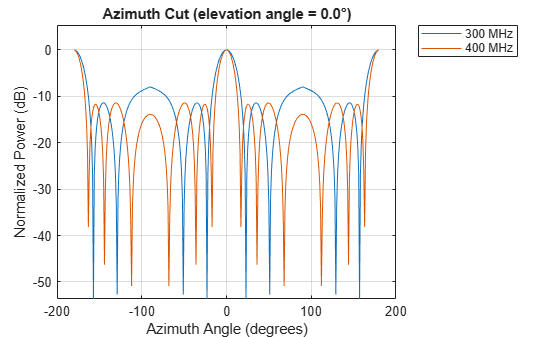
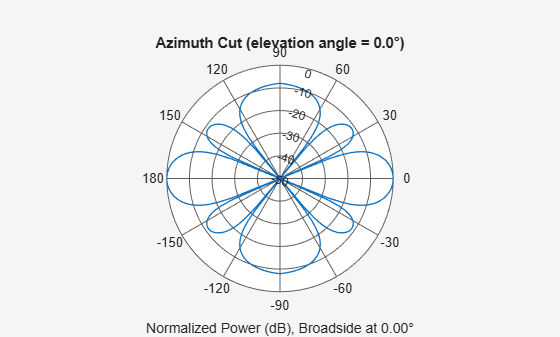
Construct a 5-element heterogeneous ULA of short-dipole antenna elements. Using the plotResponse method, plot the array's azimuth response in polar format. Assume each element's operating frequency spans 200-500 MHz and the wave propagation speed is the speed of light.
sElement1 = phased.ShortDipoleAntennaElement(...
    'FrequencyRange',[2e8 5e8],...
    'AxisDirection','Z');
sElement2 = phased.ShortDipoleAntennaElement(...
    'FrequencyRange',[2e8 5e8],...
    'AxisDirection','Y');
sArray = phased.HeterogeneousULA(...
    'ElementSet',{sElement1,sElement2},...
    'ElementIndices',[1 2 2 2 1]);
Plot the response at 300 MHz.
fc = 3e8;
c = physconst('LightSpeed');
plotResponse(sArray,fc,c,'RespCut','Az','Format','Polar');
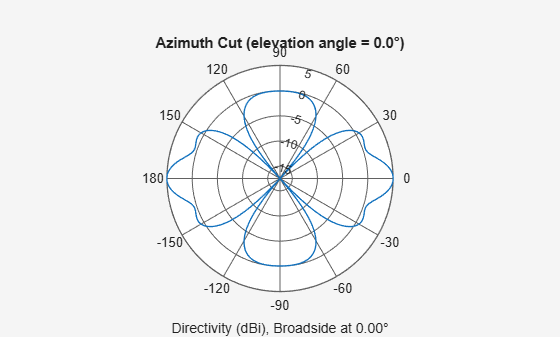
Plot the directivity of the array at 300 MHz.
plotResponse(sArray,fc,c,'RespCut','Az','Format','Polar',...
    'Unit','dbi');
Construct a 9-element heterogeneous ULA of short-dipole antenna elements having different orientations. Assume each element response is in the frequency range 200-500 MHz. Using the plotResponse method, plot the array's azimuth response in polar format. Use the Weights parameter to set two different sets of tapering weights: a uniform tapering and a Taylor tapering. Use the AzimuthAngles parameter to restrict the display range from -45 to 45 degrees in 0.1 degree increments.
Construct the array.
sElement1 = phased.ShortDipoleAntennaElement(...
    'FrequencyRange',[2e8 5e8],...
    'AxisDirection','Z');
sElement2 = phased.ShortDipoleAntennaElement(...
    'FrequencyRange',[2e8 5e8],...
    'AxisDirection','Y');
sArray = phased.HeterogeneousULA(...
    'ElementSet',{sElement1,sElement2},...
    'ElementIndices',[1 1 2 2 2 2 2 1 1]);
Plot the response at 300 MHz.
fc = 3e8;
wts1 = ones(9,1);
wts2 = taylorwin(9);
c = physconst('LightSpeed');
plotResponse(sArray,fc,c,'RespCut','Az',...
    'AzimuthAngles',[-45:0.1:45],...
    'Weights',[wts1,wts2]);
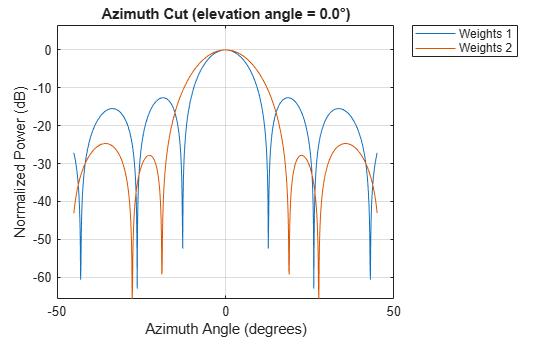
As expected, the tapered weighting broadens the mainlobe and reduces the sidelobes.

