FBC
File Bit Comparison
Libraries:
Description
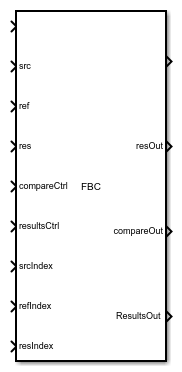
The FBC block implements the FBC instruction. The block compares the source and reference data bit by bit and stores the outcome in result.
Ports
Input
This acts as the enabler for the block. The FBC block executes only when EnableIn is true.
It gives the value stored at source. This value is compared with reference. Since the block performs a bit comparison, the source is an array variable.
Data Types: int32
It gives the value stored at reference. This value is compared with source. Since the block performs a bit comparison, the reference is an array variable.
Data Types: int32
The result of bit comparison between source and reference is stored at Result. This is an array variable.
Data Types: int32
It is a structure consisting of length and position variables. The length variable stores the number of bits to compare. The position variable stores the current position in the source. The initial value of position variable is 0.
It is a structure consisting of length and position variables. The length variable stores the number of storage locations in the result. The position variable stores the current position in the result. The initial value of position variable is 0.
Source Start Index specifies the index of the starting element in source for comparison. Typically the value of srcIndex is 0.
Data Types: int8 | int16 | int32 | single
Reference Start Index specifies the index of the starting element in reference for comparison. Typically the value of refIndex is 0.
Data Types: int8 | int16 | int32 | single
Result Start Index specifies the index of the starting element in result for storing the result of comparison. Typically the value of resIndex is 0.
Data Types: int8 | int16 | int32 | single
Output
When set, EnableOut provides the result of the block at the output. Once EnableIn is set, it automatically sets the EnableOut.
The result of comparison stored in res is available at the output port. The data can be read by connecting a variable write block at resOut.
Data Types: int32
The comparison operation modifies the values of position and length variable of compareCtrl. The compareCtrl structure is available at the compareOut port. The data can be read by connecting a variable write block to it.
The comparison operation modifies the values of position and length variable of resultsCtrl. The resultsCtrl structure is available at the resultsOut port. The data can be read by connecting a variable write block to it.
Parameters
Enter the discrete interval between sample time hits or specify -1 to inherit the sample time
See also Specify Sample Time.
Programmatic Use
Block Parameter:
SampleTime |
| Type: character vector |
| Value: real scalar |
Default: '-1' |
Version History
Introduced in R2019a
MATLAB Command
You clicked a link that corresponds to this MATLAB command:
Run the command by entering it in the MATLAB Command Window. Web browsers do not support MATLAB commands.


Select a Web Site
Choose a web site to get translated content where available and see local events and offers. Based on your location, we recommend that you select: .
You can also select a web site from the following list
How to Get Best Site Performance
Select the China site (in Chinese or English) for best site performance. Other MathWorks country sites are not optimized for visits from your location.
Americas
- América Latina (Español)
- Canada (English)
- United States (English)
Europe
- Belgium (English)
- Denmark (English)
- Deutschland (Deutsch)
- España (Español)
- Finland (English)
- France (Français)
- Ireland (English)
- Italia (Italiano)
- Luxembourg (English)
- Netherlands (English)
- Norway (English)
- Österreich (Deutsch)
- Portugal (English)
- Sweden (English)
- Switzerland
- United Kingdom (English)