Eclipse: Install Polyspace as You Code Plugin
The Polyspace® as You Code™ plugin in Eclipse™-based IDEs allows you to run Polyspace on the file that you are currently viewing and see analysis results such as bugs and coding standard violations. You must install the Polyspace as You Code analysis engine to run the analysis. The plugin allows you to use this analysis engine from Eclipse and show results produced by the Polyspace analysis.
After you install the analysis engine with the MathWorks® installer, use the contents of the
polyspaceroot\polyspace\plugin\eclipse_paycpolyspacerootC:\Program
Files\Polyspace\R2026a.
The Polyspace as You Code plugin is not compatible with the Polyspace desktop plugin for Eclipse. Uninstall the desktop plugin before installing the Polyspace as You Code Eclipse plugin.
Interactive Installation
To install the plugin interactively:
In the Eclipse IDE, select Help > Install New Software.
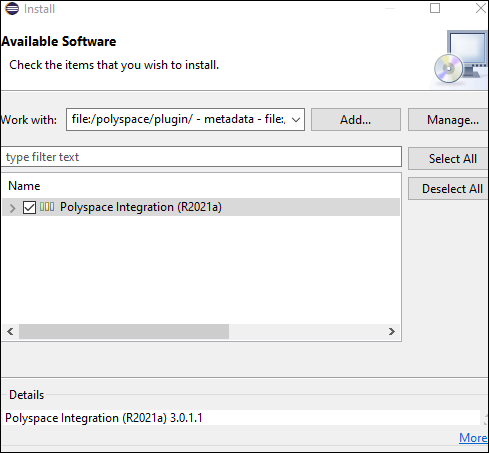
In the Install window, click Add, and then click Local in the Add Repository window.

Navigate to the
polyspaceroot\polyspace\plugin\eclipse_paycConfirm that the Polyspace as You Code plugin is selected, then click Next and follow the prompts to complete the installation.
To uninstall the plugin, go to Help > About Eclipse IDE. In the About Eclipse IDE window, click Installation Details, select the Polyspace plugin on the Installed Software tab, and then click Uninstall. Follow the prompts to uninstall the plugin.
Command-line Installation
To install the Polyspace as You Code plugin, open a terminal and navigate to your Eclipse installation folder and enter:
eclipsec.exe -application org.eclipse.equinox.p2.director ^
-repository file:"/polyspaceroot/polyspace/plugin/eclipse_payc/" ^
-installIU com.polyspace.eclipse.feature -nosplash
polyspacerootC:\Program
Files\Polyspace. The -repository path must be
specified with forward slashes "/".To uninstall the plugin, enter:
eclipsec.exe -application org.eclipse.equinox.p2.director ^
-uninstallIU com.polyspace.eclipse.feature -nosplash

