Train Reinforcement Learning Agent in Basic Grid World
R2026bThis example shows how to solve a grid world environment using reinforcement learning by training Q-learning and SARSA agents. For more information on these agents, see Q-Learning Agent and SARSA Agent.
This grid world environment has the following configuration and rules:
The grid world is 5-by-5 and bounded by borders, with four possible actions (North = 1, South = 2, East = 3, West = 4).
The agent begins from cell [2,1] (second row, first column).
The agent receives a reward +10 if it reaches the terminal state at cell [5,5] (blue).
The environment contains a special jump from cell [2,4] to cell [4,4] with a reward of +5.
The agent is blocked by obstacles (black cells).
All other actions result in –1 reward.
![5-by-5 grid world with the agent at cell [2,1], obstacles in black, a jump from cell [2,4] to [4,4] with +5 reward, and a terminal state at cell [5,5] with +10 reward](../../examples/rl/BasicGridWorldExample_01.png)

Create Grid World Environment
Create the basic grid world environment.
env = rlPredefinedEnv("BasicGridWorld");To specify that the initial state of the agent is always [2,1], create a reset function that returns the state number for the initial agent state. This function is called at the start of each training episode and simulation. States are numbered starting at position [1,1]. The state number increases as you move down the first column and then down each subsequent column. Therefore, create an anonymous function handle that sets the initial state to 2.
env.ResetFcn = @() 2;
Use the getActionInfo and getObservationInfo functions to extract the action and observation specification objects from the environment.
actInfo = getActionInfo(env);
obsInfo = getObservationInfo(env);
Specify Random Number Stream Seed and Algorithm for Reproducibility
The example code might involve computation of random numbers at several stages. Fixing the random number stream at the beginning of some sections in the example code preserves the random number sequence in the section every time you run it, which is a necessary condition to reproduce the results. For more information, see Results Reproducibility.
Specify the random number stream with seed 0 and random number algorithm Mersenne twister. For more information on controlling the seed used for random number generation, see rng.
previousRngState = rng(0,"twister");The output previousRngState is a structure that contains information about the previous state of the stream. You will restore the state at the end of the example.
Create Default Q-Learning Agent
To create a Q-learning agent, first extract the observation and action specifications from the MDP environment.
obsInfo = getObservationInfo(env);
actInfo = getActionInfo(env);
Then, create a default Q-learning agent using the observation and action specifications.
qAgent = rlQAgent(obsInfo,actInfo);
Specify Q-Learning Agent Options
Configure agent options such as the epsilon-greedy exploration and the learning rate for the function approximator.
qAgent.AgentOptions.EpsilonGreedyExploration.Epsilon = .04;
qAgent.AgentOptions.CriticOptimizerOptions.LearnRate = 0.01;
For more information on creating Q-learning agents, see rlQAgent and rlQAgentOptions.
Specify Training Options
Specify the training options. For this example, use the following options:
Train for a maximum of 200 episodes. Specify that each episode lasts for most 50 time steps.
Stop the training when the agent receives an average cumulative reward of 11 over 30 consecutive episodes.
trainOpts = rlTrainingOptions;
trainOpts.MaxStepsPerEpisode = 50;
trainOpts.MaxEpisodes= 200;
trainOpts.StopTrainingCriteria = "AverageReward";
trainOpts.StopTrainingValue = 11;
trainOpts.ScoreAveragingWindowLength = 30;
For more information on training options, see rlTrainingOptions.
Train Q-Learning Agent
To reproduce the results of this section, specify the seed and algorithm used for random number generation.
rng(0,"twister");Train the Q-learning agent using the train function.
Training can take several minutes to complete. To save time, load a pretrained agent by setting doTraining to false. To train the agent yourself, set doTraining to true.
doTraining =false; if doTraining % Train the agent. qTrainingStats = train(qAgent,env,trainOpts); else % Load the pretrained agent for the example. load("basicGWQAgent.mat","qAgent") end
The Reinforcement Learning Training Monitor window opens and displays the training progress.
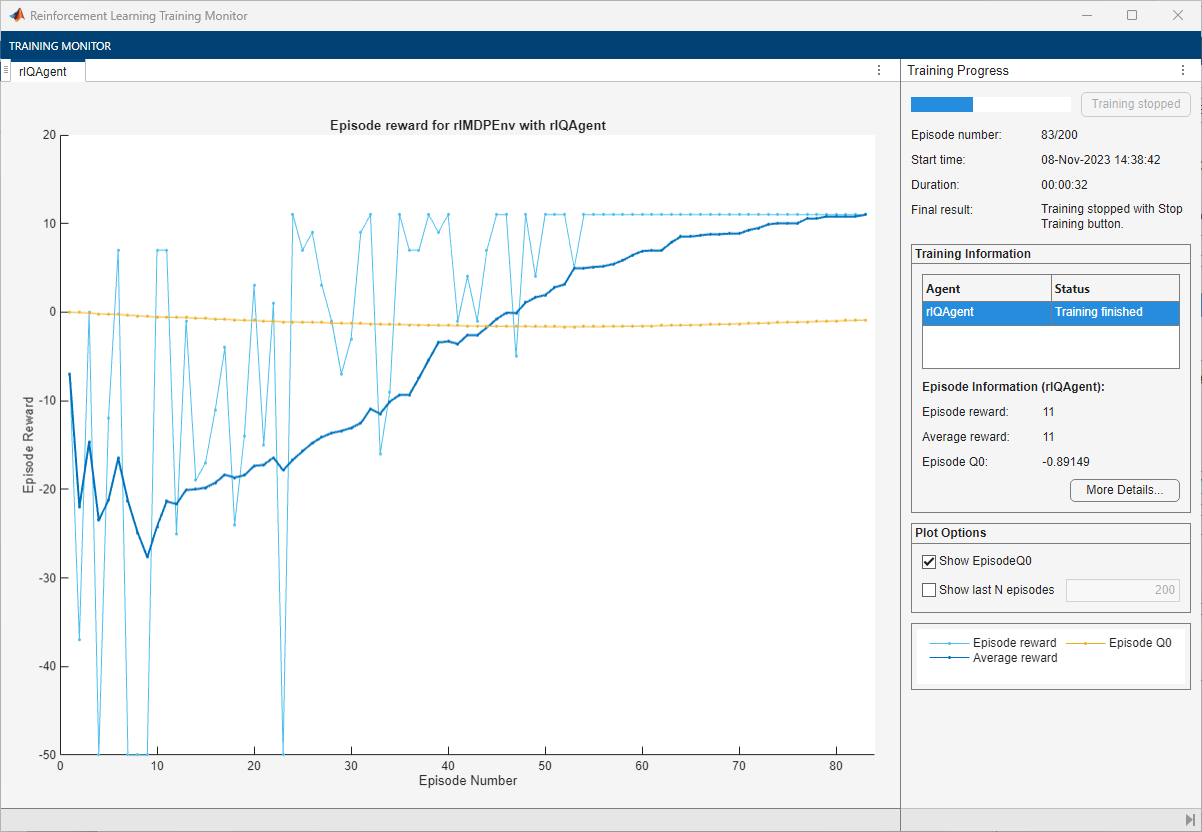
The training converges after 83 episodes.
Simulate Trained Q-Learning Agent
To validate the training results, simulate the trained agent against the environment.
To reproduce the results of this section, specify the seed and algorithm used for random number generation.
rng(0,"twister");Before running the simulation, visualize the environment, configure the visualization to maintain a trace of the agent states, and clear any previously existing trace.
plot(env)
env.Model.Viewer.ShowTrace = true;
env.Model.Viewer.clearTrace;
By default, the agent uses a greedy (hence deterministic) policy in simulation. If you want to use the exploratory policy instead, set the UseExplorationPolicy agent property to true.
Simulate the agent in the environment using the sim function.
sim(qAgent,env)
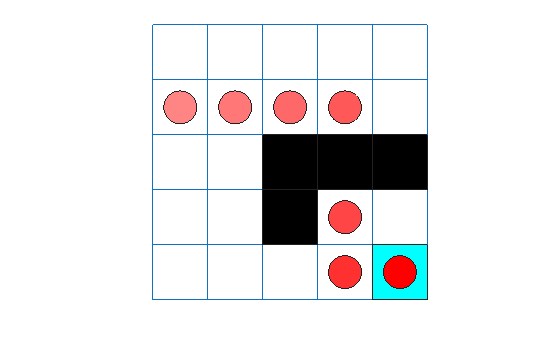
The trace shows that the Q-Learning agent successfully finds the jump from cell [2,4] to cell [4,4].
Create and Train SARSA Agent
To create a SARSA agent, use the same specification objects and epsilon-greedy configuration as for the Q-learning agent. For more information on creating SARSA agents, see rlSARSAAgent and rlSARSAAgentOptions.
sarsaAgent = rlSARSAAgent(obsInfo,actInfo);
sarsaAgent.AgentOptions.EpsilonGreedyExploration.Epsilon = .04;
sarsaAgent.AgentOptions.CriticOptimizerOptions.LearnRate = 0.01;
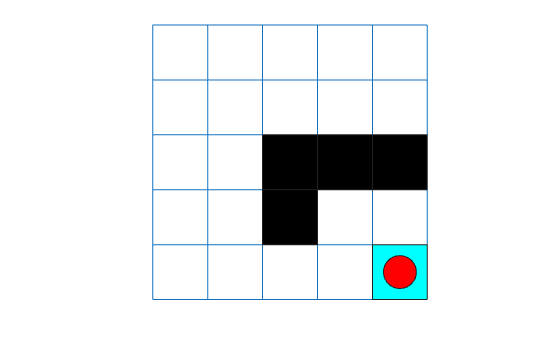
Before running the training, configure the visualization to not maintain a trace of the agent states, and clear any previously existing trace.
env.Model.Viewer.ShowTrace = false;
env.Model.Viewer.clearTrace;
Train the SARSA agent using the train function. Use the same training options defined before for the Q-learning agent.
Training can take several minutes to complete. To save time, load a pretrained agent by setting doTraining to false. To train the agent yourself, set doTraining to true.
doTraining =false; if doTraining % Train the agent. sarsaTrainingStats = train(sarsaAgent,env,trainOpts); else % Load the pretrained agent for the example. load("basicGWSarsaAgent.mat","sarsaAgent") end
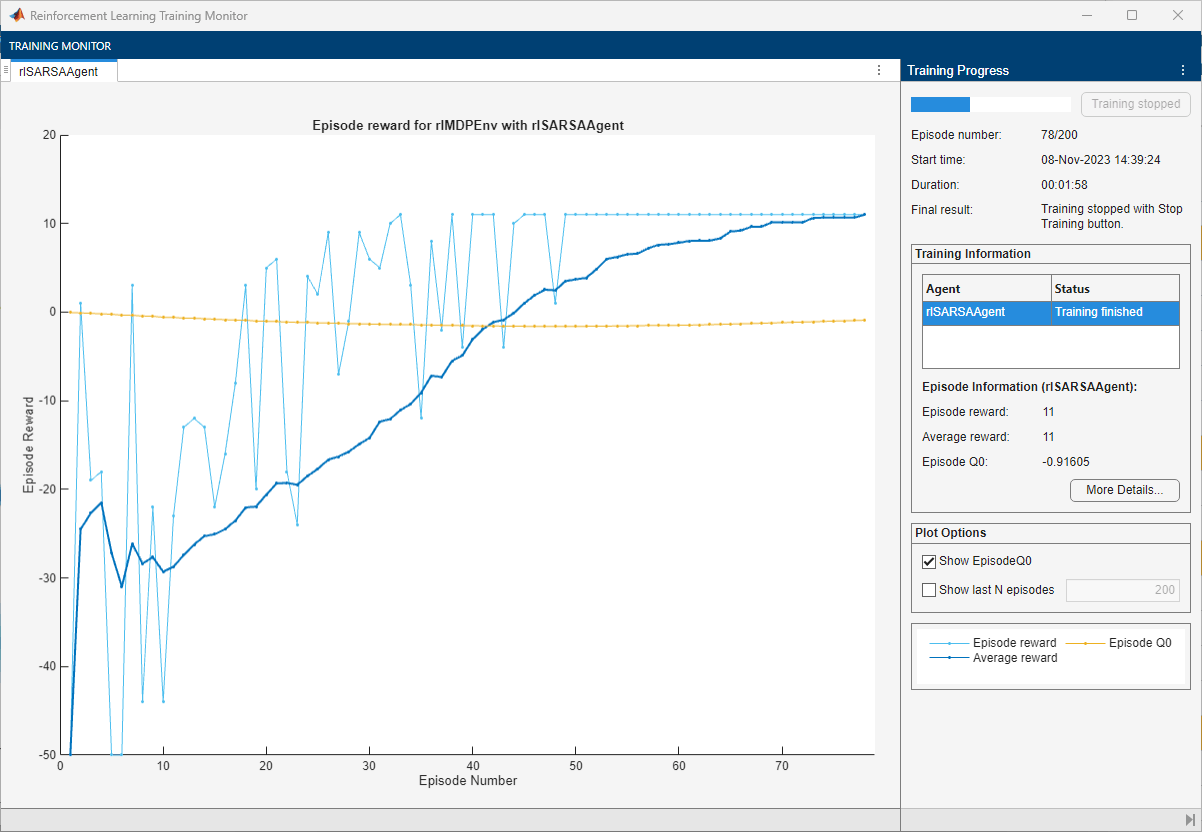
The training converges after 78 episodes.
Simulate Trained SARSA Agent
Before running the simulation, visualize the environment and configure the visualization to maintain a trace of the agent states.
plot(env)
env.Model.Viewer.ShowTrace = true;
env.Model.Viewer.clearTrace;
To reproduce the results of this section, specify the seed and algorithm used for random number generation.
rng(0,"twister");By default, the agent uses a greedy (hence deterministic) policy in simulation. If you want to use the exploratory policy instead, set the UseExplorationPolicy agent property to true.
Simulate the agent in the environment.
sim(sarsaAgent,env)
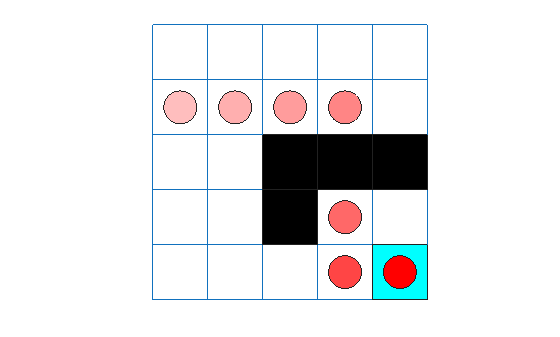
The agent trace shows that the SARSA agent finds the same grid world solution as the Q-learning agent.
Restore the random number stream using the information stored in previousRngState.
rng(previousRngState);
See Also
Functions
createGridWorld|sim|train

