Screen Risk Factors
R2026bRemove risk factors from data in Modelscape
Description
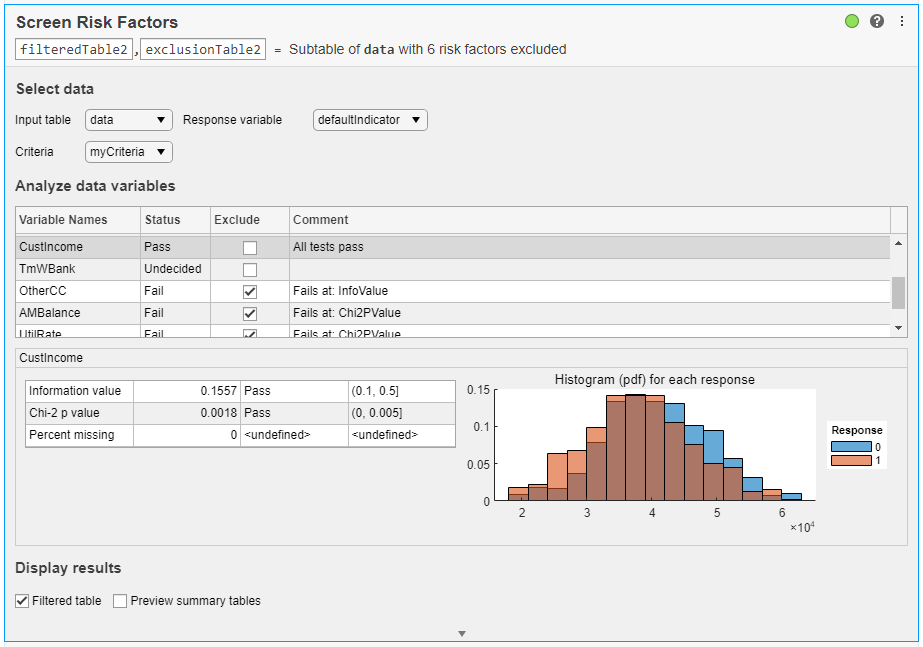
Use the Modelscape™ Screen Risk Factors task to automatically remove risk factors from a data table based on their predictive power relative to a binary response variable. Feature selection is an important step in the development of a statistical model. Input data can have hundreds or thousands of variables, and discarding some variables often improves model interpretability, training times, and other important attributes. The task automatically generates MATLAB® code for your live script. This task requires the Modelscape for MATLAB support package.
Using this task, you can:
Inspect summary statistics and histograms for variables in a data table.
Use customizable screening criteria to analyze the predictive power of variables.
Remove variables from a data table and record the corresponding reason for exclusion.
Record reasons for including variables in a data table.
Export the resulting subtables to MATLAB desktop.
For general information about Live Editor tasks, see Add Interactive Tasks to Live Scripts.
Open the Task
To add the Threshold Predictors task to a live script in the MATLAB Editor:
On the Live Editor tab, select Task > Screen Risk Factors.
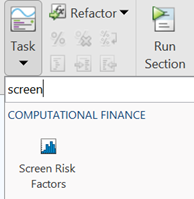
In a code block in the script, type a relevant keyword, such as
screen. SelectScreen Risk Factorsfrom the suggested command completions.
Parameters
Version History
Introduced in R2021b

