Retrieve Addressable Data for Model Hierarchy
R2026bThis example shows how to use code descriptor APIs to retrieve addressable data such as signals, states, and parameters for a Simulink® model hierarchy. You can retrieve information from the generated C code such as variable expressions and entry point function prototypes, and collect this information for the entire hierarchy by recursive descent. You can then use the retrieved information to generate external files that monitor and tune data for your model hierarchy. For details, see Generate External C Code to Monitor and Tune Model Data.
Prepare Example Model
Run the script prepare_sldemo_fuelsys_dd_ctrl.m. The script opens the model sldemo_fuelsys_dd_controller and prepares it for this example. It converts the existing subsystems into the model references airflow_calc and fuel_calc. One instance of each model reference appears in the top model.
prepare_sldemo_fuelsys_dd_ctrl;
top = "sldemo_fuelsys_dd_controller";
open_system(top);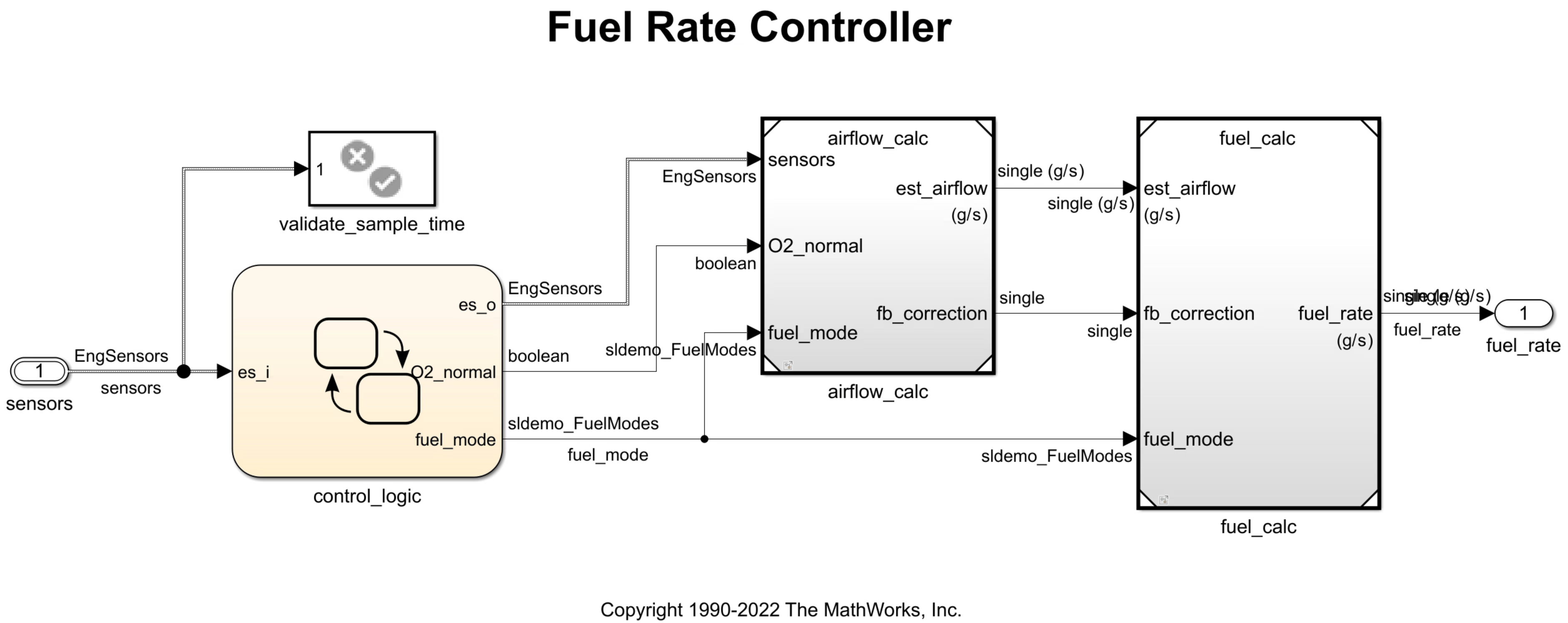
Generate Model Code
To prevent the code generator from optimizing away model signals and parameters, disable the following settings.
Open the Configuration Parameters dialog box. Navigate to the Code Generation > Optimization pane.
From the Default parameter behavior list, select
Tunable.Expand Advanced parameters and clear Signal storage reuse.
Click Apply.
Alternatively, enter the following at the MATLAB command prompt:
set_param(top,DefaultParameterBehavior="Tunable");
set_param(top,OptimizeBlockIOStorage="off");
Repeat the above procedure for the referenced model airflow_calc.
ref = "airflow_calc";
open_system(ref);
set_param(ref,DefaultParameterBehavior="Tunable");
set_param(ref,OptimizeBlockIOStorage="off");
Additionally, configure airflow_calc with a nonreusable subcomponent code interface. The code generator then passes root-level I/O data (such as signals and states) to the referenced model as global variables, enabling external code to access the data directly. For details on this step, see Configure Code Interface Packaging and Root-Level I/O Data for Model References (Embedded Coder).
In the Configuration Parameters dialog box for airflow_calc, in the Model Referencing pane, from the Total number of instances allowed per top model, select One.
Alternatively, enter the following at the MATLAB command prompt:
set_param(ref,ModelReferenceNumInstancesAllowed='Single');Generate code for the model, but do not compile the generated code.
evalc("slbuild(top, GenerateCodeOnly=true)");Get Code Expressions for Addressable Signals and States in Model Hierarchy
In getAddressableVarsRef.m, the getAddressableVarsRef function uses code descriptor APIs to retrieve a list of expressions for addressable variables in the generated code.
The function prototype contains these arguments:
codeDescObj: Code descriptor object describing the model of interestinterfaceTypes: Types of data for which you want to retrieve a list of expressions and addressesgetRefs: Option to examine all referenced models descended frommodel. By default, this setting istrue.
function [expressions, addresses] = getAddressableVarsRef(codeDescObj, interfaceTypes, getRefs)
The first part of the function body performs these steps:
Loop over all interface types available to
codeDescObjand get a list ofDataInterfaceobjects of each specified type.Loop over all
DataInterfaceobjects of a given type and retrieve theirImplementationfield.Check whether the data element associated with each
DataImplementationobject exists and is defined in the generated code. If it does, check whether the data element has internal (static) linkage. Data elements with internal linkage are not visible outside their translation unit (such as in an external main file), and are ignored for this example.Record C expressions and addresses for each eligible data element.
for i = 1:length(interfaceTypes)
    interfaces = codeDescObj.getDataInterfaces(interfaceTypes{i});

    for j = 1:length(interfaces)
        impl = interfaces(j).Implementation;

        if isempty(impl) || ~impl.isDefined()
            continue;
        end

        if isa(impl, 'coder.descriptor.Variable') && contains(impl.StorageSpecifier,'static')
            continue;
        end

        expressions{end+1} = impl.getExpression();
        addresses{end+1} = impl.getAddress();
    end
end
The second part of the function body performs the following:
Obtain a list of names of all models descended recursively from the model described by
codeDescObj.For each descendant, get its code descriptor object.
Loop over all descendant code descriptor objects and get a list of expressions and addresses.
Append the expressions and addresses in each descendant to the global list of expressions and addresses.
refModels = codeDescObj.getReferencedModelNames(IncludeAllLevels=true);

for i = 1:length(refModels)
    refObj = codeDescObj.getReferencedModelCodeDescriptor(refModels{i});
    [refExps, refAddrs] = getAddressableVarsRef(refObj, interfaceTypes);
    expressions = unique([expressions, refExps]);
    addresses = unique([addresses, refAddrs]);
end
Get a code descriptor object to the top model.
cd.topObj = coder.getCodeDescriptor(top);
Call getAddressableVarsRef on the code descriptor object, specifying InternalData (signals and states) as the target interface type. Since getRefs is true by default, the function retrieves the target data for the entire model hierarchy.
[expressions, addresses] = getAddressableVarsRef(cd.topObj, {'InternalData'});
expressions'
ans = 30×1 cell
{'airflow_calcrtB.DataTypeConversion' }
{'airflow_calcrtB.Product' }
{'airflow_calcrtB.Product2' }
{'airflow_calcrtB.PumpingConstant' }
{'airflow_calcrtB.RampRateKi' }
{'airflow_calcrtB.ThrottleTransient' }
{'airflow_calcrtB.e0' }
{'airflow_calcrtB.e1' }
{'airflow_calcrtB.holdintegrator' }
{'airflow_calcrtDWork.DiscreteIntegrator_DSTATE'}
{'airflow_calcrtDWork.ThrottleTransient_states' }
{'airflow_calcrtDWork.ThrottleTransient_tmp' }
{'rtB.O2_normal' }
{'rtB.PressureEstimation' }
{'rtB.Saturation' }
{'rtB.SpeedEstimation' }
{'rtB.ThrottleEstimation' }
{'rtB.es_o' }
{'rtB.est_airflow' }
{'rtB.fb_correction' }
{'rtB.fuel_mode' }
{'rtB.map' }
{'rtB.map_i' }
{'rtB.speed' }
{'rtB.speed_e' }
{'rtB.throttle' }
{'rtB.throttle_a' }
{'rtDWork.fuel_calc_InstanceData' }
{'rtDWork.sfEvent' }
{'rtDWork.temporalCounter_i1' }
addresses'
ans = 30×1 cell
    {'&(airflow_calcrtB.DataTypeConversion)'           }
    {'&(airflow_calcrtB.Product)'                      }
    {'&(airflow_calcrtB.Product2)'                     }
    {'&(airflow_calcrtB.PumpingConstant)'              }
    {'&(airflow_calcrtB.RampRateKi)'                   }
    {'&(airflow_calcrtB.ThrottleTransient)'            }
    {'&(airflow_calcrtB.e0)'                           }
    {'&(airflow_calcrtB.e1)'                           }
    {'&(airflow_calcrtB.holdintegrator)'               }
    {'&(airflow_calcrtDWork.DiscreteIntegrator_DSTATE)'}
    {'&(airflow_calcrtDWork.ThrottleTransient_states)' }
    {'&(airflow_calcrtDWork.ThrottleTransient_tmp)'    }
    {'&(rtB.O2_normal)'                                }
    {'&(rtB.PressureEstimation)'                       }
    {'&(rtB.Saturation)'                               }
    {'&(rtB.SpeedEstimation)'                          }
    {'&(rtB.ThrottleEstimation)'                       }
    {'&(rtB.es_o)'                                     }
    {'&(rtB.est_airflow)'                              }
    {'&(rtB.fb_correction)'                            }
    {'&(rtB.fuel_mode)'                                }
    {'&(rtB.map)'                                      }
    {'&(rtB.map_i)'                                    }
    {'&(rtB.speed)'                                    }
    {'&(rtB.speed_e)'                                  }
    {'&(rtB.throttle)'                                 }
    {'&(rtB.throttle_a)'                               }
    {'&(rtDWork.fuel_calc_InstanceData)'               }
    {'&(rtDWork.sfEvent)'                              }
    {'&(rtDWork.temporalCounter_i1)'                   }
Get Code Expressions for Addressable Variables in Referenced Model
To retrieve expressions for a specific referenced model (and optionally its descendants), get a code descriptor object to the referenced model. This example assumes that each referenced model is descended from only one parent model.
Get a code descriptor object for referenced model airflow_calc.
cd.refObj = cd.topObj.getReferencedModelCodeDescriptor('airflow_calc');Call getAddressableVarsRef on the code descriptor object, specifying InternalData (signals and states) as the target interface types.
[expressions, addresses] = getAddressableVarsRef(cd.refObj, {'InternalData'});
expressions'
ans = 12×1 cell
{'airflow_calcrtDWork.DiscreteIntegrator_DSTATE'}
{'airflow_calcrtDWork.ThrottleTransient_states' }
{'airflow_calcrtDWork.ThrottleTransient_tmp' }
{'airflow_calcrtB.PumpingConstant' }
{'airflow_calcrtB.Product' }
{'airflow_calcrtB.Product2' }
{'airflow_calcrtB.ThrottleTransient' }
{'airflow_calcrtB.holdintegrator' }
{'airflow_calcrtB.DataTypeConversion' }
{'airflow_calcrtB.e0' }
{'airflow_calcrtB.RampRateKi' }
{'airflow_calcrtB.e1' }
addresses'
ans = 12×1 cell
    {'&(airflow_calcrtDWork.DiscreteIntegrator_DSTATE)'}
    {'&(airflow_calcrtDWork.ThrottleTransient_states)' }
    {'&(airflow_calcrtDWork.ThrottleTransient_tmp)'    }
    {'&(airflow_calcrtB.PumpingConstant)'              }
    {'&(airflow_calcrtB.Product)'                      }
    {'&(airflow_calcrtB.Product2)'                     }
    {'&(airflow_calcrtB.ThrottleTransient)'            }
    {'&(airflow_calcrtB.holdintegrator)'               }
    {'&(airflow_calcrtB.DataTypeConversion)'           }
    {'&(airflow_calcrtB.e0)'                           }
    {'&(airflow_calcrtB.RampRateKi)'                   }
    {'&(airflow_calcrtB.e1)'                           }
The output lists C expressions and addresses for all addressable signal and state variables of airflow_calc. These variables form a subset of the variables for the entire model hierarchy found in the previous step.
See Also
getCodeDescriptor | getDataInterfaces | getDataInterfaceTypes | getAddress | getExpression | isDefined | getReferencedModelNames | getReferencedModelCodeDescriptor

