Translational Mechanical Converter (2P)
R2026bInterface between two-phase fluid and mechanical translational networks
Translational Mechanical Converter (2P) block

To add a block to a model, double-click the canvas and start typing the block name. Then, select the block from the list.
Libraries:
Simscape /
Foundation Library /
Two-Phase Fluid /
Elements
Description
The Translational Mechanical Converter (2P) block models an interface between two-phase fluid and mechanical translational networks. The interface converts pressure in the fluid network into force in the mechanical translational network and vice versa.
This block enables you to model a linear actuator powered by a two-phase fluid system. It does not, however, account for mass, friction, or hard stops, common in linear actuators. You can model these effects separately using Simscape™ blocks such as Mass, Translational Friction, and Translational Hard Stop.
Port A represents the inlet through which fluid enters and exits the converter. Ports C and R represent the converter casing and moving interface, respectively. Port H represents the wall through which the converter exchanges heat with its surroundings.
Force Direction
The force direction depends on the mechanical orientation of the converter. If the Mechanical Orientation parameter is set to positive, then a positive flow rate through the inlet tends to translate the moving interface in the positive direction relative to the converter casing.
Positive Mechanical Orientation

If the Mechanical Orientation parameter is set to negative, then a positive mass flow rate through the inlet tends to translate the moving interface in the negative direction relative to the converter casing.
Negative Mechanical Orientation

The flow resistance between port A and the converter interior is assumed negligible. Pressure losses between the two is approximately zero. The pressure at port A is therefore equal to that in the converter:
where:
pA is the pressure at port A.
pI is the pressure in the converter.
Similarly, the thermal resistance between port H and the converter interior is assumed negligible. The temperature gradient between the two is approximately zero. The temperature at port H is therefore equal to that in the converter:
where:
TH is the temperature at port H.
TI is the temperature in the converter.
Fluid Volume
The volume of fluid in the converter is the sum of the dead and displaced fluid volumes. The dead volume is the amount of fluid left in the converter at a zero interface displacement. This volume enables you to model the effects of dynamic compressibility and thermal capacity even when the interface is in its zero position.
The displacement volume is the amount of fluid added to the converter due to translation of the moving interface. This volume increases with the interface displacement. The total volume in the converter as a function of the interface displacement is
where:
V is the total volume of fluid in the converter.
Vdead is the dead volume of the converter.
Sint is the cross-sectional area of the interface, assumed equal to that of the inlet.
xint is the displacement of the moving interface.
∊or is the mechanical orientation of the converter (
1if increase in fluid pressure causes positive displacement of R relative to C,-1if increase in fluid pressure causes negative displacement of R relative to C).
If you connect the converter to a Multibody joint, use the physical signal input port p to specify the displacement of port R relative to port C. Otherwise, the block calculates the interface displacement from relative port velocities, according to the block equations. The interface displacement is zero when the fluid volume is equal to the dead volume. Then, depending on the Mechanical orientation parameter value:
If
Pressure at A causes positive displacement of R relative to
              C
, the interface displacement increases when the fluid volume increases from dead volume.If
Pressure at A causes negative displacement of R relative to
              C
, the interface displacement decreases when the fluid volume increases from dead volume.
Force Balance
At equilibrium, the internal pressure in the converter counteracts the external pressure of its surroundings and the force exerted by the mechanical network on the moving interface. This force is the reverse of that applied by the fluid network. The force balance in the converter is therefore
where:
patm is the environmental pressure outside the converter.
Fint is the magnitude of the force exerted by the fluid network on the moving interface.
Energy Balance
The total energy in the converter can change due to energy flow through the inlet, heat flow through the converter wall, and work done by the fluid network on the mechanical network. The energy flow rate, given by the energy conservation equation, is therefore
where:
E is the total energy of the fluid in the converter.
ϕA is the energy flow rate into the converter through port A.
ϕH is the heat flow rate into the converter through port H.
Taking the fluid kinetic energy in the converter to be negligible, the total energy of the fluid reduces to:
where:
M is the fluid mass in the converter.
uI is the specific internal energy of the fluid in the converter.
Mass Balance
The fluid mass in the converter can change due to flow through the inlet, represented by port A. The mass flow rate, given by the mass conservation equation, is therefore
where:
is the mass flow rate into the converter through port A.
A change in fluid mass can accompany a change in fluid volume, due to translation of the moving interface. It can also accompany a change in mass density, due to an evolving pressure or specific internal energy in the converter. The mass rate of change in the converter is then
where:
is the partial derivative of density with respect to pressure at constant specific internal energy.
is the partial derivative of density with respect to specific internal energy at constant pressure.
vI is the specific volume of the fluid in the converter.
The block blends the density partial derivatives of the various domains using a cubic polynomial function. At a vapor quality of 0–0.1, this function blends the derivatives of the subcooled liquid and two-phase mixture domains. At a vapor quality of 0.9–1, it blends those of the two-phase mixture and superheated vapor domains.
The smoothed density partial derivatives introduce into the original mass conservation equation undesirable numerical errors. To correct for these errors, the block adds the correction term
where:
∊M is the correction term.
τ is the phase-change time constant—the characteristic duration of a phase change event. This constant ensures that phase changes do not occur instantaneously, effectively introducing a time lag whenever they occur.
The final form of the mass conservation equation is
The block uses this equation to calculate the internal pressure in the converter given the mass flow rate through the inlet.
Assumptions and Limitations
The converter walls are rigid. They do not deform under pressure.
The flow resistance between port A and the converter interior is negligible. The pressure is the same at port A and in the converter interior.
The thermal resistance between port H and the converter interior is negligible. The temperature is the same at port H and in the converter interior.
The moving interface is perfectly sealed. No fluid leaks across the interface.
Mechanical effects such as hard stops, inertia, and friction, are ignored.
Examples
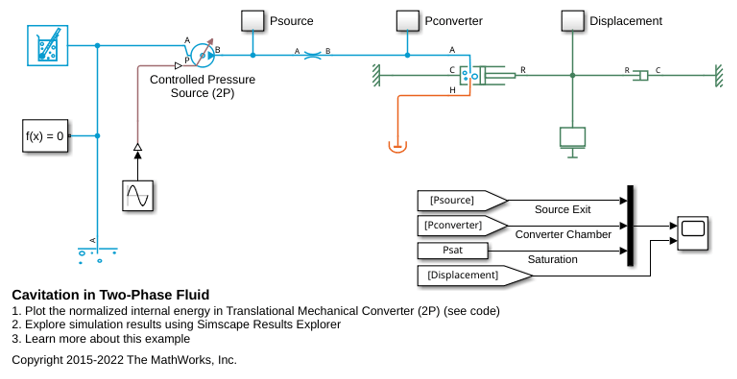
Cavitation in Two-Phase Fluid
How two-phase fluid components can be used to simulate cavitation. The model is a translational mechanical converter driven by an oscillating pressure source. During the negative portion of the pressure source cycle, the fluid cavitates, reducing the force produced by the converter. As a result, the converter displacement drifts and does not return to the starting position.
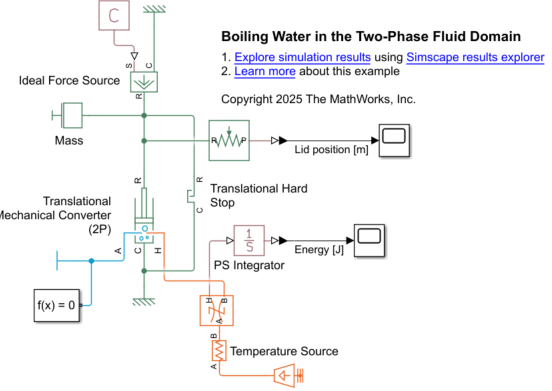
Calculate Energy Required to Boil Water in the Two-Phase Fluid Domain
Calculate the amount of energy needed to lift the lid of a container filled with water by boiling the water. First, you solve for the solution analytically, and then build a Simscape™ model to represent the physical scenario and validate your results.
Ports
Input
Conserving
Parameters
Extended Capabilities
Version History
Introduced in R2015b

