Variant Manager Workflow to Set Up Variant Configurations for Models
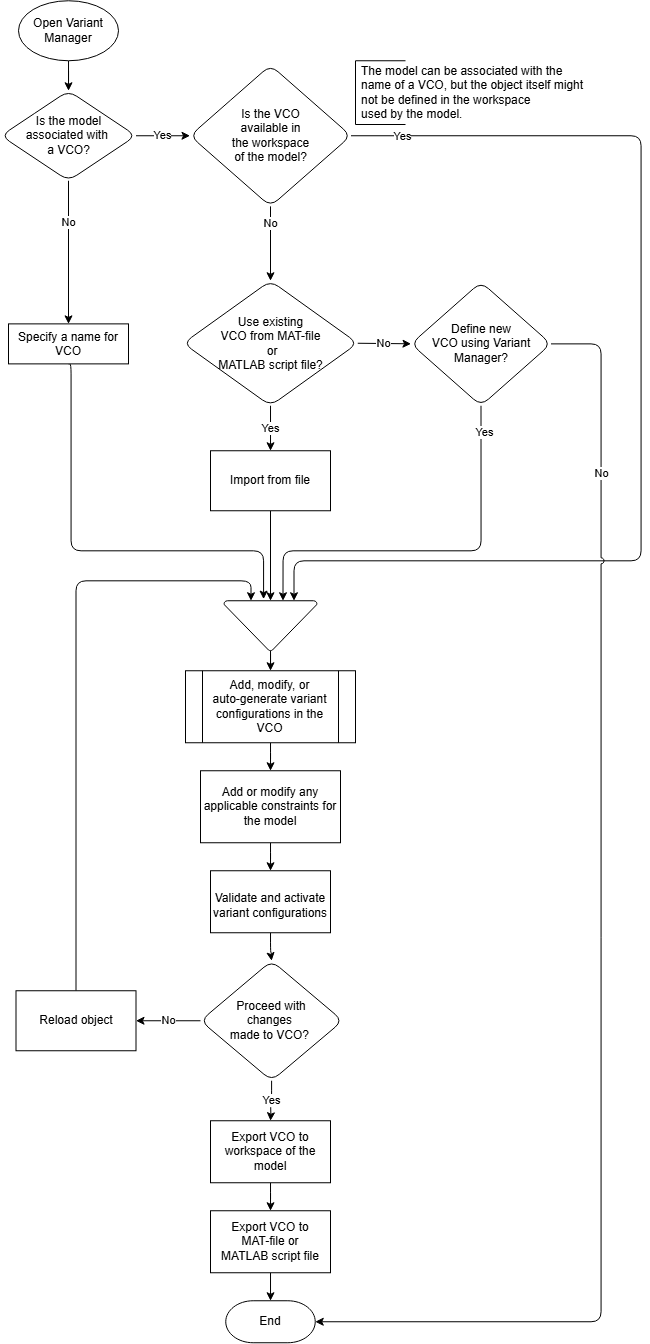
R2026bThis flow chart shows the high-level workflow to set up variant configurations for a model using Variant Manager.
A Simulink.VariantConfigurations object (VCO) stores all the variant
configurations and constraints created for a model. The VariantConfigurations
model parameter indicates the name of the VCO that is associated with a model. You can view
and set this value using the Name field of the
Simulink.VariantConfigurations object in the Variant Manager.
For more information about variant configurations, see Variant Configurations.
For more information about creating and activating variant configurations in Variant Manager, see Create and Activate Variant Configurations.
See Also
Simulink.VariantConfigurations | Simulink.VariantConfigurationAnalysis

