Send
R2026bCreate and send message
Send block

To add a block to a model, double-click the canvas and start typing the block name. Then, select the block from the list.
Libraries:
Simulink /
Messages & Events
SimEvents
Alternative Configurations of Send Block:
Message Send
Description
The Send block reads the value of an input signal and creates a message that sends the value to the block connected to its output port. In effect, the Send block converts the input signal to a message. In message-based communication, a message is a discrete item that carries data of any type that Simulink® supports. For more information about messages, see Simulink Messages Overview.
The Send block has an input port to receive a signal and an optional input port to receive an enable signal. If you do not enable the optional port, the Send block inherits the sample time of the input signal. If you enable the optional port, the Send block executes when this port receives an enable signal with a value greater than 0.
The Send and Message Send blocks are identical blocks.
Examples
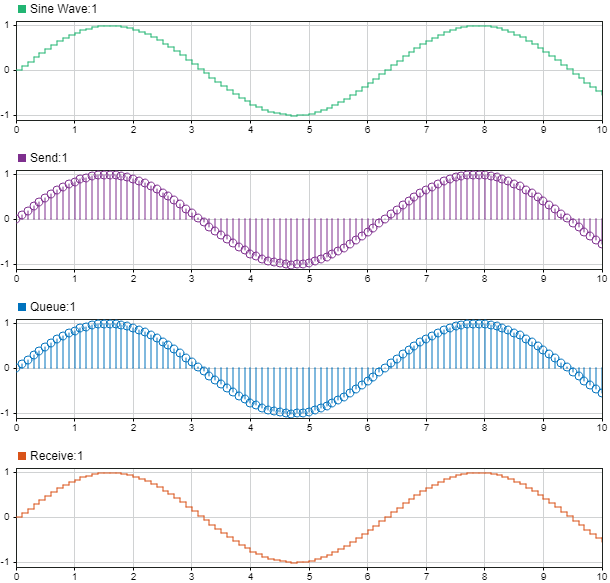
Animate and Understand Sending and Receiving Messages
Send, receive, visualize, and animate messages and display message data.
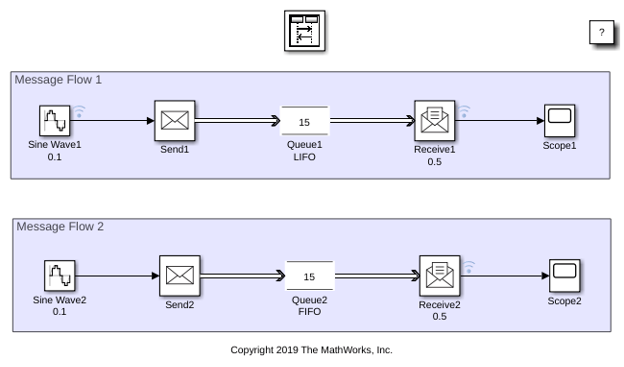
Use a Queue Block to Manage Messages
Use FIFO queue, LIFO queue, and priority queue to sort and store messages and define queue policies.
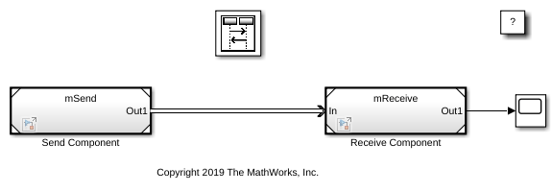
Establish Message Send and Receive Interfaces Between Software Components
Create message send and receive interfaces, and prepare components for C++ code generation.
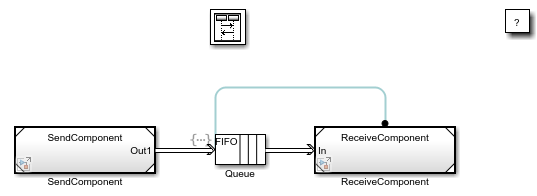
Connect Message Receive Interface with Simulink Functions
Synchronize execution with data availability in message-based systems. We show how to model this behavior using events and actions. This example builds on another example, Establish Message Send and Receive Interfaces Between Software Components, where two software components communicate using messages.
Ports
Input
Output
Parameters
Block Characteristics
Data Types |
|
Direct Feedthrough |
|
Multidimensional Signals |
|
Variable-Size Signals |
|
Zero-Crossing Detection |
|
Alternative Configurations
Extended Capabilities
Version History
Introduced in R2016a

