Stop Simulation
R2026bStop simulation when input is nonzero
Stop Simulation block

To add a block to a model, double-click the canvas and start typing the block name. Then, select the block from the list.
Libraries:
Simulink /
Sinks
HDL Coder /
Sinks
Description
The Stop Simulation block stops the simulation when the input is nonzero. The simulation completes the current time step before terminating. If the block input is a vector, any nonzero vector element causes the simulation to stop.
When you use the Stop Simulation block in a For Iterator subsystem, the stop action occurs after execution of all iterations in the subsystem during a time step. The stop action does not interrupt execution until the start of the next time step.
You cannot use the Stop Simulation block to pause the simulation. To create a block that pauses the simulation, see Pause Simulation Using Assertion Blocks.
Examples
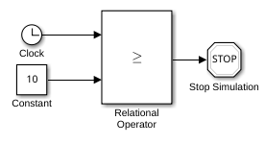
This example shows how to control when a simulation stops by using a Stop Simulation block with a Relational Operator block. When you simulate the model, the model stops simulation when the simulation time reaches 10.
Extended Examples
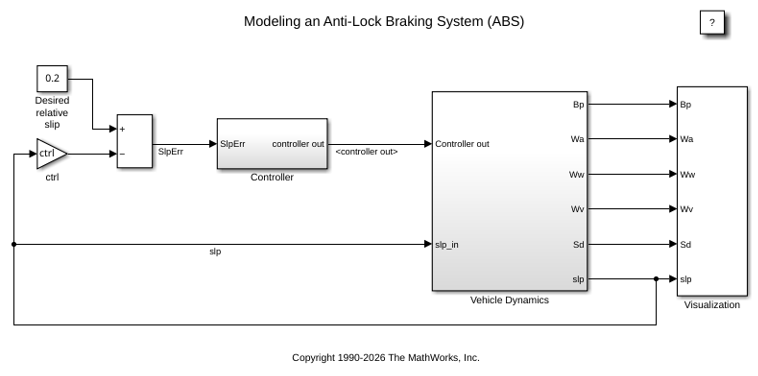
Model an Anti-Lock Braking System
Model a simple Anti-Lock Braking System (ABS). The model simulates the dynamic behavior of a vehicle under hard braking conditions. The model represents a single wheel, which may be replicated a number of times to create a model for a multi-wheel vehicle.
Ports
Input
Block Characteristics
Data Types |
|
Direct Feedthrough |
|
Multidimensional Signals |
|
Variable-Size Signals |
|
Zero-Crossing Detection |
|
Programmatic Use: Add Block
To add the block programmatically, use the add_block function with one of these library block paths as the source.
"simulink/Sinks/Stop Simulation"
"hdlsllib/Sinks/Stop Simulation"
Example: add_block("simulink/Sinks/Stop Simulation","myModel/myBlock",MakeNameUnique="on")
Extended Capabilities
Version History
Introduced before R2006a

