Accelerometer
R2026bMeasure linear acceleration along X, Y, and Z axes in m/s2
Accelerometer block

To add a block to a model, double-click the canvas and start typing the block name. Then, select the block from the list.
Libraries:
Simulink Support Package for Android Devices /
Sensors
Description
Add-On Required: This feature requires the Simulink Support Package for Android Devices add-on.
Use the Accelerometer block to measure linear acceleration along the X, Y, and Z axes in m/s2.
The following illustration shows the X, Y, and Z orientation axes relative to a typical Android® mobile phone.

The following illustration shows the X, Y, and Z orientation axes relative to a typical Android tablet.
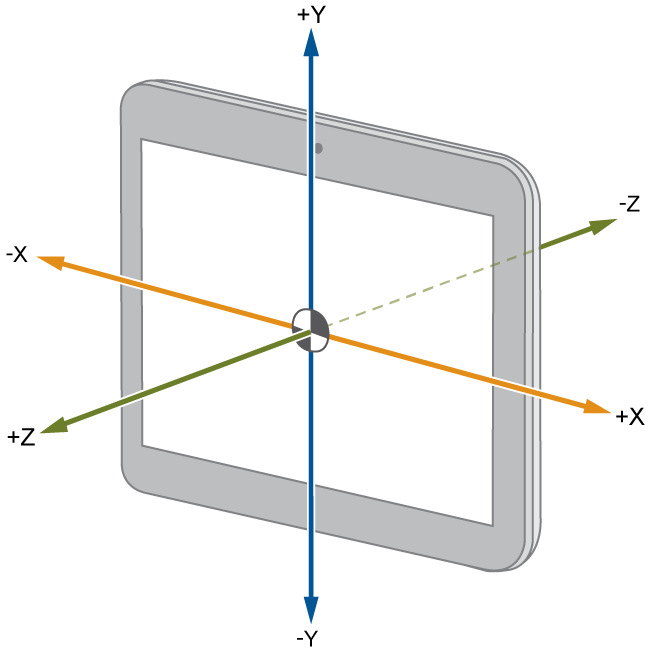
The X, Y, and Z orientation axes relative to the device remain constant. For example, if you place the device face-up on a table, the Z-axis measures the acceleration of Earth gravity and outputs ≈ 9.81 in m/s2. The X and Y axes, which are perpendicular to the acceleration of Earth gravity, both output ≈ 0.00 in m/s2.
Note
During simulation with no hardware connected, this block does nothing. For more information, see Block Produces Zeros or Does Nothing in Simulation.
Ports
Output
Parameters
Programmatic Use: Add Block
To add the block programmatically, use the add_block function with one of these library block paths as the source.
"androidsensorlib/Accelerometer"
Example: add_block("androidsensorlib/Accelerometer","myModel/myBlock",MakeNameUnique="on")
Version History
Introduced in R2014a

