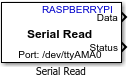
Serial Read
Read data from serial device
Libraries:
Raspberry Pi Blockset /
Communication
Description
Read data from a serial device connected to the Raspberry Pi® hardware.
Note
To generate code C/C++ code for this block, you must have an Embedded Coder® license.
Ports
Output
The data port through which the block reads the data from the serial device.
Data Types: single | double | int8 | int16 | int32 | uint8 | uint16 | uint32
The output port that emits status of the data read. The following table lists the possible status values and their description.
| Status Value | Status Description |
|---|---|
0 | SUCCESS |
1 | RX_BUSY |
2 | TX_BUSY |
4 | PARITY_ERROR |
8 | FRAME_ERROR |
16 | BUS_ERROR |
32 | DATA_NOT_AVAILABLE |
Data Types: uint8
Parameters
Select the specific board that you are using. Changing the board updates the pin choices that you get. To open the pin map of the Raspberry Pi board, click the View pin map button.
The port to which to you want to connect from the selected Raspberry Pi board to the serial device. For Pi 3 Model B board, the default serial port is /dev/ttyS0.
Select the rate at which the data is read over the serial line. The baud rate is measured as the number of bits read per second.
Select the parity added to the data transmitted. A parity bit is used to detect error in data transmission.
None – None value in this parameter means that no parity is used for error detection in the data transmission.
Even parity – The parity bit value is 1, if the number of bits with value as 1 is odd. The parity bit value is 0, if the number of bits with value as 1 is even.
Odd parity – The parity bit value is 1, if the number of bits with value as 1 is even. The parity bit value is 0, if the number of bits with value as 1 is odd.
Select the bit used as the stop bit in the data transmission. A stop bit marks the end of a unit of transmission.
Enter the data size that you want to read from the serial device for the selected data type.
Select the data type you want to transmit.
Specify how often this block reads the serial data. Enter a value greater than zero.
Extended Capabilities
To generate code C/C++ code for this block, you must have an Embedded Coder license. For more information on selecting the right product stack according to your development goals, see Product Stack for Raspberry Pi Blockset.
Version History
Introduced in R2017a
MATLAB Command
You clicked a link that corresponds to this MATLAB command:
Run the command by entering it in the MATLAB Command Window. Web browsers do not support MATLAB commands.


Select a Web Site
Choose a web site to get translated content where available and see local events and offers. Based on your location, we recommend that you select: .
You can also select a web site from the following list
How to Get Best Site Performance
Select the China site (in Chinese or English) for best site performance. Other MathWorks country sites are not optimized for visits from your location.
Americas
- América Latina (Español)
- Canada (English)
- United States (English)
Europe
- Belgium (English)
- Denmark (English)
- Deutschland (Deutsch)
- España (Español)
- Finland (English)
- France (Français)
- Ireland (English)
- Italia (Italiano)
- Luxembourg (English)
- Netherlands (English)
- Norway (English)
- Österreich (Deutsch)
- Portugal (English)
- Sweden (English)
- Switzerland
- United Kingdom (English)