Customize State Ranking
If you log continuous states in the Solver Profiler, you can open the State Explorer to investigate each continuous state. The State Explorer ranks continuous states by the following metrics:
State Derivative
Newton/DAE Exception
State Value
Error Control Exception
State Name
State Chatter
In addition to these ranking metrics, you can write and upload your own algorithm to determine how continuous states are ranked in the State Explorer.
Click the edit button next to the Rank States By dropdown.
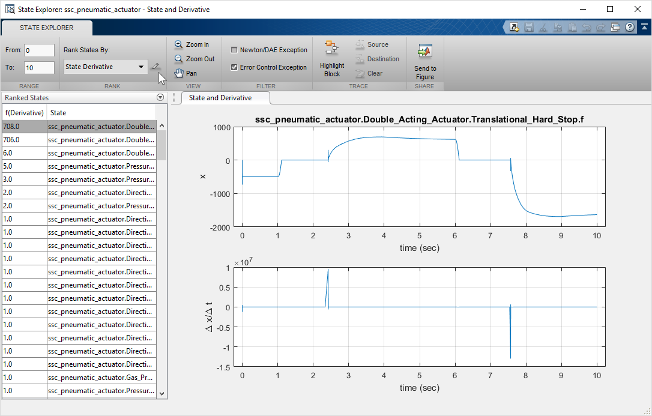
In the Custom Algorithm dialog box that appears, click Add and upload a MATLAB® script that contains your ranking algorithm.
A simple algorithm that ranks states by value looks as follows:
Note
The structures referenced in this example organize information that the Solver Profiler collects during a profiling run. For more information on the structures, see Develop Profiler Rule Set.
function [index,score] = customRank(sd,tl,tr)

% Allocate storage for index and score list
nStates = length(sd.stateInfo);
index = l:nStates;
score = zeros(nStates,l);

% Loop through each state to calculate score
for i = l:nStates
    x = sd.stateInfo(i).value;
    % apply time range constraints
    x = x(sd.tout>=tl & sd.tout<=tr);
    if max(x) > 1
        score(i) = 1;
    else
        score(i) = 0;
    end
end

% Rank the states
[score, order] = sort(score, 'descend');
index = index(order);

end

