Override Parameters and Assess Signals in Fault Models
R2026bThis example shows how to test a fault model by overriding the fault model parameters. You then assess signals in the fault model by using temporal assessments.
In this example, you examine a test case that uses parameter overrides to specify when a fault occurs. You simulate the model with the faults enabled, and then simulate it again without the faults. You then use a temporal assessment to analyze one of the signals in the fault model and view the results.
View the Model
This example uses a modified version of the Van der Pol Oscillator model, forcedVdp. For more information about the original model, see Van der Pol Oscillator.
Open the forcedVdp model.
model = "forcedVdp.slx";
open_system(model);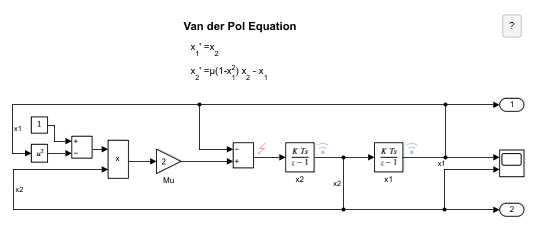
In this model, the fault on the output signal of the Sum block adds noise to the output signal.
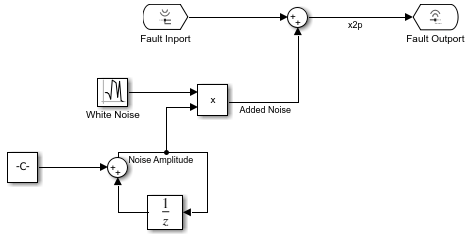
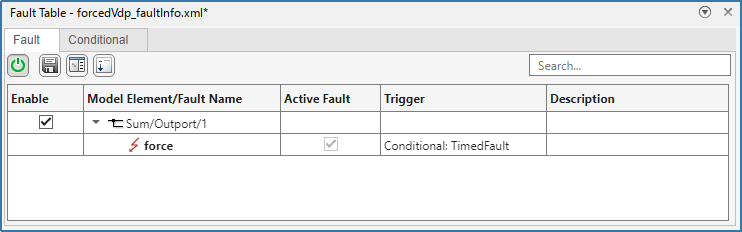
A conditional controls the injection of the fault. The fault injects when the simulation time is between faultStartTime and faultEndTime, or 3 and 7, respectively. For more information on conditionals, see Create and Manage Conditionals (Simulink Fault Analyzer).
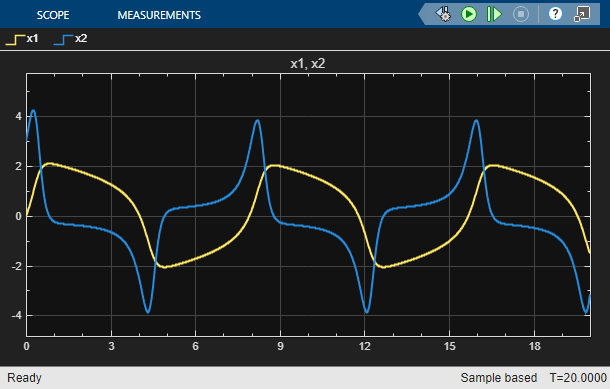
Simulate the Model Without Faults
Disable fault injection on the Sum block output signal.
Simulink.fault.enable("forcedVdp/Sum/Outport/1",false);Simulate the model.
sim(model);
Simulate the Model with Faults Enabled
Enable the fault injection and simulate the model. The conditional injects the fault between faultStartTime and faultEndTime, or between 3 and 7 seconds respectively.
Simulink.fault.enable("forcedVdp/Sum/Outport/1",true);
sim(model);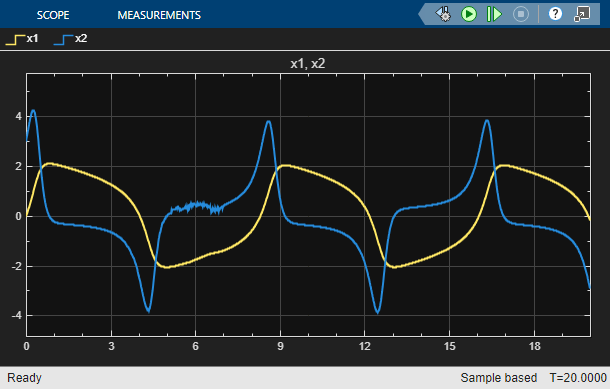
View the Test File
Load the test file and open the Test Manager.
sltest.testmanager.load("vdpFaultsTest.mldatx");
sltest.testmanager.view;
In the Test Browser pane, click the vdpFaultsTestCase test case. In the right pane, expand the Parameter Overrides section.

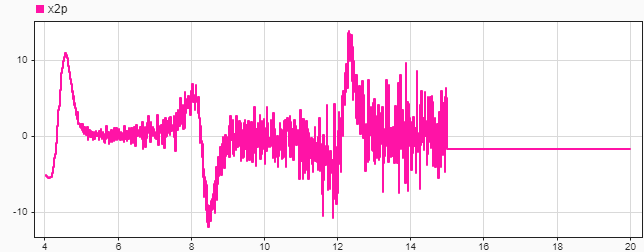
The table contains one parameter set. The parameter set specifies the override values for the faultStartTime and faultEndTime parameters that the conditional uses to control the fault injection. The parameter set sets the values to 4 and 15, respectively. The conditional uses these override values to determine when to inject the fault. The parameter set also overrides the NoiseRampRate parameter and sets it to 0.003. The fault model uses the NoiseRampRate to calculate the amplitude of the noise that injects into the model. For more information about overriding model parameters, see Override Model Parameters in a Test Case.
Expand the Simulation Outputs section. The test case logs the x2p signal from the fault model. For more information about selecting signals to log, see Capture Simulation Data in a Test Case.

Next, expand the Logical and Temporal Assessments section of the test case. The test case has one temporal assessment. The noiseAmplitude signal triggers the assessment when the signal is greater than 2. The assessment checks that the noiseAmplitude signal stays greater than 2 for at least 1 second.

For the test case to return a passed result, the assessment must return a passed result.
Run the Test Case and View Results
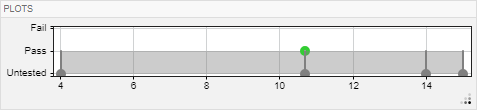
To run the test case in the Test Manager, click Run. In the Results and Artifacts pane, the results display a passing result. Expand vdpFaultsTestCase and select Sim Outputs. In the Data Inspector tab, in the Inspect pane, plot the x2p signal.
In the Results and Artifacts pane, expand the Logical and Temporal Assessments section and select Assessment1. The plot in the Assessment Result displays the results.