Parameterize MOSFET and Diode Blocks from Wolfspeed Datasheets
R2026bThis example shows how to automatically apply parameterizations from Wolfspeed® datasheets to tabulated MOSFET (Ideal, Switching) and Diode blocks in Simscape™ Electrical™.
Open Model
The ImportWolfspeedPartsToMOSFETAndDiode model contains two MOSFET (Ideal, Switching) blocks and two Diode blocks. These blocks form a half-bridge circuit that drives an inductive load.
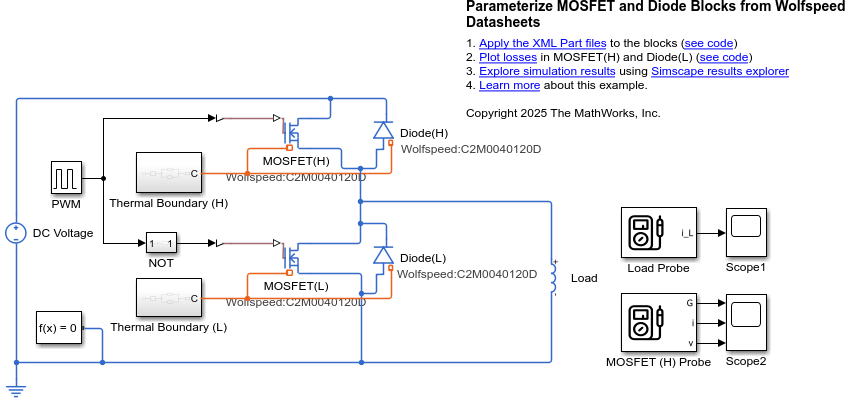
Apply Wolfspeed XML Part Data to Simscape Blocks
Apply the C2M0040120D_mosfet.xml file into the MOSFET (Ideal, Switching) blocks and the C2M0040120D_diode.xml file into the Diode blocks. To apply parameterizations from Wolfspeed datasheets for MOSFET parts, you must specify the switch-on and switch-off gate resistance values.
GateResistanceSwitchOn =1; % Ohm GateResistanceSwitchOff =
15; % Ohm
Choose the XML files you want to apply to the Simscape blocks.
mosfetFileName ="C2M0040120D_mosfet.xml"; diodeFileName =
"C2M0040120D_diode.xml";
Load the model and specify the block paths.
modelName = "ImportWolfspeedPartsToMOSFETAndDiode";
open_system(modelName);
blockPathMOSFETL = modelName + "/MOSFET(L)";
blockPathMOSFETH = modelName + "/MOSFET(H)";
blockPathDiodeL = modelName + "/Diode(L)";
blockPathDiodeH = modelName + "/Diode(H)";
Use the ee_importDeviceParameters function to apply the data in the XML files to the blocks.
% MOSFET(H) device.
ee_importDeviceParameters(mosfetFileName,"wolfspeed",blockPathMOSFETH, ...
GateResistanceOn=GateResistanceSwitchOn,...
GateResistanceOff=GateResistanceSwitchOff)
% MOSFET(L) device
ee_importDeviceParameters(mosfetFileName,"wolfspeed",blockPathMOSFETL,...
GateResistanceOn=GateResistanceSwitchOn,...
GateResistanceOff=GateResistanceSwitchOff)
% Diode(H) device
ee_importDeviceParameters(diodeFileName,"wolfspeed",blockPathDiodeH)
Current axis IfVec contains a negative value. Removing negative current value and the corresponding column of lookup table VfMat for parameterization.
Invalid current axis value for reverse recovery loss data. Extending the length of the current axis and the width of reverse recovery loss data to 2 for compatibility.
Turn-off voltage when measuring recovery loss (VrecVal) contains invalid value 0. Replacing the value with 10.
% Diode(L) device
ee_importDeviceParameters(diodeFileName,"wolfspeed",blockPathDiodeL)
Current axis IfVec contains a negative value. Removing negative current value and the corresponding column of lookup table VfMat for parameterization.
Invalid current axis value for reverse recovery loss data. Extending the length of the current axis and the width of reverse recovery loss data to 2 for compatibility.
Turn-off voltage when measuring recovery loss (VrecVal) contains invalid value 0. Replacing the value with 10.
Plot Simulation Results
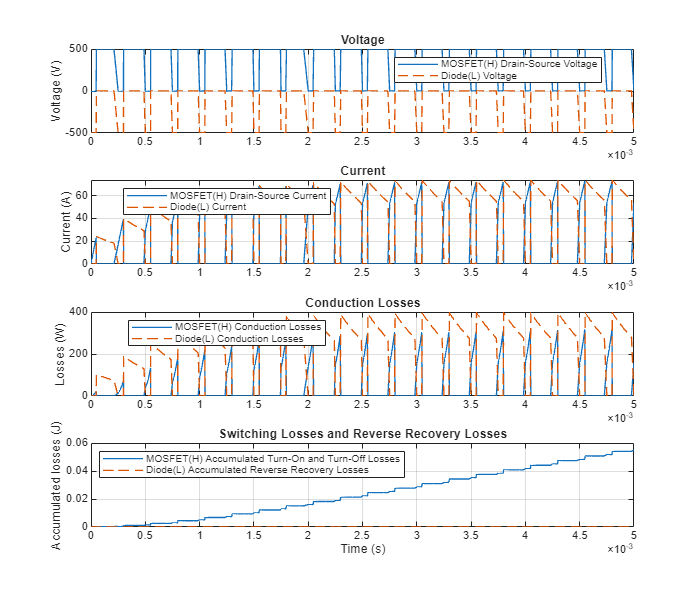
Plot the voltage, current, conduction losses, and switching losses for the high-side MOSFET and the low-side diode.
ImportWolfspeedMOSFETAndDiodePartsPlot;
See Also
ee_importDeviceParameters | MOSFET (Ideal, Switching) | Diode

