Control DC Motor with PWM Voltage Source and H-Bridge Driver
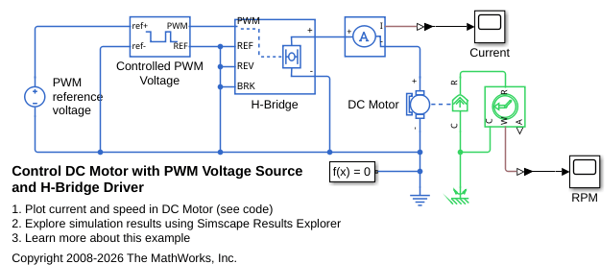
R2026bThis example shows how to control a DC motor by using the Controlled PWM Voltage and H-Bridge blocks. The DC Motor block delivers a mechanical power of 10 W at 2500 rpm and turns at a no-load speed of 4000 rpm when the DC supply voltage is 12 V. Consequently, if you set the PWM reference voltage to its maximum value of 5 V, the motor runs at 4000 rpm. If you set the PWM reference voltage to 2.5 V, the motor runs at approximately 2000 rpm. To achieve fast simulation, this example sets the Simulation mode parameter of the Controlled PWM Voltage and H-Bridge blocks to Averaged. To validate the averaged behavior, set the Simulation mode parameter to PWM in both the Controlled PWM Voltage and H-Bridge blocks.
For more information about this example and to learn how to build this model, see Build and Simulate a Simple DC Motor.
Open Model
Open the PWMControlledDCMotor model. The Controlled PWM Voltage block generates a pulse-width modulated signal. The H-Bridge block receives this PWM signal and drives the motor by generating a constant output voltage equal to the average value of the PWM signal. When the motor is on, the H-Bridge block connects the motor terminals to the power supply. When the motor is off, the H-Bridge block acts as a freewheeling diode to maintain the motor current.
View Simulation Results from Simscape Logging
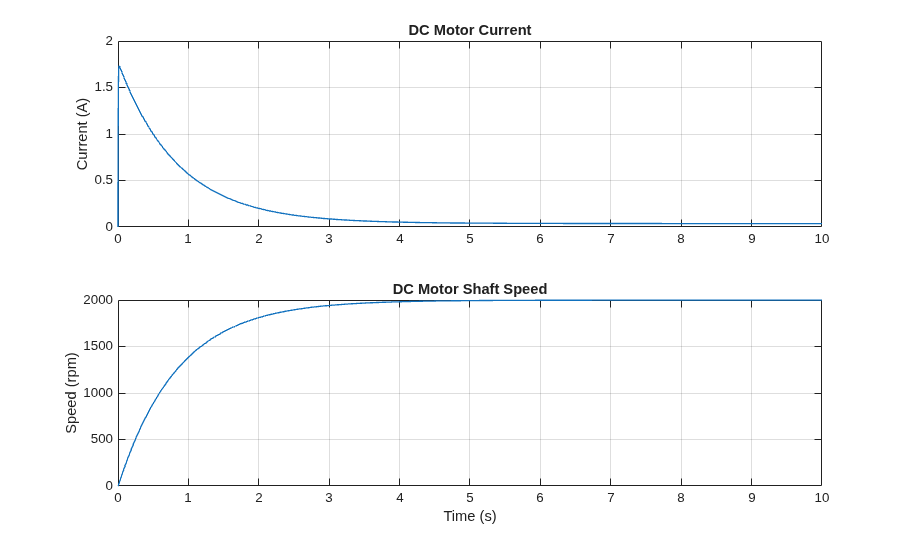
This plot shows the current passing through the motor and the speed of the motor shaft. As expected, the motor runs at about 2000 rpm when you apply a DC voltage of 2.5 V.
Results from Real-Time Simulation
This example has been tested on these platforms:
Speedgoat™ Performance real-time target machine with an Intel® 3.5 GHz i7 multi-core CPU and 4 GB RAM.
dSPACE® SCALEXIO LabBox with Intel® Core XEON E3-1275v3 at 3.5GHz and 4 GB RAM.
You can run this model in real time with a step size of 30 microseconds by using the Simscape local solver. For small sample rates, a task overrun might occur during the initial task execution due to a cold cache. To avoid this overrun, if the selected platform supports these options, relax the start-up behavior by specifying a limited number of task overruns or increasing the sample time of periodic tasks during the start-up phase of the real-time application.
See Also
Controlled PWM Voltage | DC Motor | H-Bridge

