Resolve Unresponsive Firmware Upload on Pixhawk Boards with Separate Bootloader Port
R2026bIssue
Some Pixhawk® boards use separate COM ports for bootloader communication and main MAVLink communication. When you connect such a board, the bootloader port appears briefly in Device Manager and then switches to the main communications port after a few seconds.

Firmware upload requires the bootloader COM port. If you specify the main communications port instead, the upload does not proceed and the Hardware Setup window stops responding.

Possible Solutions
Identify the Bootloader and Communications COM Ports
Determine which COM port corresponds to the bootloader and which corresponds to main communications.
Disconnect the Pixhawk hardware from your computer.
Open Device Manager.
Connect the Pixhawk hardware to your computer.
Note the COM port that appears first. This is the bootloader COM port.
Wait approximately five seconds. The device disappears from Device Manager as it transitions from bootloader to main PX4® firmware.
Note the COM port that appears after one to two seconds. This is the main communications port.
Upload Firmware Using the Correct COM Ports
Use the bootloader COM port for firmware upload and the communications COM port for MAVLink communication.
In the Test Connection step of the Hardware Setup, set Host Serial Port for upload to
Specify Serial Port.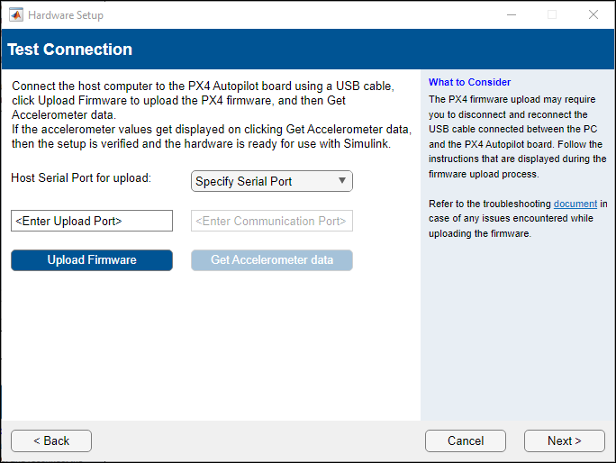
Replace
Enter Upload Portwith the bootloader COM port value.
Disconnect the Pixhawk board and reconnect it to the host computer.
Click Upload Firmware immediately after reconnecting the board. When the dialog box prompts you to disconnect and reconnect the board, do so, then click OK to start the upload.
If the upload does not start, disconnect and reconnect the board again.
After the firmware uploads successfully, replace
Enter Communication Portwith the main communications COM port value. Then, click Get Accelerometer data to verify the connection.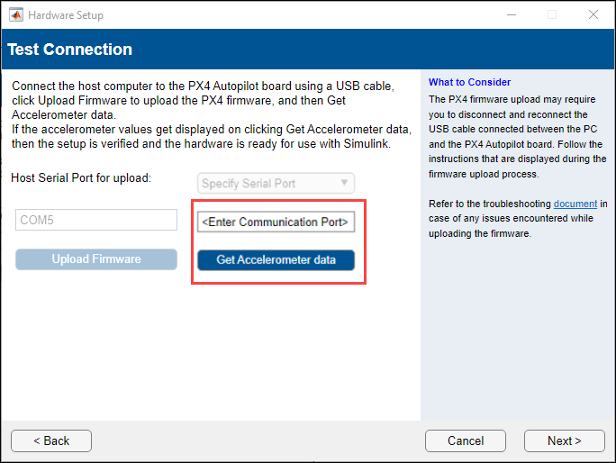
Set the COM ports for upload and communication in the Simulink® model, and then deploy the model on the Pixhawk hardware.

