Replay CAN Messages from MDF Files
This example shows you how to replay CAN messages contained in MDF files using MathWorks® Virtual CAN channels in Simulink®. You can update this model to connect to supported hardware on your system.
Read CAN Data Frames from the MDF File
Read all data in the MDF file into a timetable using the mdfRead function. The timetable is structured to follow the ASAM MDF standard logging format. Every row represents one raw CAN frame from the bus, while each column represents a channel within the specified channel group. The channels, such as "CAN_DataFrame.BusChannel", are named to follow the bus logging standard.
data = mdfRead("PowerTrain_Log.mf4")data = 1×1 cell array
{7648×12 timetable}
canData = data{1}canData=7648×12 timetable
t CAN_DataFrame.BusChannel CAN_DataFrame.Flags CAN_DataFrame.Dir CAN_DataFrame.SingleWire CAN_DataFrame.WakeUp CAN_DataFrame.ID CAN_DataFrame.IDE CAN_DataFrame.FrameDuration CAN_DataFrame.BitCount CAN_DataFrame.DLC CAN_DataFrame.DataLength CAN_DataFrame.DataBytes
__________ ________________________ ___________________ _________________ ________________________ ____________________ ________________ _________________ ___________________________ ______________________ _________________ ________________________ ______________________________
2.2601 sec 2 1 "Tx" 0 0 103 0 128000 67 2 2 {[ 1 0]}
2.2801 sec 2 1 "Tx" 0 0 103 0 128000 67 2 2 {[ 1 0]}
2.3002 sec 2 1 "Tx" 0 0 100 0 232000 119 8 8 {[ 238 2 25 1 0 0 238 2]}
2.3005 sec 2 1 "Tx" 0 0 102 0 240000 123 8 8 {[ 0 128 59 68 0 0 0 0]}
2.3006 sec 2 1 "Tx" 0 0 103 0 128000 67 2 2 {[ 1 0]}
2.3008 sec 2 1 "Tx" 0 0 201 0 196000 101 6 6 {[ 0 0 0 0 172 38]}
2.3009 sec 2 1 "Tx" 0 0 1020 0 110000 58 1 1 {[ 1]}
2.3201 sec 2 1 "Tx" 0 0 103 0 128000 67 2 2 {[ 1 0]}
2.3401 sec 2 1 "Tx" 0 0 103 0 128000 67 2 2 {[ 1 0]}
2.3502 sec 2 1 "Tx" 0 0 100 0 234000 120 8 8 {[ 4 0 25 2 119 1 238 2]}
2.3505 sec 2 1 "Tx" 0 0 102 0 228000 117 8 8 {[53 127 119 64 0 128 187 67]}
2.3507 sec 2 1 "Tx" 0 0 201 0 198000 102 6 6 {[ 0 0 0 0 35 40]}
2.3508 sec 2 1 "Tx" 0 0 1020 0 110000 58 1 1 {[ 1]}
2.3601 sec 2 1 "Tx" 0 0 103 0 128000 67 2 2 {[ 1 0]}
2.3801 sec 2 1 "Tx" 0 0 103 0 128000 67 2 2 {[ 1 0]}
2.4002 sec 2 1 "Tx" 0 0 100 0 234000 120 8 8 {[ 10 0 25 3 119 1 238 2]}
⋮
Decode CAN Messages Using the DBC File
Open the DBC file using the canDatabase function.
canDB = canDatabase("PowerTrain_MDF_Replay.dbc")canDB =
Database with properties:
Name: 'PowerTrain_MDF_Replay'
Path: '/tmp/Bdoc26a_3146167_47098/tp66b972e5/vnt-ex54765443/PowerTrain_MDF_Replay.dbc'
UTF8_File: '/tmp/Bdoc26a_3146167_47098/tp66b972e5/vnt-ex54765443/PowerTrain_MDF_Replay.dbc'
Nodes: {2×1 cell}
NodeInfo: [2×1 struct]
Messages: {12×1 cell}
MessageInfo: [12×1 struct]
Attributes: {11×1 cell}
AttributeInfo: [11×1 struct]
UserData: []
The canMessageTimetable function uses the database to decode the message names and signals. The timetable of ASAM standard logging format data is converted into a Vehicle Network Toolbox™ CAN message timetable.
msgTimetable = canMessageTimetable(canData, canDB)
msgTimetable=7648×8 timetable
       Time        ID     Extended           Name                        Data                 Length      Signals       Error    Remote
    __________    ____    ________    __________________    ______________________________    ______    ____________    _____    ______

    2.2601 sec     103     false      {'Ignition_Info' }    {[                       1 0]}      2       {1×1 struct}    false    false
    2.2801 sec     103     false      {'Ignition_Info' }    {[                       1 0]}      2       {1×1 struct}    false    false
    2.3002 sec     100     false      {'EngineData'    }    {[      238 2 25 1 0 0 238 2]}      8       {1×1 struct}    false    false
    2.3005 sec     102     false      {'EngineDataIEEE'}    {[       0 128 59 68 0 0 0 0]}      8       {1×1 struct}    false    false
    2.3006 sec     103     false      {'Ignition_Info' }    {[                       1 0]}      2       {1×1 struct}    false    false
    2.3008 sec     201     false      {'ABSdata'       }    {[            0 0 0 0 172 38]}      6       {1×1 struct}    false    false
    2.3009 sec    1020     false      {'GearBoxInfo'   }    {[                         1]}      1       {1×1 struct}    false    false
    2.3201 sec     103     false      {'Ignition_Info' }    {[                       1 0]}      2       {1×1 struct}    false    false
    2.3401 sec     103     false      {'Ignition_Info' }    {[                       1 0]}      2       {1×1 struct}    false    false
    2.3502 sec     100     false      {'EngineData'    }    {[      4 0 25 2 119 1 238 2]}      8       {1×1 struct}    false    false
    2.3505 sec     102     false      {'EngineDataIEEE'}    {[53 127 119 64 0 128 187 67]}      8       {1×1 struct}    false    false
    2.3507 sec     201     false      {'ABSdata'       }    {[             0 0 0 0 35 40]}      6       {1×1 struct}    false    false
    2.3508 sec    1020     false      {'GearBoxInfo'   }    {[                         1]}      1       {1×1 struct}    false    false
    2.3601 sec     103     false      {'Ignition_Info' }    {[                       1 0]}      2       {1×1 struct}    false    false
    2.3801 sec     103     false      {'Ignition_Info' }    {[                       1 0]}      2       {1×1 struct}    false    false
    2.4002 sec     100     false      {'EngineData'    }    {[     10 0 25 3 119 1 238 2]}      8       {1×1 struct}    false    false
      ⋮
Use the canSignalTimetable function to repackage signal data from the "EngineData" message on the bus into a signal timetable.
engineDataSignals = canSignalTimetable(msgTimetable, "EngineData")engineDataSignals=1147×6 timetable
Time PetrolLevel EngPower EngForce IdleRunning EngTemp EngSpeed
__________ ___________ ________ ________ ___________ _______ ________
2.3002 sec 1 7.5 0 0 0 750
2.3502 sec 2 7.5 375 0 0 4
2.4002 sec 3 7.5 375 0 0 10
2.4502 sec 4 7.5 375 0 0 17
2.5002 sec 5 7.5 375 0 0 23
2.5502 sec 6 7.5 375 0 0 30
2.6002 sec 7 7.5 375 0 0 36
2.6502 sec 8 7.5 375 0 0 43
2.7002 sec 9 9 450 0 0 50
2.7502 sec 10 10.5 525 0 0 59
2.8002 sec 10 10.5 525 0 0 69
2.8502 sec 11 12 600 0 0 80
2.9002 sec 11 13.5 675 0 0 92
2.9502 sec 12 13.5 675 0 0 106
3.0002 sec 13 15 750 0 0 121
3.0502 sec 13 16.5 825 0 0 136
⋮
Notice that the initial timestamp of the recorded messages is not zero:
startTime = seconds(engineDataSignals.Time(1))
startTime =
2.3002
stopTime = seconds(engineDataSignals.Time(end))
stopTime =
59.6002
CAN Replay Model
This model contains:
A Pack subsystem that feeds the input signal data to a CAN Pack block to be packed into CAN messages using the DBC file.
A CAN Transmit block that transmits the CAN messages to
MathWorks Virtual Channel 1.A CAN Receive block that receives the messages on a CAN network, through
MathWorks Virtual Channel 2.An Unpack subsystem that feeds the CAN messages to a CAN Unpack block to be unpacked as signal data using the DBC file and verified.
The CAN Receive block is configured to block all extended IDs and allow only the EngineData message with the standard ID 100 to pass.

Engine Data Pack Subsystem
The Engine Data Pack subsystem packs the engine data signals from the engineDataSignals workspace variable using a "Playback" block.

Engine Data Unpack Subsystem
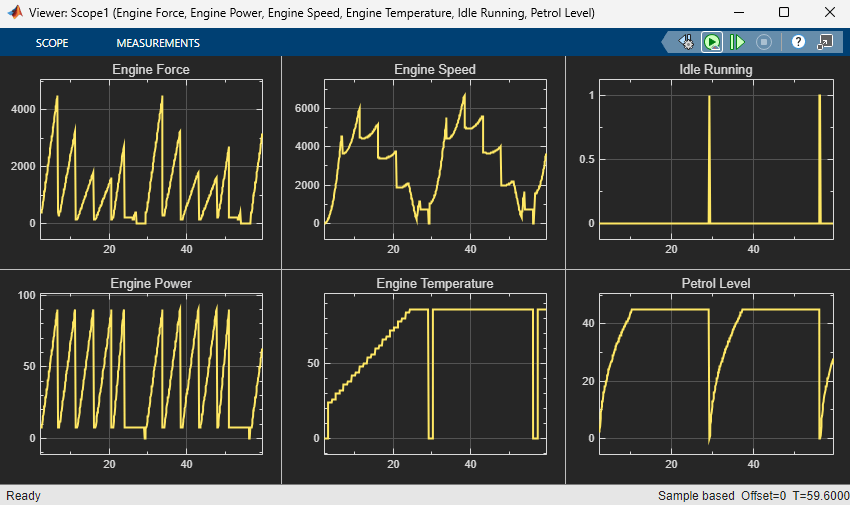
The Engine Data Unpack subsystem unpacks the engine data information from the received CAN messages and plots them to a scope.

Visualize Engine Data Signals
Click Run to run the simulation. Depending on your computer configuration, the output shown in the scope might be zero. This result is expected: model simulation and message transmission are executed on separate threads, and are not synchronized. Simulink attempts to execute the simulation as fast as possible, and the provided time series is very short; it is therefore likely that transmission of the first message had not been initiated before the simulation was completed.
A better approach to replaying logged signals is to use simulation pacing, which slows down model execution to achieve an approximately real-time simulation. To activate simulation pacing, click on Run -> Simulation Pacing, then select the option by checking its box. Run the simulation again, then visualize the engine data signals.