Frequency Offset Estimation for QPSK Modulated Signals
R2026bThis example show how to estimate carrier frequency offset (CFO) using the Frequency Estimator block. The frequencyEstimation subsystem in the Simulink® model in this example supports HDL code generation. To verify the behavior of this block, the example compares the estimated offset output with the introduced offset input.
Set Up Input Parameters
Set up workspace variables for the Simulink model. The example uses these variables to configure the Frequency Estimator block in the model. These variables control the behavior of the block. You can modify these variable values according to your requirement.
numEstimates           = 50;
avgLength              = 1024;
corrLength             = 4;
M                      = 4; % QPSK
MaximumFrequencyOffset = 1/((corrLength+1)*M);

% Use the fractional range -0.95 to 0.95. Value close to maximum value
% might create a wrapping action of the phase in the estimation process.
fracOfMaxCFO = 0.3;
normalizedFrequencyOffset = fracOfMaxCFO * MaximumFrequencyOffset;
Generate QPSK Data with Channel Effects
Generate a random sequence of quadrature phase shift keying (QPSK) symbols, apply a frequency offset by multiplying with a complex exponential, and add additive white Gaussian noise (AWGN) to simulate channel noise.
data = randsrc(avgLength*numEstimates,1,[1 1i -1 -1i].*exp(1i*pi/4));

% Add frequency offset
dataCFO = data .* exp(1i*2*pi*normalizedFrequencyOffset*(0:length(data)-1).');

% Add AWGN
nVar = 0.1;
dataAWGN = dataCFO + sqrt(nVar) * ((randn(size(dataCFO)) + 1i * randn(size(dataCFO)))/sqrt(2));

% Prepare variables for simulation
dataIn = fi(dataAWGN,1,16,14);
validIn = true(size(dataIn));
sampleTime = 1;
defaultLatency = 1089;
stopTime = sampleTime * (defaultLatency + avgLength * numEstimates);
Run Model
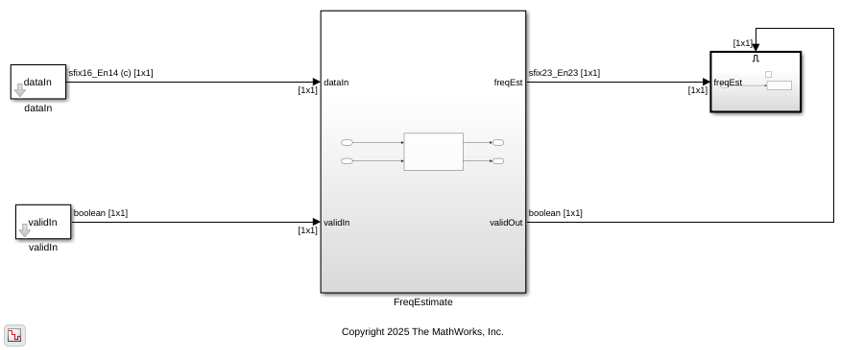
Running the model imports the input signal variables to the model and exports freqEst and a control signal validOut to the MATLAB® workspace.
open_system("freqEstimate");
out = sim("freqEstimate");
Plot and Compare Results
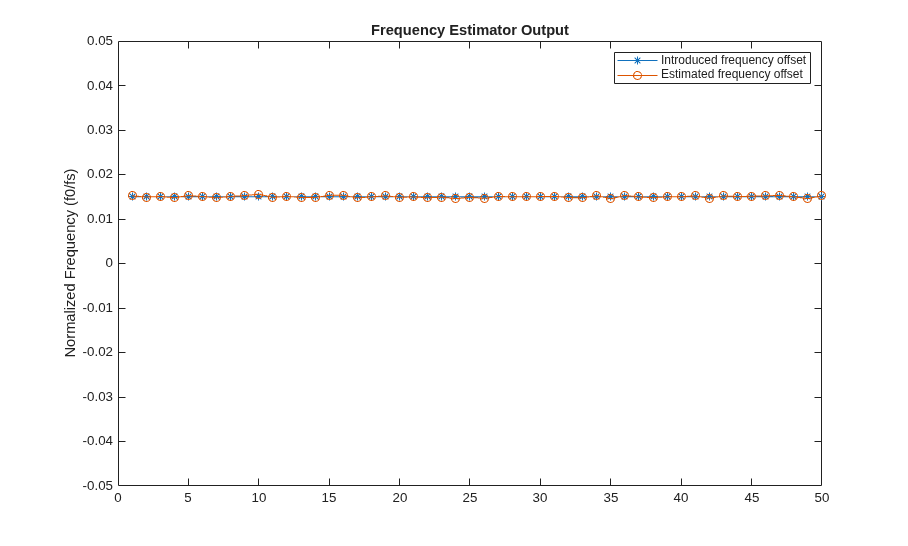
Compare the estimated frequency offset block output with the introduced frequency offset input.
figure
plot(1:numEstimates,repmat(normalizedFrequencyOffset,numEstimates,1),'*-');
hold on;
plot(1:numEstimates,out.simFreqEst,'o-');
ylabel('Normalized Frequency (f0/fs)');
legend('Introduced frequency offset','Estimated frequency offset')
title('Frequency Estimator Output');
ylim([-MaximumFrequencyOffset MaximumFrequencyOffset]);