Plotting latitude, longitude,and signal strength
Show older comments
I have a list of latitude and longitude along with signal strength obtained from mobile towers in a certain region. I have all the data in CSV format. In total, I have 4 CSV files.
How can I plot that data in MATLAB?
As a range of signal strength will be shown by different colour and other range will be shown in different colour.
2 Comments

Bob Thompson
on 8 Jan 2019

Simran Sandhu
on 8 Jan 2019
Edited: Simran Sandhu
on 8 Jan 2019
Accepted Answer

KSSV
on 9 Jan 2019
0 votes
Read about pcolor, surf, scatter, conourf. All these can be used to plot what you want.
The below link shows the possible plots which can be obtained from MATLAB. YOu can have a look on the link, it has a plot and respective code from which you can learn.
8 Comments
Simran Sandhu
on 9 Jan 2019
Simran Sandhu
on 9 Jan 2019
KSSV
on 9 Jan 2019
[num,txt,raw] = xlsread('powerlevel.csv') ;
lat = num(:,1) ;
lon = num(:,2) ;
val = num(:,3) ;
scatter(lon,lat,10,val,'filled') ; colorbar
Simran Sandhu
on 9 Jan 2019
KSSV
on 9 Jan 2019
YOu have any other data? Or the only above data? The second figure is plotted using contour.
Simran Sandhu
on 9 Jan 2019
To use contour you should be having a matrix data. With your data..this is what I can get:
[num,txt,raw] = xlsread('powerlevel.csv') ;
lat = num(:,1) ;
lon = num(:,2) ;
val = num(:,3) ;
scatter(lon,lat,10,val,'filled') ; colorbar
m = 100 ;
x = linspace(min(lon),max(lon),m) ;
y = linspace(min(lat),max(lat),m) ;
[X,Y] = meshgrid(x,y) ;
Z = griddata(lon,lat,val,X,Y) ;
contour(X,Y,Z) ;
Simran Sandhu
on 9 Jan 2019
More Answers (1)

Jacob Halbrooks
on 3 Apr 2020
0 votes
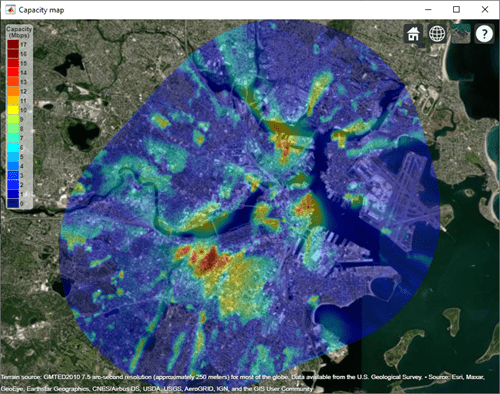
A new feature is available in R2020a to support importing and visualizing propagation data like this. The feature is available in Communications Toolbox and Antenna Toolbox and supports table-based files or data which contains latitude, longitude, and corresponding values like signal strength. You can learn about the feature here, and below is an example contour map that you can create with it:
Categories
Find more on Geographic Plots in Help Center and File Exchange
Products
Community Treasure Hunt
Find the treasures in MATLAB Central and discover how the community can help you!
Start Hunting!
