Can I add units to the table?
Show older comments
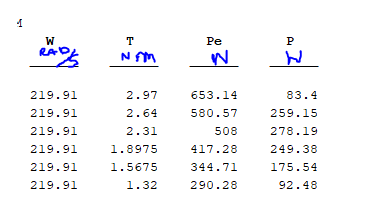
Can I add units to the variables in the table? I have searched for information and I could not find anything, it can only be done in numbers ...please help
7 Comments

Matthew Anderson
on 9 Apr 2020
Agree, super annoying that when you put units into a table - they aren't displayed.

Lorenzo Chiaverini
on 21 Jan 2021
Idem, it would be great if they were displayed as you showed

Greg
on 29 May 2024
This would be a great feature to add. Units are very important and would help my work a ton.

@Greg -- agreed, and re: @Walter Roberson's comment that the table is not intended for display but that it would seem a minor thing to add, the present format already has a blank line there; it wouldn't take up any more room on the screen if MW would just stuff the units in there if they exist. (Speaking of blank lines, I've always wished they would do away with the one after the line before the first data row...)
t=array2table([[0:2].',rand(3,1)],'VariableNames',{'Time','Velocity'});
t.Properties.VariableUnits={'sec','mph'}

Paul
on 28 Jul 2024
Does the VariableUnits property have any built-in functional use?
Or is it just there to alllow the user to keep track of the units and provide an ability to do a unit checking in user-defined functions?

Walter Roberson
on 28 Jul 2024
Sure, enough. They don't even get checked when co[n]catenating tables.
T1 = table([1;2;3],'VariableNames',{'x'}); T1.Properties.VariableUnits = {'sec'};
T2 = table(2*[1;2;3],'VariableNames',{'x'}); T2.Properties.VariableUnits = {'m'};
summary([T1;T2])
summary([T2;T1])
Answers (2)

Raj
on 17 May 2019
"Can I add units to the variables in the table?" Yes you can. You can specify units for each variable in the table by modifying the table property,
% |VariableUnits|.
Specify the variable units as a cell array of character vectors.
Something like this:
table (W,T,Pe,P)
T.Properties.VariableUnits = {'Rad/S','NM','N','N'}; % what I could make out from your picture. Please correct if wrong.
Or Do you want the units to get displayed on your table? Please be clear.
9 Comments

Diego Guarachi
on 17 May 2019
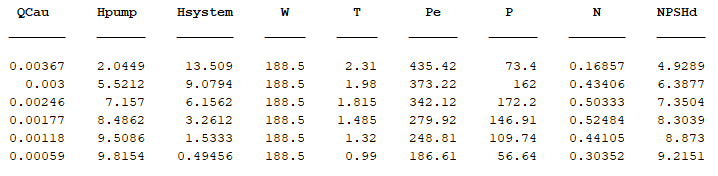
END=[Qt Ht Hbt Wt Tt Pet Pt Nt NPSHdt];
names={'QCau','Hpump','Hsystem','W','T','Pe','P','N','NPSHd'};
T = array2table(END,'VariableNames',names);
T.Properties.VariableUnits = {'m3/s','m','m','rad/s','N*m','W','W','%','m'};
disp(T)
Should I implement it like that? It did not work..
Raj
on 17 May 2019
That's what i asked. The units have got defined. They don't get displayed by default here. If you open the table in workspace, the first row will have a drop down option where you will be able to see the units for each variable as you have defined. Or try using
summary(T)
You'll be able to see the defined units.

Shan Alan David
on 5 Apr 2020
I have a similar question to this. I am trying to print the units next to the values in the table.
Walter Roberson
on 9 Apr 2020
table() objects are not designed for display purposes. There is no facility to format the entries in custom ways, and there is no facility to display units along side the entries.

Andreas Lobinger
on 14 Dec 2020
Is there a facility to deal with multiline VariableNames? Then one could do Units in the second line manually. Or, what actually is the infrastructure to display tables?
Walter Roberson
on 15 Dec 2020
>> t = table((1:5).', 'VariableNames', {sprintf('Depth\n[mm]')})
t =
5×1 table
Depth↵[mm]
__________
1
2
3
4
5
That ↵ character is literally what is output: the code specifically searches for newline characters and replaces them with that, and it specifically replaces carriage return characters with ←
The "actually" infrastructure to display tables is the code in toolbox/matlab/datatypes/tabular/@tabular/disp.m . In R2020b look at line 75:
% Replace LF with "knuckle" tab with "arrow", and CR with "backarrow".
% This also truncates long lines, but is irrelevant here.
% Replaces hyperlinks with no display text with ''.
for iv = 1:numel(varNames)
varNames(iv) = matlab.internal.display.truncateLine(varNames(iv),10000);
end
The truncateLine call is the one that does the replacement.
Is there a facility to deal with multiline VariableNames: Yes, the facility explicitly converts them to not be multi-line.
Andreas Lobinger
on 15 Dec 2020
I see - and thanks for the long explaination. Can you provide a "why" here? I'd assume a lot of researchers want to put units in tables - and adding to the variable name eats up screen space, so a second line looks like the natural solution.
Walter Roberson
on 15 Dec 2020
table() are not designed for presentation purposes. Report Generator has facilities for better output of tables.
That said, it would seem to me to be a small thing to add the units or the Variable Description information (which might be the original names of the variables.) It could even be made into properties as to whether to display them or not. I don't know why Mathworks has not done this.
table() could also benefit from a per-variable format specification... among other things.
t=array2table([[0:2].',rand(3,1)],'VariableNames',{'Time','Velocity'});
t.Properties.VariableUnits={'sec','mph'}
Indeed to all...there's already room for them with a blank line just waiting to be used for something besides wasted white space.

KSSV
on 17 May 2019
It is not allowed...may be you can use something like this:
varNames = {'Name', 'Age_in_Years'} ;
varTypes = {'string','double'};
s = {'Tom' ; 'Dick' ; 'Hary'} ;
a = [20 ;21; 24] ;
T = table(s,a) ;
T.Properties.VariableNames = varNames
Categories
Find more on Loops and Conditional Statements in Help Center and File Exchange
on 17 May 2019
Community Treasure Hunt
Find the treasures in MATLAB Central and discover how the community can help you!
Start Hunting!
