Greetings, Anyway to help to create ridgeline by MATLAB
Show older comments
Greetings,
Anyway to help to create ridgeline by MATLAB as the attache link please?
3 Comments

KALYAN ACHARJYA
on 26 Nov 2019
Which one, 1st or 2nd or 3rd figure?

Yaser Khojah
on 26 Nov 2019
Accepted Answer
Here's a demo that creates a number of guassian distributions as input. The code produces an appropriate number of contiguous subplots where you can set the left, right, upper, and lower margins. Then it uses histfit() to compute and plot the density functions of each data. The code extracts the (x,y) values of the density curve and uses them to form a colored patch which replaces the histfit() plots. The axis limits and linked and some plot cosmetics are done to make the plot similar in appearance to the link you provided.
See inline comments for details.
% Generate n distributions
n = 8; % number of distributions
mu = linspace(0,100,n);
sd = (rand(size(mu)) +1).*2;
nSamp = 100; %number of samples per dist.
data = arrayfun(@normrnd,mu,sd,ones(size(mu)),nSamp.*ones(size(mu)),'UniformOutput',false); % req. stats & ML toolbox
yLabs = num2cell(char(64+cumsum(ones(1,n))));
Now we have two key input variables.
- data which is a 1 x n cell array where each element is a 1xm vector of data that will be used to compute a distribution.
- yLabs : a 1 x n cell array of characters used to label each distribution along the y axis.
% Generate figure.
fh = figure();
% Compute axes positions with contigunous edges
n = numel(data);
margins = [.13 .13 .12 .15]; %left, right, bottom, top
height = (1-sum(margins(3:4)))/n; % height of each subplot
width = 1-sum(margins(1:2)); %width of each sp
vPos = linspace(margins(3),1-margins(4)-height,n); %vert pos of each sp
% Plot the histogram fits (normal density function)
% You can optionally specify the number of bins
% as well as the distribution to fit (not shown,
% see https://www.mathworks.com/help/stats/histfit.html)
% Note that histfit() does not allow the user to specify
% the axes (as of r2019b) which is why we need to create
% the axes within a loop.
% (more info: https://www.mathworks.com/matlabcentral/answers/279951-how-can-i-assign-a-histfit-graph-to-a-parent-axis-in-a-gui#answer_218699)
% Otherwise we could use tiledlayout() (>=r2019b)
% https://www.mathworks.com/help/matlab/ref/tiledlayout.html
subHand = gobjects(1,n);
histHand = gobjects(2,n);
for i = 1:n
subHand(i) = axes('position',[margins(1),vPos(i),width,height]);
histHand(:,i) = histfit(data{i});
end
% Link the subplot x-axes
linkaxes(subHand,'x')
% Extend density curves to edges of xlim and fill.
% This is easier, more readable (and maybe faster) to do in a loop.
xl = xlim(subHand(end));
colors = jet(n); % Use any colormap you want
for i = 1:n
x = [xl(1),histHand(2,i).XData,xl([2,1])];
y = [0,histHand(2,i).YData,0,0];
fillHand = fill(subHand(i),x,y,colors(i,:),'FaceAlpha',0.4,'EdgeColor','k','LineWidth',1);
% Add vertical ref lines at xtick of bottom axis
arrayfun(@(t)xline(subHand(i),t),subHand(1).XTick); %req. >=r2018b
% Add y axis labels
ylh = ylabel(subHand(i),yLabs{i});
set(ylh,'Rotation',0,'HorizontalAlignment','right','VerticalAlignment','middle')
end
% Cosmetics
% Delete histogram bars & original density curves
delete(histHand)
% remove axes (all but bottom) and
% add vertical ref lines at x ticks of bottom axis
set(subHand(1),'Box','off')
arrayfun(@(i)set(subHand(i).XAxis,'Visible','off'),2:n)
set(subHand,'YTick',[])
set(subHand,'XLim',xl)

8 Comments
Yaser Khojah
on 27 Nov 2019
Edited: Yaser Khojah
on 27 Nov 2019
Dear Adam,
Thank you so much for writing this code. You have helped a lot since I lost hope and I have started to learn R to create the plot. My MATLAB version is '9.6.0.1072779 (R2019a)' .
I have the following qeusions:
1) Are these density functions in orders by thier means. I see A has the lowest mean and so on as below.
If not in my data A and B share the same mean as of 22, but I do not see that in yours. When I tried in R plot as below, I can compare the value of the means. Does that mean your plot x-axis is representing only numbers? So, my questions would be possible to show the mean as below. Also, Would be possible to color some statistics of these plots as below as last plot below. (please note, the data are different for every plots, and I'm just using this to explain my questions)



Adam Danz
on 27 Nov 2019
Glad I could help. If you want exactly those plots, it may be faster to do them in R where the functions are already developed.
To add the shaded areas, check out Matlab's fill function. That's what I used to color the area under the curves.
When you say "write the mean", do you mean plot a marker at the mean or add text? Either would be simple. It would go in the loop.
Yaser Khojah
on 27 Nov 2019
Edited: Yaser Khojah
on 27 Nov 2019
Adam Danz
on 28 Nov 2019
In the example plot you shared, it looks like you're using my example data instead of your data. The data in your R plot are completely different data than the data in the matlab plot.
The first 6 lines of my answer merely generate fake data. You don't need those lines other than to run the demo. Maybe I should have made that clearer (I'll clear that up in my answer).
The only variables you need are
- data which is a cell array where each element contains a vector of values.
- yLabs which is the y axis lable.
Run those first 6 lines to see what I'm talking about.

noquinhas
on 27 Jan 2020
Hi,
Thank you so much for this.
Is it possible to overlap the subplots?

Image Analyst
on 27 Jan 2020
Not with the subplot() function - it will blow away other subplots(). However you can inset, and probably overlap partially, axes with the axes() function. See attached demos.
Adam Danz
on 27 Jan 2020
Image Analyst's advice is also mentioned in the subplot documentation tips-section. Calling the subplot function deletes existing axes that overlap the newly created subplot. However, once the subplots are created, you can overlap them by changing their position.
Here's a demo where you set the number of vertically stacked subplots (nSubs) and the amount of overlap (p, a value 0:1).
nSubs = 6;
p = 0.10; % 10%
clf() % clear figure
sh = arrayfun(@(i)subplot(nSubs,1,i),1:nSubs); % create all subplots, default position
arrayfun(@(i)box(sh(i),'on'),1:nSubs) % Turn on axis box
subPos = reshape([sh.Position]',4,[])'; % Get subplot positions
% Change the y position of each plot so that
% all subplots overlap by p percent (0:1).
subPos(:,2) = (sum(subPos(1,[2,4])) - (subPos(1,4) * (1-p)) * (0:nSubs-1)) - subPos(1,4);
% Set new subplot positions
set(sh,{'position'},mat2cell(subPos,ones(nSubs,1),4))

Jacqueline Chrabot
on 19 Jul 2021
Adam,
I'm trying to reuse this code, to make a plot, except my data is set up in a field where y is depth, x is time and the data fills in columns 1-12 of chlorophyll data. I'm trying to fit gaussian for each colomn and then display them all in the graph you showed. Can you help with this?
More Answers (2)
Image Analyst
on 28 Nov 2019
Perhaps you'd be interested in stackedplot(): Pick of the Week
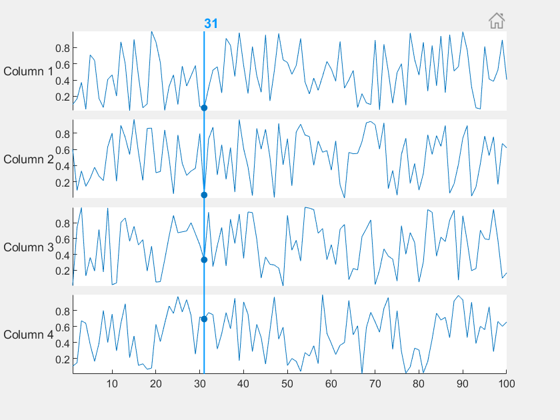
>> doc stackedplot
Introduced in R2018b.

Santiago Benito
on 21 Apr 2020
Edited: Santiago Benito
on 21 Apr 2020
Hi there,
Maybe it's a little late, but I stumbled upon the same problem. I really wanted the plots to overlap, so I did the following:
% Number of data plots
n = 8;
% Sample points
N = 100;
% Distribution, example data
distName = 'normal';
mn = linspace(0,1,n);
% Allocate a matrix to store the dataset
yData = zeros(N,n);
% Plot options
mini = -0.3;
maxi = 1.3;
overlap = 0.4;
% Create the data
for ii = 1:n
distCell = makedist(distName,'mu',mn(ii),'sigma',0.1);
yData(:,ii) = pdf(distCell,linspace(mini,maxi,N));
end
% Get the position of each dataset
y = cumsum(max(yData,[],1))*(1-overlap);
% Create the figure with patch & plot
figure, hold on
for ii = n:-1:1
patch([linspace(mini,maxi,N),-mini],[yData(:,ii)+y(ii);y(ii)],mn(ii),...
'EdgeColor','none','FaceAlpha',0.8)
plot(linspace(mini,maxi,N),yData(:,ii)+y(ii),'k','LineWidth',1)
end
hold off
% Other stuff
colormap(spring)
yticks(y)
yticklabels({'A','B','C','D','E','F','G','H'})
xlim([mini,maxi])
The result:

Some thoughts:
- This is not as elegant as the other solutions, but works for me.
- You could add more information to the y-axis with some more coding.
Cheers!
6 Comments
Santiago Benito
on 22 Apr 2020
I couldn't help myself and quickly programmed a function that does just what I wanted.
It might be what you need: LINK

Cheers!
Image Analyst
on 22 Apr 2020
Looks like the built-in waterfall() function.
Santiago Benito
on 23 Apr 2020
waterfall() was the first thing I tried. But as far as I could tell, that works great for 3D representations. What I wanted to do is to plot a stack of 2D plots in a single axis. For instance, I don't think that waterfall can do something like this:

There you have 10 gamma distributions, their medians in the dashed vertical lines, the default colormap shows the local value of the probability density and the spring colormap shows the scale value of the each distribution. You can find this example and many others in the documentation of joyPlot.
Cheers!
Adam Danz
on 23 Apr 2020
Looks good, Santiago Benito. Tidy code, too.
Santiago Benito
on 23 Apr 2020
Thanks, Adam!
The colorbar in the example above is a bit confusing. There are two yellows that have different values. The lower colorbar should be based on something like the winter colormap which doesn't have intersecting colors with the spring colormap. It's not clear why 2 colormaps/colorbars are needed.
Categories
Find more on Color and Styling in Help Center and File Exchange
Community Treasure Hunt
Find the treasures in MATLAB Central and discover how the community can help you!
Start Hunting!
