figure to latex

Converts a displayed figure to latex .tex format. The code can handle zoomed in plots

You are now following this Submission

Create your 2D, multiple axes plot, and then convert it to a LaTeX .tex file. Then, include the .tex file in your thesis or paper using pstricks. The code uses the data contained in the figure window, so as long as you can create your 2D plot, it should be converted to a .tex file (I haven't tried it with stem plots, semilog, etc).

Also, if you have adjusted the axis so that parts of the lines are outside of the plot area, the code should be able to handle that.

You can use standard LaTeX commands (i.e., $\pi$, \acs{WDM}) in your titles and annotations. The code automatically adds the \\ for use with fprintf.

The arguments include being able to adjust the weight (thickness) of the ticks and lines, and a comment line (useful for tracing where the data came from if your figures are ending up in a common directory). Also, you can set the size of the plot rectangle.

If you want to make some small adjustments, the output .tex file can be opened in jPicEdt.

Then, create the .dvi file, convert the .dvi to .ps (run dvips), and then create your pdf (run ps2pdf).

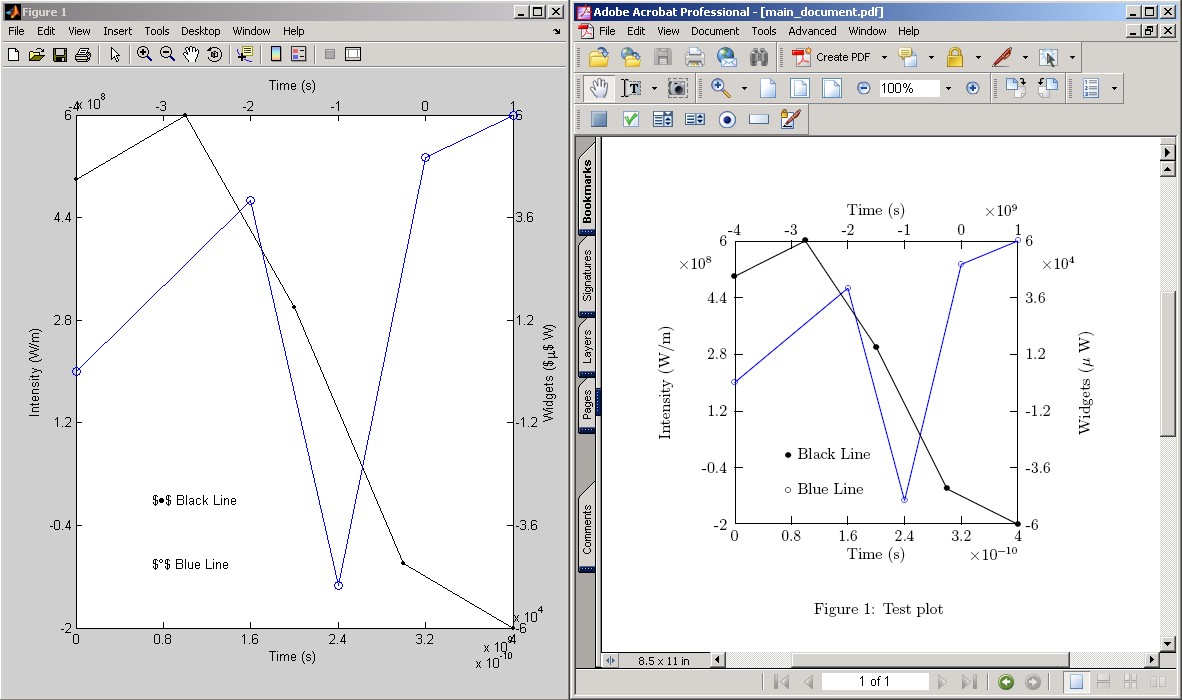
Oddly, my version of MATLAB does a poor job of placing the x10^9 type of annotations (see the screen shot). So, I corrected for this in the LaTeX output.

Please let me know what you think!

Cheers, David.

Cite As

David Krause (2026). figure to latex (https://www.mathworks.com/matlabcentral/fileexchange/11632-figure-to-latex), MATLAB Central File Exchange. Retrieved .

Acknowledgements

Inspired by: fig2tex

Inspired: surf to LaTeX, fig2tex - With Marker

Categories

Find more on Printing and Saving in Help Center and MATLAB Answers

General Information

MATLAB Release Compatibility

  • Compatible with any release

Platform Compatibility

  • Windows
  • macOS
  • Linux
Version Published Release Notes Action
1.0.0.0

Slight bug caused some LaTeX plots not to be created correctly.