chordChart (chord diagram | 弦图)

Plot beautiful chord chart/chord diagram (好看的弦图/和弦图绘制)

https://github.com/slandarer/MATLAB-chord-diagram

You are now following this Submission

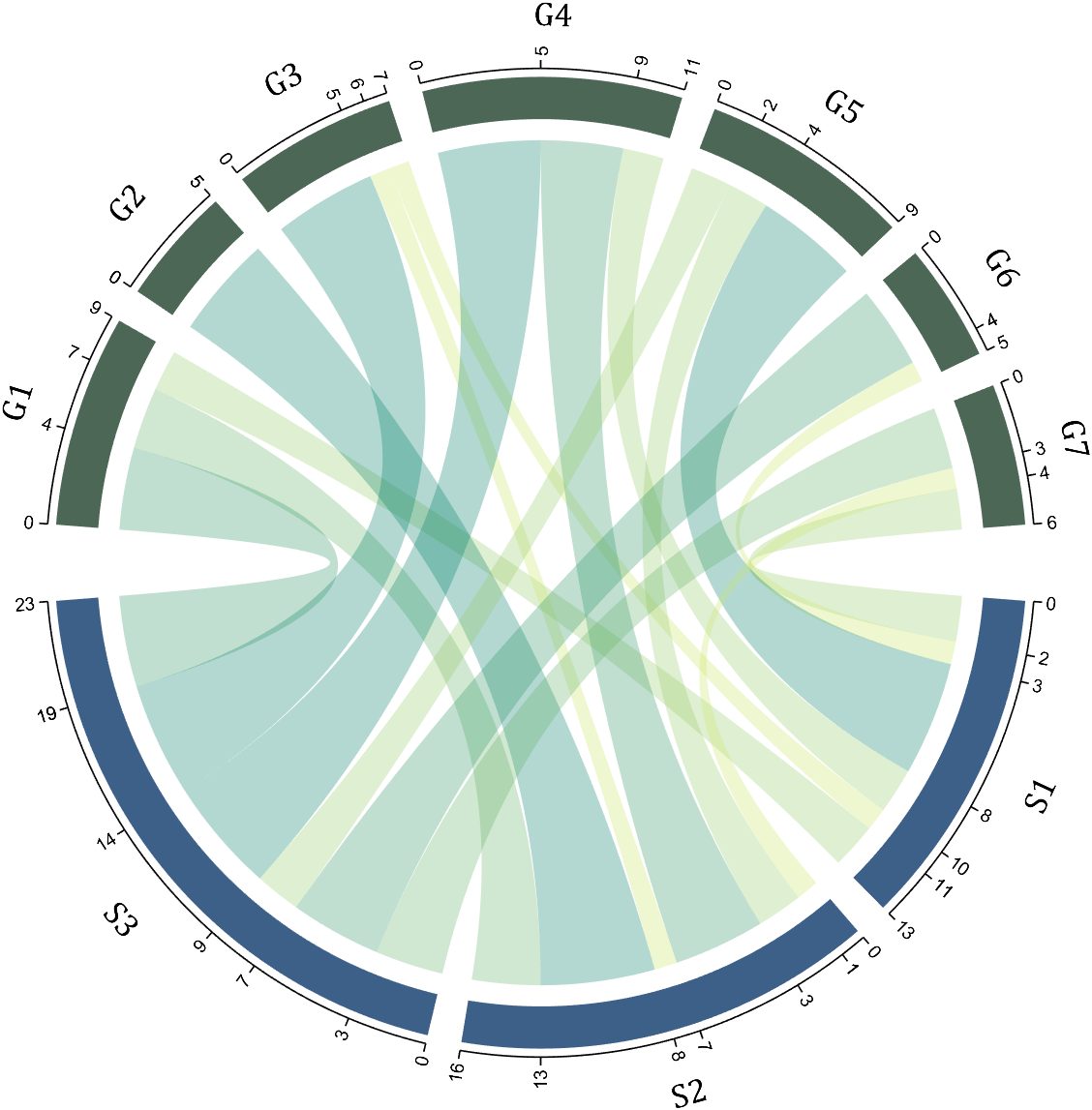
Plot beautiful chord chart (好看的弦图绘制), see demos for detail (详细使用请看demo).
Basic usage
dataMat=[2 0 1 2 5 1 2;
3 5 1 4 2 0 1;
4 0 5 5 2 4 3];
colName={'B1','G2','G3','G4','G5','G6','G7'};
rowName={'S1','S2','S3'};
% 创建弦图对象并绘图(Create chord diagram object and draw)
CC=chordChart(dataMat,'RowName',rowName,'ColName',colName);
CC=CC.draw();
% 调整字体并显示刻度(Set Font for labels and show ticks)
CC.setFont('FontSize',17,'FontName','Cambria')
CC.tickState('on')
CC.tickLabelState('on')
Set color for top split blocks/squares for chord ends
+ 单独设置每一个弦末端方块(Set individual end blocks for each chord)
Use obj.setEachSquareT_Prop
or obj.setEachSquareF_Prop
F means from (blocks below)
T means to (blocks above)
rng(3)
dataMat = randi([1, 15], [7, 22]); dataMat(dataMat < 11) = 0;
dataMat(1, sum(dataMat,1) == 0) = 15;
colName = {'A2M', 'FGA', 'FGB', 'FGG', 'F11', 'KLKB1', 'SERPINE1', 'VWF',...
'THBD', 'TFPI', 'PLAT', 'SERPINA5', 'SERPIND1', 'F2', 'PLG', 'F12',...
'SERPINC1', 'SERPINA1', 'PROS1', 'SERPINF2', 'F13A1', 'PROC'};
rowName = {'Lung', 'Spleen', 'Liver', 'Heart',...
'Renal cortex', 'Renal medulla', 'Thyroid'};
figure('Units','normalized', 'Position',[.02, .05, .6, .85])
CC = chordChart(dataMat, 'RowName',rowName, 'ColName',colName, 'Sep',1/80, 'LRadius',1.21, 'SSqRatio',1);
CC = CC.draw();
CC.labelRotate('on')
% 修改下方方块颜色(Modify the color of the blocks below)
CListF=[128,108,171; 222,208,161; 180,196,229; 209,150,146; 175,201,166;
134,156,118; 175,175,173]./255;
CC.setSquareColorF(CListF)
% 修改弦颜色(Modify chord color)
CC.setChordColorBySquareF()
% 单独设置每一个弦末端方块(Set individual end blocks for each chord)
% Use obj.setEachSquareF_Prop | F means from (blocks below)
% or obj.setEachSquareT_Prop | T means to (blocks above)
CListT = [173,70,65; 79,135,136]./255;
% Upregulated:1 | Downregulated:2
Regulated = (rand([7, 22]) < .8) + 1;
for i = 1:size(Regulated, 1)
for j = 1:size(Regulated, 2)
CC.setEachSquareT_Prop(i, j, 'FaceColor', CListT(Regulated(i,j),:))
end
end
% 绘制图例(Draw legend)
H1 = fill([0,1,0]+100, [1,0,1]+100, CListT(1,:), 'EdgeColor','none');
H2 = fill([0,1,0]+100, [1,0,1]+100, CListT(2,:), 'EdgeColor','none');
lgdHdl = legend([H1,H2], {'Upregulated','Downregulated'}, 'AutoUpdate','off', ...
'Location','best', 'Box','off', 'FontSize',13);
lgdHdl.ItemTokenSize = [12,12];
Square ratio
+ 可使用`SSqRatio`属性调整弦末端弧形块占比
The 'SSqRatio' attribute can be used to adjust
the ratio of arc-shaped blocks at the end of the chord
+ 新增辅助属性`OSqRatio`用来调整原本弧形块占比
The 'OSqRatio' attribute can be used to adjust
the ratio of original arc-shaped blocks
dataMat = round(10.*rand([11,4]).*((11:-1:1).'+1))./10;
colName = {'A','B','C','D'};
rowName = {'Acidobacteriota', 'Actinobacteriota', 'Proteobacteria', ...
'Chloroflexi', 'Bacteroidota', 'Firmicutes', 'Gemmatimonadota', ...
'Verrucomicrobiota', 'Patescibacteria', 'Planctomyetota', 'Others'};
figure('Units','normalized', 'Position',[.02,.05,.8,.85])
CC = chordChart(dataMat, 'ColName',colName, 'Sep',1/80, 'SSqRatio',-30/100, 'OSqRatio',80/100);
CC.RowName = repmat({' '}, [1, length(rowName)]);
CC = CC.draw();
% 修改上方方块颜色(Modify the color of the blocks above)
CListT = [.93,.60,.62; .55,.80,.99; .95,.82,.18; 1.0,.81,.91];
CC.setSquareColorT(CListT)
% 修改下方方块颜色(Modify the color of the blocks below)
CListF = [.75,.73,.86; .56,.83,.78; .00,.60,.20; 1.0,.49,.02; .78,.77,.95; .59,.24,.36;
.98,.51,.45; .96,.55,.75; .47,.71,.84; .65,.35,.16; .40,.00,.64];
CC.setSquareColorF(CListF)
% 修改弦颜色(Modify chord color)
CC.setChordColorBySquareT()
% 添加刻度
CC.tickState('on')
% 修改字体,字号及颜色
CC.setFont('FontName','Cambria', 'FontSize',17)
% 绘制图例(Draw legend)
lgdHdl = legend(CC.squareFHdl, rowName, 'Location','eastoutside', ...
'FontSize',16, 'FontName','Cambria', 'Box','off');
lgdHdl.ItemTokenSize = [18,8];
Rotation
+ 新增辅助属性`Rotation`用来整体旋转图形
The 'Rotation' attribute is used to rotate the entire shape
clc;clear
rng(2)
dataMat = rand([14,5]) > .3;
colName = {'phosphorylation', 'vasculature development', 'blood vessel development', ...
'cell adhesion', 'plasma membrane'};
rowName = {'THY1', 'FGF2', 'MAP2K1', 'CDH2', 'HBEGF', 'CXCR4', 'ECSCR',...
'ACVRL1', 'RECK', 'PNPLA6', 'CDH5', 'AMOT', 'EFNB2', 'CAV1'};
figure('Units','normalized', 'Position',[.02,.05,.9,.85])
CC = chordChart(dataMat, 'ColName',colName, 'RowName',rowName, 'Sep',1/80, 'LRadius',1.2, 'Rotation',3*pi/2);
CC = CC.draw();
% 修改上方方块颜色(Modify the color of the blocks above)
CListT = [0.47 0.58 0.75; 0.48 0.54 0.58; 0.65 0.72 0.65; 0.94 0.92 0.90; 0.98 0.76 0.68];
for i = 1:size(dataMat, 2)
CC.setSquareT_N(i, 'FaceColor',CListT(i,:), 'EdgeColor',[0,0,0])
end
% 修改弦颜色(Modify chord color)
for i = 1:size(dataMat, 1)
for j = 1:size(dataMat, 2)
CC.setChordMN(i,j, 'FaceColor',CListT(j,:), 'FaceAlpha',.9, 'EdgeColor',[0,0,0])
end
end
% 修改下方方块颜色(Modify the color of the blocks below)
logFC = sort(rand(1,14))*6 - 3;
for i = 1:size(dataMat, 1)
CC.setSquareF_N(i, 'CData',logFC(i), 'FaceColor','flat', 'EdgeColor',[0,0,0])
end
% 一个红白蓝配色 colorbar
CMap = interp1([0,.5,1].', [0,0,1;1,1,1;1,0,0], linspace(0,1,50).');
colormap(CMap);
try clim([-3,3]),catch,end
try caxis([-3,3]),catch,end
CBHdl = colorbar();
CBHdl.Position = [0.74,0.25,0.02,0.2];
% Draw legend
text(1.25,-.15, 'LogFC', 'FontSize',16)
text(1.25,1, 'Terms', 'FontSize',16)
lgdHdl = legend(CC.squareTHdl, colName, 'Location','best', 'FontSize',14, 'Box','off');
lgdHdl.Position = [.735,.53,.167,.27];
lgdHdl.ItemTokenSize = [18,8];
Square, tick, label radius
More convenient radius control:
Add highlight arrow
dataMat = [2 0 1 2 5 1 2;
3 5 1 4 2 0 1;
4 0 5 5 2 4 3];
CC = chordChart(dataMat);
CC = CC.draw();
CC.addHighlightArrow(3, 4)
CC.addHighlightArrow(2, 2)

Cite As

Zhaoxu Liu / slandarer (2026). chordChart (chord diagram | 弦图) (https://www.mathworks.com/matlabcentral/fileexchange/116550-chordchart-chord-diagram), MATLAB Central File Exchange. Retrieved .

General Information

MATLAB Release Compatibility

  • Compatible with any release

Platform Compatibility

  • Windows
  • macOS
  • Linux
Version Published Release Notes Action
6.0.3

Improved description.

6.0.2

Improved description.

6.0.1

Improved description.

6.0.0

+ Optimized variable and graphics object name display
+ Significantly improved plotting speed for large-scale matrices

5.0.0

More convenient radius control, new property name shorthands, and more user-friendly coloring functions

4.1.4

Improved the documentation comments.

4.1.3

Improved the documentation comments.

4.1.2

A bug causing certain components not to render in specific axes has been resolved. Additionally, several examples have been simplified.

4.1.1

change Project Website.

4.1.0

# version 4.1.0
+ 使用 addHighlightArrow 添加提示箭头
Use function addHighlightArrow to add arrow(demo13)

4.0.1

More English Support

4.0.0

+ 左键添加数据提示框,右键隐藏高亮
Left-click to add data tooltip, right-click to hide highlight

3.1.3

The bug, which prevented certain strings from being used as variable names due to the use of the `table` function during the struct construction process in the previous version, has been fixed.

3.1.2

Fixed the bug related to incorrect column labels.

3.1.1

+ 新增辅助属性`OSqRatio`用来调整原本弧形块占比 (demo9)
The 'OSqRatio' attribute can be used to adjust
the ratio of original arc-shaped blocks(demo9)
+ 新增辅助属性`Rotation`用来整体旋转图形
The 'Rotation' attribute is used to rotate the entire shape(demo12)

3.1.0

support R2018b

3.0.0

+ 新增两种标志刻度的方法
Added 2 methods to adjust ticks
try : CC = chordChart(..., 'TickMode','auto', ...)

+ 'value' : default

+ 'auto' : 当有刻度离得很近的时候,绘制斜线将其距离拉远
When there are scales that are very close, draw a diagonal line

2.2.0

+ 可使用`SSqRatio`属性调整弦末端弧形块占比
The 'SSqRatio' attribute can be used to adjust
the ratio of arc-shaped blocks at the end of the chord

2.1.1

修复了老版本部分标签错误旋转的bug
Fixed a bug with incorrect rotation of some labels in older versions

2.1.0

+ 单独设置每一个弦末端方块(Set individual end blocks for each chord)
Use obj.setEachSquareT_Prop
or obj.setEachSquareF_Prop
F means from (blocks below)
T means to (blocks above)

1.7.4

add Copyright

1.7.3

Adjust numeric string format

1.7.2

fix labelRotate

1.7.1

add function setTickFont

1.7.0

Added attribute 'LRadius' with adjustable Label radius
Added attribute 'LRotate' and function `labelRatato` with adjustable Label rotate
Colors can be adjusted directly using the function `colormap`
Use function `tickLabelState` to disp tick labels

1.6.0

修复了老版本 sum(....,[1,2])的bug
Fixed the bug of the old version(sum(....,[1,2]))
增添了可调节方块间距的属性'Sep'
Added attribute 'Sep' with adjustable square spacing
增添demo3 旋转标签角度示例
demo3 is added to show how to rotate the label

对1.5.0的间距控制做了调整

1.5.0

修复了老版本 sum(....,[1,2])的bug
Fixed the bug of the old version(sum(....,[1,2]))
增添了可调节方块间距的属性'Sep'
Added attribute 'Sep' with adjustable square spacing
增添demo3 旋转标签角度示例
demo3 is added to show how to rotate the label

1.0.0