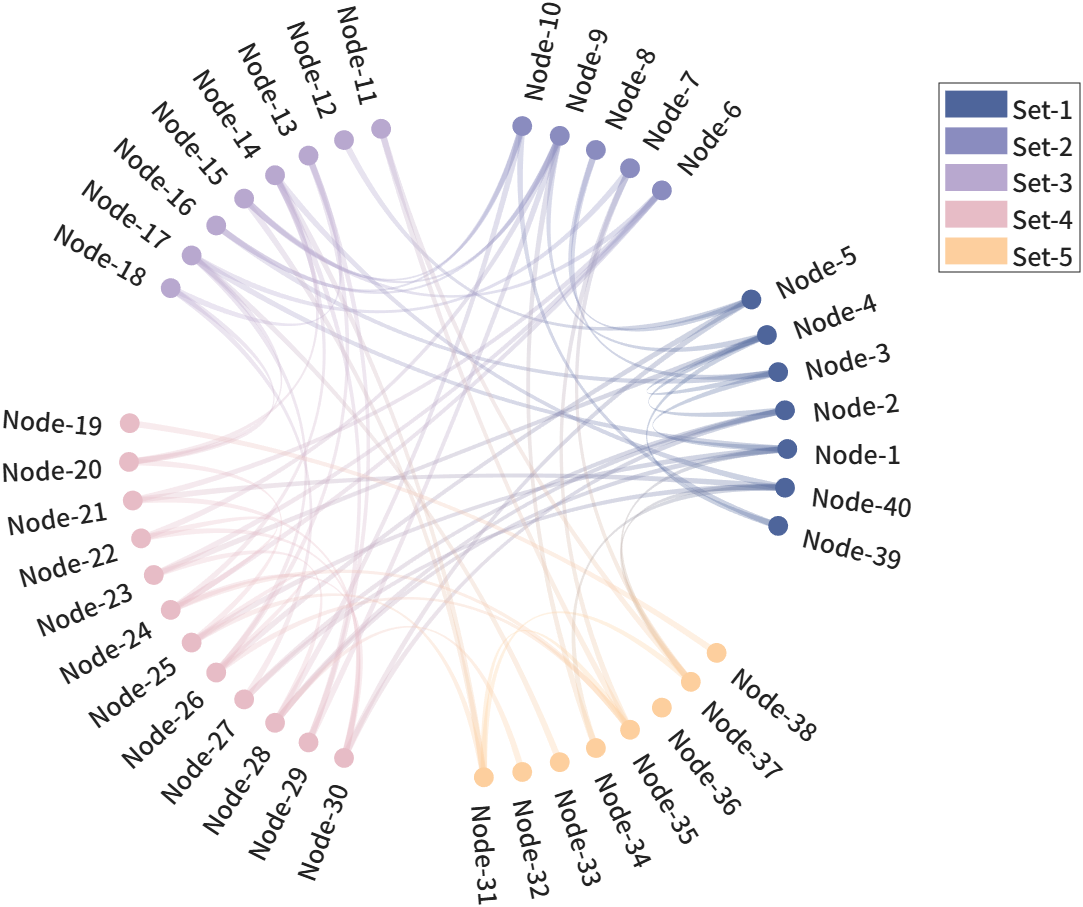
circular network chart (non-ribbon chord diagram)

Creates a circular graph/network with customisable nodes and edges. Supports multiple rendering methods, group layout, curvature control.

https://github.com/slandarer/MATLAB-chord-diagram

You are now following this Submission

Basic usage and RenderingMethod
Data = [25, 0, 0, 22, 24, 25, 8, 0, 0;
0, 14, 0, 0, 0, 0, 6, 4, 1;
0, 0, 11, 0, 0, 0, 0, 0, 7;
0, 0, 0, 22, 0, 20, 17, 0, 0;
0, 0, 0, 0, 24, 3, 6, 3, 0;
0, 0, 0, 0, 0, 25, 7, 0, 2;
0, 0, 0, 0, 0, 0, 17, 0, 0;
0, 0, 0, 0, 0, 0, 0, 11, 0;
0, 0, 0, 0, 0, 0, 0, 0, 5];
% Input required: Upper triangular adjacency matrix
% Node radius is mapped from diagonal values;
% edge width is mapped from off‑diagonal values (separate mappings).
%% Basic usage (default RenderingMethod : simple)
figure()
% Create circular network chart object and draw.
CN1 = circNetChart(Data);
CN1 = CN1.draw();
%% Change color (RenderingMethod : interp)
figure()
CList = [127, 91, 93; 187,128,110; 197,173,143; 59, 71,111; 104, 95,126; 76,103, 86;
112,112,124; 72, 39, 24; 197,119,106; 160,126, 88; 238,208,146]./255;
CN2 = circNetChart(Data);
CN2.RenderingMethod = 'interp'; % RenderingMethod : interp
CN2.NodeColor = CList; % Change node color
% CN2.EdgeColor = CList; % Change edge color (Edge color defaults to match node color)
CN2 = CN2.draw();
%% RenderingMethod : map
figure()
CN3 = circNetChart(Data);
CN3.RenderingMethod = 'map'; % RenderingMethod : map (Map values to colors)
CN3 = CN3.draw();
colormap(turbo)
colorbar('FontName','Times New Roman', 'FontSize',15)
Node-Size-Lim and Edge-Width-Lim, Label, Curvature
Data = triu(randi([1, 20], [18, 18]));
%% Node-Size-Lim and Edge-Width-Lim
figure()
CN4 = circNetChart(Data);
% Node radius is mapped from diagonal values;
% edge width is mapped from off‑diagonal values (separate mappings).
% The minimum non‑zero diagonal value maps to the first element of NodeSizeLim,
% and the maximum maps to the second. (The same applies to EdgeWidthLim).
% If the two values of NodeSizeLim are equal,
% all nodes will have the same size. (The same applies to EdgeWidthLim).
CN4.NodeSizeLim = [.05, .05];
CN4.EdgeWidthLim = [.01, .01];
CN4 = CN4.draw();
%% Label rotate and label porperties
figure()
CN5 = circNetChart(Data);
CN5.NodeSizeLim = [.05, .05];
CN5.EdgeWidthLim = [.01, .01];
CN5 = CN5.draw();
% Enable label rotation for better readability.
CN5.labelRotate('on')
% Set global label style: monospaced font, size 15.
CN5.setLabel('FontName', 'Monospaced', 'FontSize',15)
% Customize the 2nd label individually with blue color.
CN5.setLabelN(2, 'Color',[0,0,.8])
%% Curvature (Default : 0.5 | Straight line: 0 | Bezier curve: 1)
figure()
CN6 = circNetChart(Data);
CN6.NodeSizeLim = [.05, .05];
CN6.EdgeWidthLim = [.01, .01];
CN6.Curvature = 0; % Straight line: 0
CN6 = CN6.draw();
figure()
CN7 = circNetChart(Data);
CN7.NodeSizeLim = [.05, .05];
CN7.EdgeWidthLim = [.01, .01];
CN7.Curvature = 1; % Bezier curve: 1
% CN7.NodeColor = turbo(18);
CN7 = CN7.draw();
%% Node name
Data = triu(randi([1, 20], [5, 5]));
figure()
CN8 = circNetChart(Data);
CN8.NodeName = {'AAA','BBB','CCC','DDD','EEE'}; % Change node name
CN8 = CN8.draw();
Group
Data = triu(randi([1, 20], [40, 40]));
Data((rand(40) + eye(40)) < .9) = 0;
% Define node groups
Group = [ones(1,5), ones(1,5).*2, ones(1,8).*3, ones(1,12).*4, ones(1,8).*5, 1, 1];
groupName = {'Set-AAA','Set-BBB','Set-CCC','Set-DDD','Set-EEE'};
% CList = [127, 91, 93; 187, 128, 110; 197, 173, 143; 59, 71, 111; 104, 95, 126]./255;
CList = [78, 101, 155; 138, 140, 191; 184, 168, 207; 231, 188, 198; 253, 207, 158]./255;
%% Group
figure()
CN9 = circNetChart(Data);
CN9.NodeSizeLim = [.03, .03];
CN9.EdgeWidthLim = [.01, .01];
CN9.Curvature = .8;
CN9.NodeColor = CList(Group, :); % Color nodes by group membership
CN9.RenderingMethod = 'interp'; % RenderingMethod : interp
% Group layout settings
CN9.Group = Group; % Group assignment for each node
CN9.GroupSep = 1/4; % Group gaps occupy 1/4 of the circle
% CN9.GroupName = groupName;
% CN9.GroupLabelRadius = 1.35;
CN9 = CN9.draw();
% Enable label rotation for better readability.
CN9.labelRotate('on')
% Set global label style: monospaced font, size 12.
CN9.setLabel('FontName', 'Monospaced', 'FontSize',12)
% % Set global group label style: monospaced font, size 21.
% CN9.setGroupLabel('FontName', 'Monospaced', 'FontSize',21)
% Create legend for each group
[~, ind] = unique(Group);
legend(CN9.nodeHdl(ind), groupName, 'FontName', 'Monospaced', 'FontSize',12, 'Location','best')
A demo (Pi digit connectivity visualization)
%% Pi digit connectivity visualization (digits 1-1000)
% First 1000 digits of pi after decimal point
piStr = ['1415926535897932384626433832795028841971693993751058209749445923078', ...
'1640628620899862803482534211706798214808651328230664709384460955058', ...
'1723175359408128481117450284102701938521105559644622948954930381964', ...
'4288109756659334461284756482337867831652712019091456485669234603486', ...
'1045432664821339360726024914127372458700660631558817488152092096282', ...
'9254091715364367892590360011330530548820466521384146951941511609433', ...
'0572703657595919530921861173819326117931051185480744623799627495673', ...
'5188575272489122793818301194912983367336244065664308602139494639522', ...
'4737190702179860943702770539217176293176752384674818467669405132000', ...
'5681271452635608277857713427577896091736371787214684409012249534301', ...
'4654958537105079227968925892354201995611212902196086403441815981362', ...
'9774771309960518707211349999998372978049951059731732816096318595024', ...
'4594553469083026425223082533446850352619311881710100031378387528865', ...
'8753320838142061717766914730359825349042875546873115956286388235378', ...
'75937519577818577805321712268066130019278766111959092164201999'];
% Convert digit characters to group indices (1-10)
% Subtract 47 to map ASCII '0' (48) to group 1
Group = abs(piStr(1:1000)) - 47;
% Build adjacency matrix: connect each digit to its next neighbor (off-diagonal)
Data = diag(ones(1, 999), -1);
% Sort nodes by group for grouped layout
[Group, ind] = sort(Group);
Data = Data(ind, ind); % Reorder adjacency matrix
Data = Data + Data.' + eye(1000); % Make symmetric and add self-loops
% Define group (digit) names and custom colors
groupName = {'0', '1', '2', '3', '4', '5', '6', '7', '8', '9'};
colorList = [239, 65, 75; 230, 115, 48; 229, 158, 57; 232, 136, 85; 239, 199, 97;
144, 180, 116; 78, 166, 136; 81, 140, 136; 90, 118, 142; 43, 121, 159] ./ 255;
% Create figure with black background
figure()
set(gca, 'Color', [0, 0, 0])
% Initialize circular network chart
CNPI = circNetChart(Data);
% Node and edge appearance (uniform sizes)
CNPI.NodeSizeLim = [0.01, 0.01];
CNPI.EdgeWidthLim = [0.005, 0.005];
% Group layout configuration
CNPI.Group = Group;
CNPI.GroupSep = 1/8; % Gap between groups (1/8 of full circle)
CNPI.GroupName = groupName;
CNPI.GroupLabelRadius = 1.05;
% RenderingMethod : interp
CNPI.NodeColor = colorList(Group, :);
CNPI.RenderingMethod = 'interp';
% Edge curvature (full Bezier curve)
CNPI.Curvature = 1;
% Render the chart
CNPI = CNPI.draw();
% Hide individual node labels
CNPI.setLabel('Visible', 'off')
% Style group labels (digit labels around the circle)
CNPI.setGroupLabel('FontSize', 25, 'FontName', 'Monospaced', ...
'FontWeight', 'bold', 'Color', 'w')
GraphType : 'bi'
rng(6)
Data = rand(9,9).*(rand(9,9) > .5);
% Determine global value limits from non‑zero entries for consistent mapping across figures
% (确定非零元素的全局数值范围,用于两张图统一的数值映射)
VLim = [min(Data(Data~=0)), max(Data(Data~=0))];
figure()
CN1 = circNetChart(Data, 'GraphType','bi');
CN1.EdgeWidthLim = [0.005, 0.04];
CN1.EdgeValueLim = VLim; % Set value mapping range (设置数值映射范围)
CN1.NodeColor = turbo(9); % Node colors from turbo (节点颜色使用 turbo 配色)
CN1.RenderingMethod = 'source'; % Color edges by source node (按源节点对边着色)
CN1.EdgeAlpha = .6; % Set edge transparency (设置边透明度)
CN1 = CN1.draw();
%% % Plot only the edges whose source is node N (仅绘制源为 N 的边)
figure()
S = 2; % also try: 2, 4, 7, 9, ...
DataS = 0.*Data;
DataS(S, :) = Data(S, :);
CN2 = circNetChart(DataS, 'GraphType','bi');
CN2.NodeValue = max(max(Data, [], 1), max(Data, [], 2).'); % Keep original node values (保留原始节点值)
CN2.EdgeWidthLim = [0.005, 0.04];
CN2.EdgeValueLim = VLim;
CN2.NodeColor = turbo(9);
CN2.RenderingMethod = 'source';
CN2.EdgeAlpha = .6;
CN2 = CN2.draw();
Apply distinct colormaps to edges and nodes
cmpE = [247, 251, 255; 233, 242, 250; 219, 233, 246; 205, 224, 241; 187, 214, 235;
164, 204, 227; 136, 190, 220; 107, 174, 214; 84, 158, 205; 61, 141, 196;
42, 122, 186; 26, 104, 174; 12, 86, 160; 8, 67, 135; 8, 48, 107]./255;
% Define colormap for nodes (定义节点的配色)
cmpN = [247, 252, 253; 237, 248, 251; 225, 244, 246; 211, 239, 235; 189, 230, 222;
160, 219, 205; 131, 207, 185; 102, 194, 164; 81, 183, 138; 61, 169, 111;
44, 149, 83; 25, 130, 62; 5, 113, 48; 0, 91, 37; 0, 68, 27]./255;
% Generate random upper triangular data (生成随机上三角数据)
rng(11)
Data = triu(rand([15, 15])).*(1 - triu(rand([15, 15]), 1)>.8);
% Create circular network chart and set properties (创建圆形网络图并设置属性)
CN = circNetChart(Data);
CN.EdgeWidthLim = [.01, .05]; % Edge width range (边宽范围)
CN.Curvature = 0; % Straight edges (直线边)
CN.RenderingMethod = 'map'; % Use colormap mapping (使用颜色映射)
CN.EdgeAlpha = .6; % Edge transparency (边透明度)
CN.EdgeOrder = 'ascend'; % Draw edges from small to large (从小到大绘制边)
CN.draw()
set(CN.nodeHdl, 'EdgeColor','k', 'LineWidth',2)
% Apply node colormap and add colorbar (应用节点配色并添加颜色条)
cbarN = CN.setNodeColorByColormap(cmpN);
cbarN.Position = [.78, .11, .02, .35];
set(cbarN.Label, 'String','Node Value', 'FontSize',17, 'FontName','Times New Roman');
% Apply edge colormap and add colorbar (应用边配色并添加颜色条)
colormap(CN.ax, cmpE)
cbarE = colorbar(CN.ax);
cbarE.Position = [.78, .575, .02, .35];
set(cbarE.Label, 'String','Edge Value', 'FontSize',17, 'FontName','Times New Roman');
Display both positive and negative correlations
% Define a diverging colormap for positive/negative values (定义用于正负值的发散配色)
cmp = [103, 0, 31; 157, 17, 40; 193, 55, 58; 218, 106, 85; 240, 155, 122;
249, 196, 169; 251, 227, 213; 247, 247, 246; 220, 234, 242; 182, 215, 232;
135, 190, 218; 78, 154, 199; 48, 121, 182; 25, 87, 151; 5, 48, 97]./255;
rng(1)
Data = triu(rand([15, 15]) - .5) .* (rand([15,15]) > .8);
% Create circular network chart (创建圆形网络图)
CN = circNetChart(Data);
CN.NodeSizeLim = [.05, .05]; % Fixed node size (固定节点大小)
CN.NodeValue = ones(1, 15); % Uniform node values (统一节点值)
CN.RenderingMethod = 'map'; % Color edges by value (按值对边上色)
CN.EdgeOrder = 'ascend'; % Draw edges from small to large (从小到大绘制边)
CN.EdgeAlpha = .6; % Edge transparency (边透明度)
CN.draw()
colormap(cmp)
colorbar()
clim([-.5, .5])

Cite As

Zhaoxu Liu / slandarer (2026). circular network chart (non-ribbon chord diagram) (https://www.mathworks.com/matlabcentral/fileexchange/118655-circular-network-chart-non-ribbon-chord-diagram), MATLAB Central File Exchange. Retrieved .

General Information

MATLAB Release Compatibility

  • Compatible with any release

Platform Compatibility

  • Windows
  • macOS
  • Linux
Version Published Release Notes Action
3.0.0

The function now supports bidirectional graph rendering.
Supports separate colormaps for nodes and edges.
Supports simultaneous display of positive and negative correlations.

2.2.1

Improved description.

2.2.0

Fixed the chord width distortion caused by excessively low Curvature values.

2.1.2

change Project Website.

2.1.1

Change summary and cover

2.1.0

Debug.

2.0.1

Fixed an error that occurred when all diagonal entries of the matrix were zero.

2.0.0

See new version.

1.0.0