ntitle
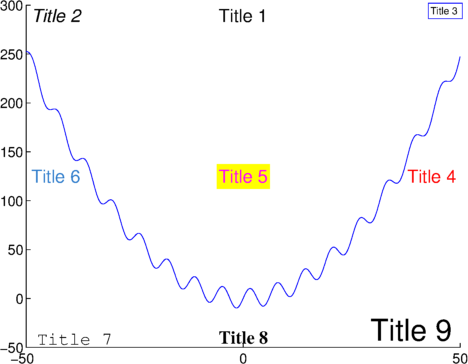
ntitle(titlestring,varargin) places a title within the plot instead of on top. In the spirit of Edward Tufte, this is intended to keep the title close to the data it describes and minimize wasted space. The ntitle function may prove particularly useful for figures with several subplots, where titles can sometimes become confused with xlabels above them.
By default, ntitle centers the title at the top of the plot, but any of the location coordinates (e.g., north, southwest, etc.) can be used with the argument 'location'. Output h provides the handle for the ntitle.
EXAMPLES:
% First make a plot:
x = -50:.1:50;
y = 10*sin(x)+.1*x.^2;
plot(x,y);
axis([-50 50 -50 300])
box off
% Here are 9 obnoxious examples of how to use ntitle:
ntitle('Title 1');
ntitle('{\it Title 2}','location','northwest');
ntitle('Title 3 ','location','northeast','fontsize',10,'edgecolor','b');
ntitle(' Title 4 ','location','east','color','r');
ntitle('Title 5','location','center','color','m','backgroundcolor','y');
ntitle(' Title 6','location','west','color',[.2 .5 .8]);
ntitle(' Title 7','location','southwest','fontname','Courier');
ntitle('Title 8','location','south','fontweight','bold','fontname','Times');
h9 = ntitle('Title 9 ','location','southeast','fontsize',30);
Consider pairing ntitle with figtitle (http://www.mathworks.com/matlabcentral/fileexchange/42667-figtitle).
Cite As
Chad Greene (2026). ntitle (https://www.mathworks.com/matlabcentral/fileexchange/42114-ntitle), MATLAB Central File Exchange. Retrieved .
MATLAB Release Compatibility
Platform Compatibility
Windows macOS LinuxCategories
Tags
Acknowledgements
Inspired: figtitle, label, Daily Antarctic sea ice concentration
Discover Live Editor
Create scripts with code, output, and formatted text in a single executable document.
