Import Explorer for tables
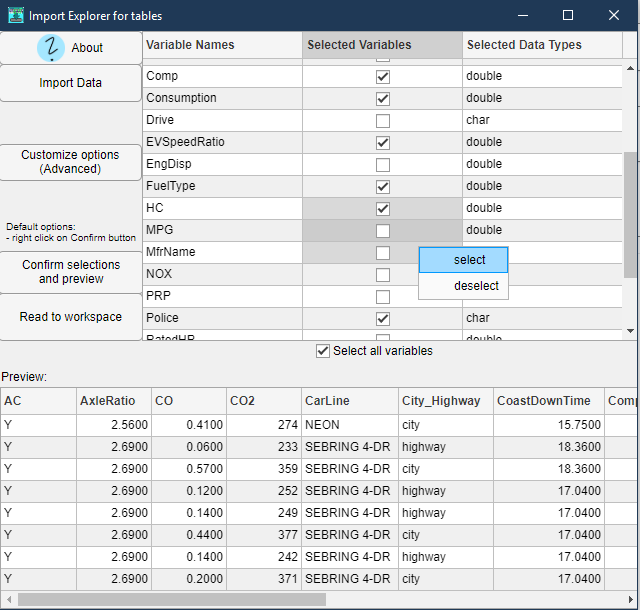
GUI for readtable and datastore. Select / sort table variables and their data types. Read from multiple tabular text or Excel files at once.

You are now following this Submission
- You will see updates in your followed content feed
- You may receive emails, depending on your communication preferences
Editor's Note: This file was selected as MATLAB Central Pick of the Week
Cite As
Jan Studnicka (2026). Import Explorer for tables (https://www.mathworks.com/matlabcentral/fileexchange/92468-import-explorer-for-tables), MATLAB Central File Exchange. Retrieved .
General Information
- Version 4.3.0 (161 KB)
MATLAB Release Compatibility
- Compatible with any release
Platform Compatibility
- Windows
- macOS
- Linux
| Version | Published | Release Notes | Action |
|---|---|---|---|
| 4.3.0 | - Fixed bug preventing to set numerical property inside "Customize Options" dialog. |
||
| 4.2.0 | - Clicking on "multiple files / lists" button and selecting only one file now uses datastore instead of readtable. This can be used to read tables with the same format from multiple spreadsheet lists in one Excel file.
|
||
| 4.1.0 | Added:
|
||
| 4.0.0 | New:
|
||
| 3.2.0 | Bug fix:
Improvement:
|
||
| 3.1.0 | Bug fix:
|
||
| 3.0.0 | - import multiple tabular text files (.csv, .txt) |
||
| 2.4.0 | Fixed:
|
||
| 2.3.0 | - names checking before reading into the workspace variables
|
||
| 2.2.0 | - de/select multiple variables at once with mouse, Ctrl, Shift and using context menu in the Selected Variables Column
|
||
| 2.1.0 | - About button
|
||
| 2.0.1 | - fixed a bug that prevented data import |
||
| 2.0.0 | Added:
Improved:
|
||
| 1.1.0 | Bug Fixes |
||
| 1.0.0 |

