
POINTEREDITOR

A GUI for creating custom pointers.

You are now following this Submission

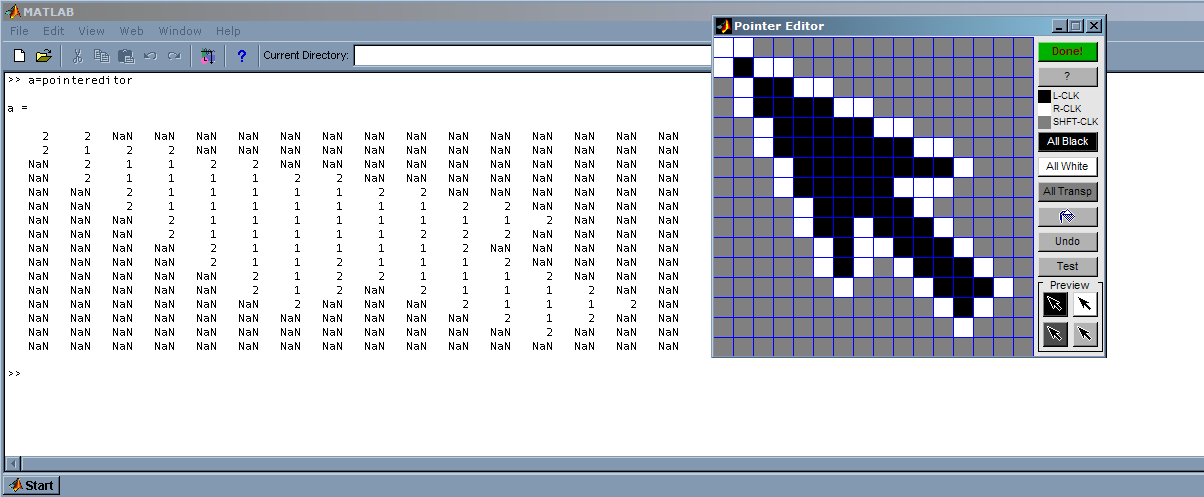
POINTEREDITOR opens a GUI for creating custom PointerShapeCData.
PointerShapeCData must be a 16-by-16 matrix that defines the pointer using 3 values (black, white, transparent). The editor allows you to create the pointer by clicking on pixels (left click, right click, shift+left click, respectively). You can also click and drag to color continuous pixels. Closing the editor via the close button cancels the changes.

M = POINTEREDITOR returns the CData matrix. To incorporate the Cdata in your m-file, copy and paste the output of the matrix. See examples in this code.

M = POINTEREDITOR(C) accepts a 16-by-16 CData matrix.

The mouse click interface is designed to be used in MS-Windows environment. In other platforms, they correspond to 'Normal', 'Alternate', and 'Extend' SelectionType, respectively.

The GUI includes a few UI control buttons at the top.
All Black - Change all pixels to black.
All White - Change all pixels to white.
All Transp - Change all pixels to transparent.
Test - Test the current pointer. Press the button again or click anywhere in the window to switch back to arrow pointer.
Done! - Exit editor.
? - Help window.

Cite As

Jiro Doke (2026). POINTEREDITOR (https://www.mathworks.com/matlabcentral/fileexchange/9895-pointereditor), MATLAB Central File Exchange. Retrieved .

Acknowledgements

Inspired by: Simplified management of figure pointer property

Categories

Find more on Environment and Settings in Help Center and MATLAB Answers

General Information

MATLAB Release Compatibility

  • Compatible with any release

Platform Compatibility

  • Windows
  • macOS
  • Linux
Version Published Release Notes Action
1.1.0.1

Updated license

1.1.0.0

Minor change in HELP text, and license update.

1.0.0.0

Allow passing in of a CData matrix. Remove outputing of matrix on screen, because one can get that from the actual matrix.