331 results
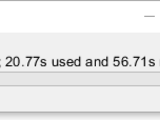
Waitbar or wait message for parfor or for loop.
This script generates a waitbar or a wait message including (1) the percentage finished; (2) the time used; and (3) the estimated remaining time for parfor or other types of loop. The script uses

Waitbar implementation for parfor loops.
This package provides a waitbar for use in parfor loops without the need to write to files or any other external synchronization.

Toolbox for 4D-STEM data processing enabling the creation of a single 2D powder diffraction image and its 1D radial average.

A lightweight, flexible progress bar for MATLAB that works in console, GUI (waitbar), and parallel (parfor) loops.
Universal Progress Bar A compact and versatile MATLAB progress bar that adapts to console output, GUI waitbars, and parallel parfor loops. Designed to be both lightweight and customizable.🌟
Displays the percentage of parfor iterations which have completed.
Monitoring the progress of a long-running parfor loop is not straightforward because the workers cannot communicate. This function gets around that limitation by storing the progress in a text

A Java progress monitor to track progress through a PARFOR loop running MATLAB® workers
A simple Java progress monitor to show a progress bar on the MATLAB client while Parallel Computing Toolbox workers are executing the iterations of a PARFOR loop. This employs a socket connection

Graphically monitors the completion of iterations in a parfor loop
Creates a graphical progress indicator to monitor the completion of iterations in a long-running loop. The usage is similar to MATLAB's built in waitbar function, but it works with parfor loops in
Simplifies managing resources such as large data within PARFOR loops and SPMD blocks
body of a PARFOR loop oran SPMD block, and this piece of data is both expensive tocreate, and does not need to be re-created multipletimes. Examples might include: database connection handles

Waitbar object with estimated time remaining and estimated time of arrival
Timerwaitbar is an object based on MATLAB waitbar and including a timer providing the following informations :- Progression [%]- Estimated Time Remaining [d HH:MM:SS]- Estimated Time of Arrival [ddd

Handy progress bar that can be used in GUI or text interface with parfor compatibility.
version: MATLAB 2020b ~ latestLegacy-compatible version: MATLAB 2017a ~ latestSimple usageTask name, ParforText based progress barFaster than waitbar (MATLAB builtin)N = 500000;WB = waitbar(0,'waitbar
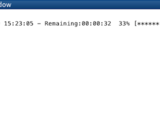
Matlab waitbar compatible with parfor.
parwaitbar is a Matlab class that displays a progress bar compatible with for/parfor loops.If parallel.pool.DataQueue is available, parwaitbar uses the queue to update the waitbar asynchronously. If

Progress monitor for matlab parfor (parallel) loops with estimation of the remaining time
A very ressource efficient Matlab class for progress monitoring during a `parfor` loop displaying the remaining time and optional progress of each worker.It supports distributed worker pools (i.e

Allows user to see a progress bar for a simulink simulation when running the model from Matlab.

Displays a tooltip-sized waitbar beneath uicontrols.
Displays a tooltip-sized waitbar beneath uicontrols, and is animated. Inspired by "About Face", similarly to my other tooltip submission.toolTipWaitBarHandle = tooltipwaitbar(hObject)Generates a
Create a parfor wait bar
Similar to waitbar MATLAB function. The ParForWaitBar can monitor progress in a parallel pool while a computation is carried out
Progress bar (waitbar) that can be embedded into a GUI uipanel element and/or decremented.
The standard WAITBAR function (and the improved WAITBAR2 function, which this code is based on) must appear in their own figure windows, and cannot be embedded into a GUI.WAITBAR2A is a drop-in

A PARFOR progress monitor for Matlab
This progress monitor comes with a nice wrapper `ParforProgressStarter2.m` which will take care of adding the classes to the java class path, depending on whether matlabpool is enabled or not.For
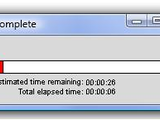
Estimated remaining, elapsed time, and percentage complete.
This version of waitbar is compatible with MATLAB's version. Thus, doesn't require any modification of existing functions using the waitbar. However, the property settings include with MATLAB
Command-line equivalent of matlab's "waitbar"
Matlab's "waitbar" is useful for tracking the progress of for-loops. However, it is not available when no GUI is used, and in addition, from my experience, it can be a run-time bottleneck if called

Simple, efficient, and user friendly replacement for waitbar.
This is a utility for timing PARFOR loops.
This utility is a class for timing PARFOR loops. It can be used to observe the various overheads that may exist in parallel for loops and the utilization of each worker. Various examples of using
Progress monitor bar for matlab parfor loops, supports distributed pools
This progress bar (progress monitor) is designed to monitor progress during the execution of long parfor loops. It works using a Java-based client/server architecture, which means that it supports

This version is an update of the progress monitor made by Edric Ellis.
Original version:http://www.mathworks.com/matlabcentral/fileexchange/24594-parfor-progress-monitorThis version has a few additional settings:- progress step size: for loops with a large number of

Quantitative Magnetic Resonance Imaging Made Easy with qMRLab: Use GUI or CLI to fit and simulate a myriad of qMRI models.

Calculates image LBP (Local binary patterns).
A progress bar that shows what percentage of a loop has finished. Based on parfor_progress.
I modified parfor_progress written by Jeremy Scheff File ID: #32101 to allow for multiple instances being run in the same folder. %PROGRESSBAR Progress bar class for matlab loops which also works
The app is used for PKPD Modeling and Simulation.

The app is used for QSP Modeling and Simulation.

A text progressbar, faster than the graphical Matlab waitbar

Photo mosaic generator. Choose a tile image, and a directory with images, and see the magic.

Parfor progress bar with percentage update
Graphical Waitbar (progressbar) for parfor Matlab which updates the percentage of work completed. This file is a modified version of parfor_progressbar <
Image Compression Using SPIHT Algorithm.

A new "shiny" progress-bar with multiple bars in a single window, time-estimates and more.
This function provides a new progress-bar (waitbar in MATLAB-speak) with the following features: * Multiple bars in one window * Robust to the window being closed * Time-estimates for long-running
A timed progress bar for concurrent code
A progress bar for concurrent code, amenable to parfor and other loop constructs.It uses the command-line, since it appears that Matlab still misses a gui concurrent version of waitbar.It posts a

This is a demo of reconstructing a 3D shape from multiple images using space-carving.

functional connectivity analyses of resting-state or task-based neuroimaging data; CONN toolbox, development version

Interface for using finite elements in inverse problems with complex domains
Modification of waitbar.
This is a small modification of waitbar to display the time remaining for computation. Was useful for me for long computations.

use rectangle to make a simple code to use waitbar in gui
use rectangle to make a simple code to use waitbar in gui

Toolbox for analysis and visualization of fNIRS data

Simple demo for use of waitbar in GUI + additional fun for testing your speed of mouse click on movi
This simple demo shows how to attatch waitbar in GUI and displays other informaton like estimated time, elapsed time and percentage completed.Another demo within this GUI is a simple fun for testing

WITio: A MATLAB data evaluation toolbox to script broader insights into big data from WITec microscopes
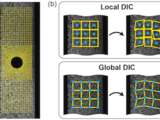
Finite-element-based global DIC method (guarantee global kinematic compatibility and decrease noise by adding regularization penalties).

GIBBON: The Geometry and Image-Based Bioengineering add-ON for MATLAB
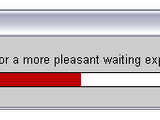
Modification of standard waitbar function; neater code, and a fancy color shift effect added
WAITBAR2 - Displays wait bar with fancy color shift effectAdaptation of the MatLab standard waitbar function:WAITBAR2 is typically used inside a FOR loop that performs alengthy computation. A sample

DynaSim simplifies the process of building and simulating models of dynamical systems.

An ImageJ like, Multi-functional, GUI-based Program for Image (Matrix) Processing and Analysis

MULTIWAITBAR displays multiple waitbars.
% MULTIWAITBAR displays multiple waitbars.% H = MULTIWAITBAR(NumAxes,StepAxes,TitleAxes)% creates and displays a waitbars of fractional lengths StepAxes. The% handle to the multiwaitbar figure
Creates a waitbar-like display in the command window.
Creates the equivalent of WAITBAR in the command window.See:help wdispfor a self-explanatory example - or type: t='-\|/'; fori=1:40 tl=wdisp( 0,sprintf('time %c %s',t(rem(i,4)+1),datestr(now
Opens a window similar to waitbar.
It creates a figure window similar to waitbar. It can be used where one process is going to take much time to indicate use to wait. It differs from waitbar in way that user does not have to set or
A Matlab toolbox for sampling inverse problems with complex prior information.
Graphical waitbar printing ODE solver progress
function shows a simple waitbar with the progress of the integration every 0.2 seconds.
displays progressing waitbars until you press cancel
fakebar(value) displays progressing waitbars until you press cancel value: how many loops are to be done until a waitbar is full. Try values > 1000 (optional parameter). Example: fakebar(20000
Source files for the book "Accelerating MATLAB Performance", CRC Press, 2014

A Matlab toolbox for cardiovascular signal processing

The STK is a (not so) Small Toolbox for Kriging

This MATLAB class provides a smart progress bar like tqdm in the command window and is built for progress info in ordinary and parfor loops.
active development.A drawback in MATLAB's own `waitbar()` function is the lack of some functionalities andthe loss of speed due to the rather laggy GUI updating process. Therefore, this MATLABclass aims to

Efficient and stylish alternative to WAITBAR.
WORKBAR Graphically monitors progress of calculations WORKBAR(X) creates and displays the workbar with the fractional length "X". It is an alternative to the built-in matlab function WAITBAR
Wrapped waitbar to track progress of parallel loops
# `waitbar` for parallel loops in MATLAB[
waitbar : when time of the end of process is unknown.
% WAITBAR1 creats waitbar which does not need to be updated. It runs % parallel with any process runing in MATLAB. % % Object = waitbar1 Creats a waitbar with figure name as "Waitbar1" %

You can also select a web site from the following list
Americas
- América Latina (Español)
- Canada (English)
- United States (English)
Europe
- Belgium (English)
- Denmark (English)
- Deutschland (Deutsch)
- España (Español)
- Finland (English)
- France (Français)
- Ireland (English)
- Italia (Italiano)
- Luxembourg (English)
- Netherlands (English)
- Norway (English)
- Österreich (Deutsch)
- Portugal (English)
- Sweden (English)
- Switzerland
- United Kingdom (English)
Asia Pacific
- Australia (English)
- India (English)
- New Zealand (English)
- 中国
- 日本Japanese (日本語)
- 한국Korean (한국어)