cellfun
R2026bApply function to each cell in cell array
Syntax
Description
A = cellfun(func,C)func to the contents of each cell of cell
array C, one cell at a time. cellfun then
concatenates the outputs from func into the output array
A, so that for the ith element of
C, A(i) = func(C{i}). The input argument
func is a function handle to a function that takes one input
argument and returns a scalar. The output from func must always
be the same data type to use this syntax. If the function outputs have different
data types, you must set the UniformOutput name-value argument to
false. The array A and cell array
C have the same size.
You cannot specify the order in which cellfun calculates the
elements of A or rely on them being done in any particular
order.
A = cellfun(___,Name,Value)func with additional options specified by one or more
Name,Value pair arguments. For example, to return output
values in a cell array, specify 'UniformOutput',false. You can
return A as a cell array when func returns
values that cannot be concatenated into an array. You can use
Name,Value pair arguments with the input arguments of
either of the previous syntaxes.
[A1,...,Am] = cellfun(___) returns multiple
output arrays A1,...,Am when func returns
m output values. func can return output
arguments that have different data types, but the data type of each output must be
the same each time func is called. You can use this syntax with
any of the input arguments of the previous syntaxes.
The number of output arguments from func need not be the same
as the number of input arguments specified by C1,...,Cn.
Examples
Create a cell array that contains numeric arrays of different sizes.
C = {1:10, [2; 4; 6], []}C = 1×3 cell array
{[1 2 3 4 5 6 7 8 9 10]} {3×1 double} {0×0 double}
Calculate the mean of each numeric array, and return the means in an array.
A = cellfun(@mean,C)
A = 1×3

    5.5000    4.0000       NaN
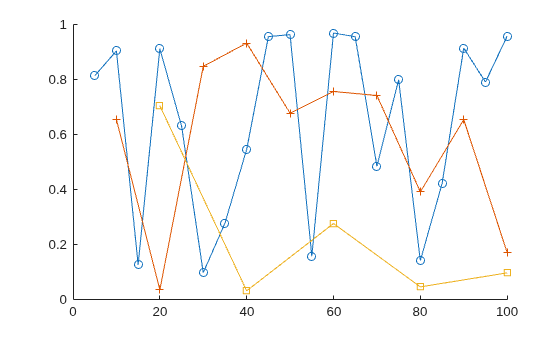
Create two cell arrays that contain numeric arrays of different sizes.
X = {5:5:100, 10:10:100, 20:20:100};
Y = {rand(1,20), rand(1,10), rand(1,5)};
Plot the arrays. Return an array of chart line objects from the plot function and use them to add different markers to each set of data points. cellfun can return arrays of any data type, so long as objects of that data type can be concatenated.
figure
hold on
p = cellfun(@plot,X,Y);
p(1).Marker = 'o';
p(2).Marker = '+';
p(3).Marker = 's';
hold off
Create a cell array that contains numeric arrays of different sizes.
C = {1:10, [2; 4; 6], []}C = 1×3 cell array
{[1 2 3 4 5 6 7 8 9 10]} {3×1 double} {0×0 double}
Calculate the sizes of each array in C. The number of rows and columns are each in 1-by-3 numeric arrays.
[nrows,ncols] = cellfun(@size,C)
nrows = 1×3

     1     3     0
ncols = 1×3

    10     1     0
You can use cellfun to apply functions to cell arrays of character vectors and to string arrays. cellfun treats the two kinds of arrays identically.
Create a cell array of character vectors that contains weekday names.
C = {'Monday','Tuesday','Wednesday','Thursday','Friday'}C = 1×5 cell
{'Monday'} {'Tuesday'} {'Wednesday'} {'Thursday'} {'Friday'}
Create three-letter abbreviations for the names using the cellfun function. Specify a function that extracts the first three characters and returns them as a character vector. To return the abbreviations in a cell array, specify the 'UniformOutput',false name-value pair.
A = cellfun(@(x) x(1:3),C,'UniformOutput',false)A = 1×5 cell
{'Mon'} {'Tue'} {'Wed'} {'Thu'} {'Fri'}
You also can call cellfun on a string array. For compatibility, cellfun treats each element of a string array as though it were a character vector. If you specify a function that returns text, then cellfun returns it as a cell array of character vectors, not as a string array.
Create abbreviations for names in a string array using cellfun.
str = ["Saturday","Sunday"]
str = 1×2 string
    "Saturday"    "Sunday"
B = cellfun(@(x) x(1:3),str,'UniformOutput',false)B = 1×2 cell
{'Sat'} {'Sun'}
Input Arguments
Name-Value Arguments
Output Arguments
Extended Capabilities
Version History
Introduced before R2006a
See Also
arrayfun | spfun | cell2mat | structfun | splitapply

