contour
R2026bContour plot of matrix

Syntax
Description
contour( creates a contour plot containing
the isolines of matrix Z)Z, where Z contains height
values on the x-y plane. MATLAB® automatically selects the contour lines to display. The column and row indices
of Z are the x and y coordinates
in the plane, respectively.
contour(___, specifies the
contour lines to display as the last argument in any of the previous syntaxes. Specify
levels)levels as a scalar value n to display the contour
lines at n automatically chosen levels (heights). To draw the contour
lines at specific heights, specify levels as a vector of monotonically
increasing values. To draw the contours at one height (k), specify
levels as a two-element row vector [k k].
contour(___, specifies
additional options for the contour plot using one or more name-value arguments. Specify the
options after all other input arguments. For a list of properties, see Contour Properties.Name=Value)
contour( displays the
contour plot in the target axes. Specify the axes as the first argument in any of the
previous syntaxes.ax,___)
M = contour(___)M, which contains the (x,
y) coordinates of the vertices at each level.
Examples
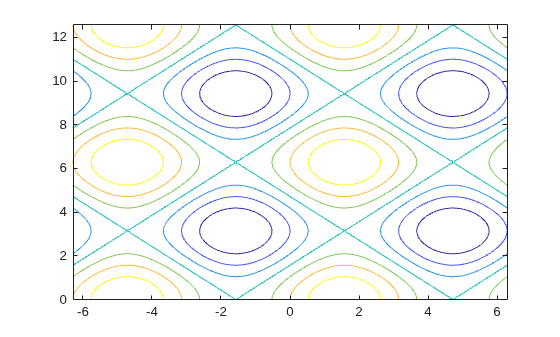
Create matrices X and Y, that define a grid in the x-y plane. Define matrix Z as the heights above that grid. Then plot the contours of Z.
x = linspace(-2*pi,2*pi);
y = linspace(0,4*pi);
[X,Y] = meshgrid(x,y);
Z = sin(X)+cos(Y);
contour(X,Y,Z)
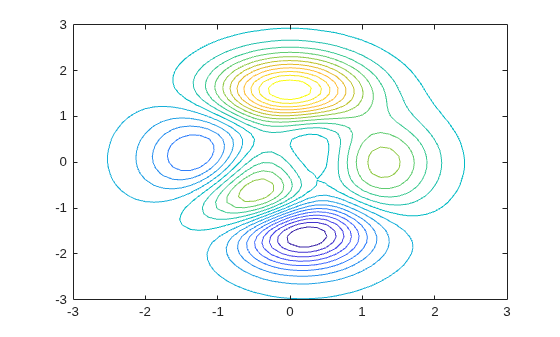
Define Z as a function of X and Y. In this case, call the peaks function to create X, Y, and Z. Then plot 20 contours of Z.
[X,Y,Z] = peaks;
contour(X,Y,Z,20)
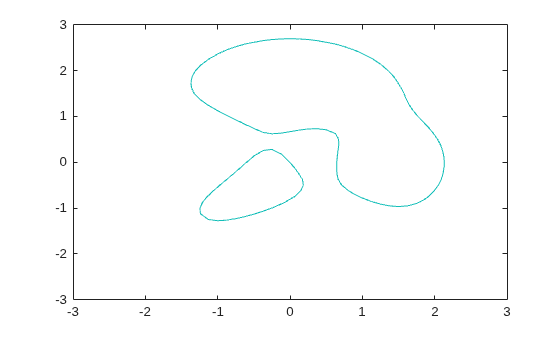
Display the contours of the peaks function at Z = 1.
[X,Y,Z] = peaks;
v = [1,1];
contour(X,Y,Z,v)
Create a contour plot of the peaks function, and specify the dashed line style.
[X,Y,Z] = peaks;
contour(X,Y,Z,'--')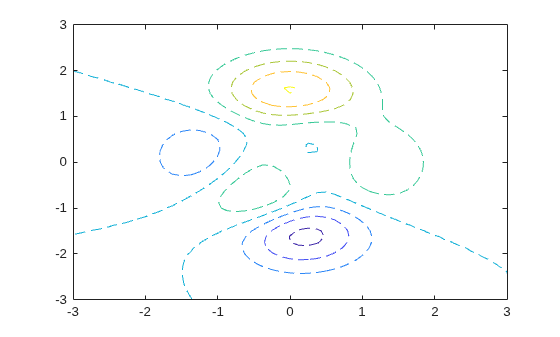
Define Z as a function of two variables, X and Y. Then create a contour plot of that function, and display the labels by setting the ShowText property to "on".
x = -2:0.2:2;
y = -2:0.2:3;
[X,Y] = meshgrid(x,y);
Z = X.*exp(-X.^2-Y.^2);
contour(X,Y,Z,ShowText="on")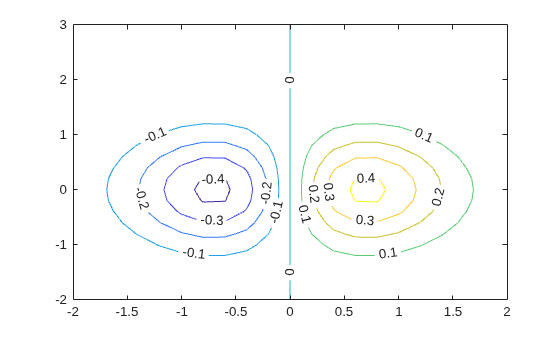
Since R2022b
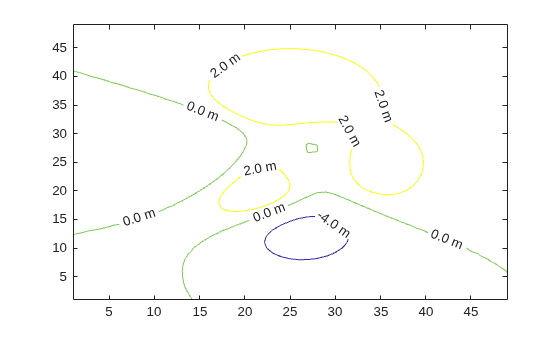
Create a contour plot that displays labels with one digit after the decimal point followed by the letter m.
contour(peaks,[-4 0 2],ShowText="on",LabelFormat="%0.1f m")
Since R2022b
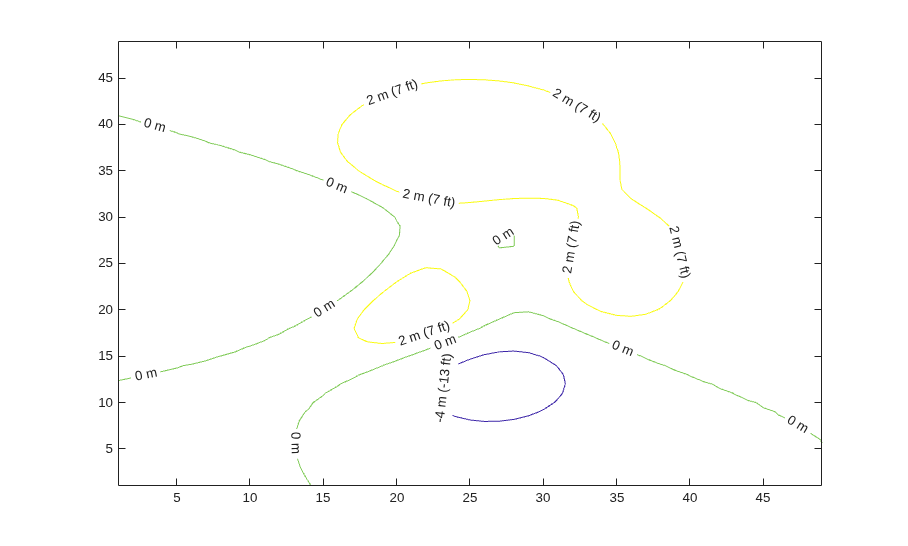
You can specify a function to format the labels when you need to calculate values. For example, you can define a function to calculate the label values in different units.
Define this function in a program file called mylabelfun.m. The function converts the input from meters to feet and returns a string vector containing each value in meters with the equivalent value in feet in parentheses.
function labels = mylabelfun(vals)
feetPerMeter = 3.28084;
feet = round(vals.*feetPerMeter);
labels = vals + " m (" + feet + " ft)";
labels(vals == 0) = "0 m";
end
Next, create a contour plot and specify the LabelFormat property as a handle to mylabelfun.
contour(peaks,[-4 0 2],ShowText="on",LabelFormat=@mylabelfun)
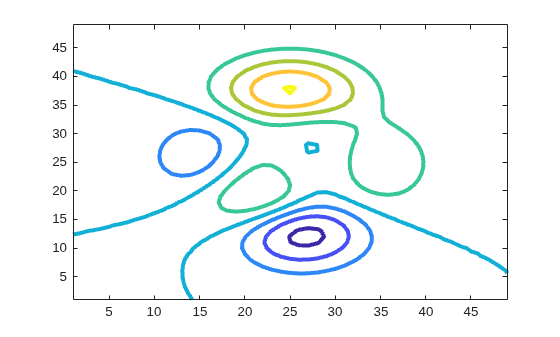
Create a contour plot of the peaks function. Make the contour lines thicker by setting the LineWidth property to 3.
Z = peaks;
[M,c] = contour(Z);
c.LineWidth = 3;
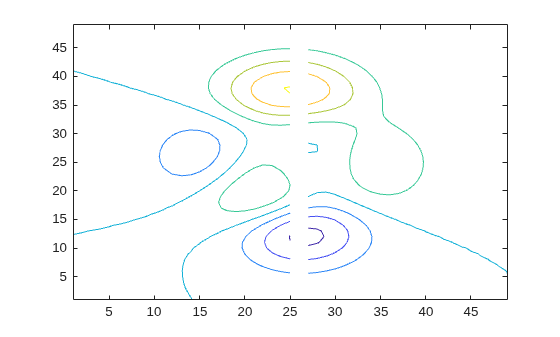
Insert NaN values wherever there are discontinuities on a surface. The contour function does not draw contour lines in those regions.
Define matrix Z as a sampling of the peaks function. Replace all values in column 26 with NaN values. Then plot the contours of the modified Z matrix.
Z = peaks;
Z(:,26) = NaN;
contour(Z)
Input Arguments
x-coordinates, specified as a matrix the same size as
Z, or as a vector with length n, where
[m,n] = size(Z). The default value of X is the
vector (1:n).
When X is a matrix, the values must be strictly increasing or
decreasing along one dimension and remain constant along the other dimension. The
dimension that varies must be the opposite of the dimension that varies in
Y. You can use the meshgrid function to create X and
Y matrices.
When X is a vector, the values must be strictly increasing or
decreasing.
Example: X = 1:10
Example: X = [1 2 3; 1 2 3; 1 2 3]
Example: [X,Y] = meshgrid(1:10)
The XData property of the Contour object
stores the x-coordinates.
Data Types: single | double | int8 | int16 | int32 | int64 | uint8 | uint16 | uint32 | uint64
y-coordinates, specified as a matrix the same size as
Z, or as a vector with length m, where
[m,n] = size(Z). The default value of Y is the
vector (1:m).
When Y is a matrix, the values must be strictly increasing or
decreasing along one dimension and remain constant along the other dimension. The
dimension that varies must be the opposite of the dimension that varies in
X. You can use the meshgrid function to create the X and
Y matrices.
When Y is a vector, the values must be strictly increasing or
decreasing.
Example: Y = 1:10
Example: Y = [1 1 1; 2 2 2; 3 3 3]
Example: [X,Y] = meshgrid(1:10)
The YData property of the Contour object
stores the y-coordinates.
Data Types: single | double | int8 | int16 | int32 | int64 | uint8 | uint16 | uint32 | uint64
z-coordinates, specified as a matrix. This matrix must have at least two rows and two columns, and it must contain at least two different values.
Example: Z = peaks(20)
The ZData property of the Contour object
stores the z-coordinates.
Data Types: single | double | int8 | int16 | int32 | int64 | uint8 | uint16 | uint32 | uint64
Contour levels, specified as a scalar whole number or a vector. Use this argument to
control the number and location of the contour lines. When you do not specify the
levels, the contour function chooses the levels automatically.
To draw contour lines at n automatically chosen heights, specify levels as the scalar value n.
To draw the contour lines at specific heights, specify
levelsas a vector of monotonically increasing values.To draw contour lines at a single height
k, specifylevelsas a two-element row vector[k k].
Example: contour(peaks,10) draws contour lines at 10 automatically
chosen heights on the peaks function.
Example: contour(peaks,[-4 0 4]) draws contour lines at 3 specific
heights on the peaks function: -4,
0, and 4.
Example: contour(peaks,[3 3]) draws contour lines to show where
the height of the peaks function is
3.
Data Types: single | double | int8 | int16 | int32 | int64 | uint8 | uint16 | uint32 | uint64
Line style and color, specified as a character vector or string scalar containing characters
and symbols. The characters and symbols can appear in any order. You can specify the
line style, line color, or both. Marker symbols such as "o" are
ignored.
Example: "--g" is a green dashed line.
| Line Style | Description | Resulting Line |
|---|---|---|
"-" | Solid line |
|
"--" | Dashed line |
|
":" | Dotted line |
|
"-." | Dash-dotted line |
|


| Color Name | Short Name | Appearance |
|---|---|---|
"red" | "r" |
|
"green" | "g" |
|
"blue" | "b" |
|
"cyan"
| "c" |
|
"magenta" | "m" |
|
"yellow" | "y" |
|
"black" | "k" |
|
"white" | "w" |
|


Target axes, specified as an Axes object. If you do not specify
the axes, then contour plots into the current axes.
Name-Value Arguments
Output Arguments
Extended Capabilities
Version History
Introduced before R2006a

