reducevolume
R2026bReduce number of elements in volume data set
Syntax
[nx,ny,nz,nv] = reducevolume(X,Y,Z,V,[Rx,Ry,Rz])

[nx,ny,nz,nv] = reducevolume(V,[Rx,Ry,Rz])

nv = reducevolume(...)
Description
[nx,ny,nz,nv] = reducevolume(X,Y,Z,V,[Rx,Ry,Rz])
reduces the number of elements in the volume by retaining every Rxth element
in the x direction, every Ryth element
in the y direction, and every Rzth element
in the z direction. If a scalar R is
used to indicate the amount or reduction instead of a three-element
vector, the MATLAB® software assumes the reduction to be [R
R R].
The arrays X, Y, and Z define
the coordinates for the volume V. The reduced volume
is returned in nv, and the coordinates of the reduced
volume are returned in nx, ny,
and nz.
[nx,ny,nz,nv] = reducevolume(V,[Rx,Ry,Rz])
assumes the arrays X, Y, and Z are
defined as [X,Y,Z] = meshgrid(1:n,1:m,1:p), where [m,n,p]
= size(V).
nv = reducevolume(...)
returns only the reduced volume.
Examples
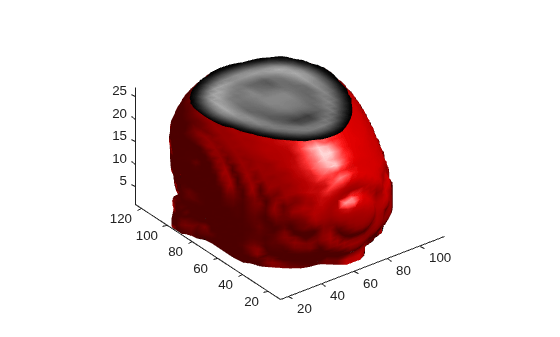
This example uses a data set that is a collection of MRI slices of a human skull. This data is processed in a variety of ways:
The 4-D array is squeezed (
squeeze) into three dimensions and then reduced (reducevolume) so that what remains is every fourth element in the x and y directions and every element in the z direction.The reduced data is smoothed (
smooth3).The outline of the skull is an isosurface generated as a patch (
p1) whose vertex normals are recalculated to improve the appearance when lighting is applied (patch,isosurface,isonormals).A second patch (
p2) with an interpolated face color draws the end caps (FaceColor) isocaps).The view of the object is set (
view,axis,daspect).A 100-element grayscale colormap provides coloring for the end caps (
colormap).Adding a light to the right of the camera illuminates the object (
camlight,lighting).
load mri
D = squeeze(D);
[x,y,z,D] = reducevolume(D,[4,4,1]);
D = smooth3(D);
p1 = patch(isosurface(x,y,z,D,5),...
    'FaceColor','red','EdgeColor','none');
isonormals(x,y,z,D,p1)
p2 = patch(isocaps(x,y,z,D,5),...
    'FaceColor','interp','EdgeColor','none');
view(3)
axis tight
daspect([1,1,.4])
colormap(gray(100))
camlight
lighting gouraud
Extended Capabilities
Version History
Introduced before R2006a
See Also
isosurface | isocaps | isonormals | smooth3 | subvolume | reducepatch

