subvolume
R2026bExtract subset of volume data set
Syntax
[Nx,Ny,Nz,Nv] = subvolume(X,Y,Z,V,limits)

[Nx,Ny,Nz,Nv] = subvolume(V,limits)

Nv = subvolume(...)
Description
[Nx,Ny,Nz,Nv] = subvolume(X,Y,Z,V,limits)
extracts a subset of the volume data set V using
the specified axis-aligned limits. limits
= [xmin,xmax,ymin, ymax,zmin,zmax] (Any NaNs
in the limits indicate that the volume should not be cropped along
that axis.)
The arrays X, Y, and Z define
the coordinates for the volume V. The subvolume
is returned in NV and the coordinates of the subvolume
are given in NX, NY, and NZ.
[Nx,Ny,Nz,Nv] = subvolume(V,limits)
assumes the arrays X, Y, and Z are
defined as
[X,Y,Z] = meshgrid(1:N,1:M,1:P)
where [M,N,P] = size(V).
Nv = subvolume(...) returns
only the subvolume.
Examples
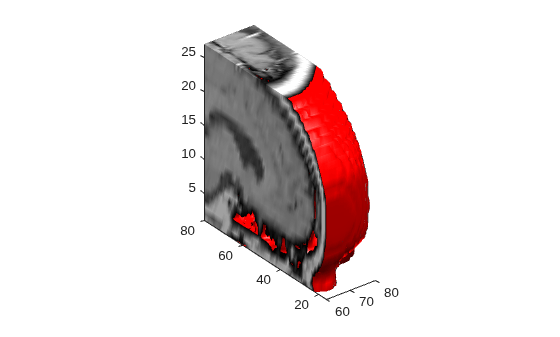
Load the mri data set, which is a collection of MRI slices of a human skull. Then:
Squeeze the four-dimensional array into three dimensions and extract a subset using
subvolume.Use a patch to display an isosurface of the skull outline.
Add a second patch with interpolated face colors.
Set the view of the object.
Change the colormap to a grayscale colormap.
Add lights to the right and left of the camera to illuminate the object.
load mri
D = squeeze(D);
[x,y,z,D] = subvolume(D,[60,80,nan,80,nan,nan]);
p1 = patch(isosurface(x,y,z,D, 5),...
     'FaceColor','red','EdgeColor','none');
isonormals(x,y,z,D,p1);
p2 = patch(isocaps(x,y,z,D, 5),...
     'FaceColor','interp','EdgeColor','none');
view(3);
axis tight;
daspect([1 1 0.4])
colormap(gray(100))
camlight right;
camlight left;
lighting gouraud
Extended Capabilities
Version History
Introduced before R2006a
See Also
isocaps | isonormals | isosurface | reducepatch | reducevolume | smooth3

